

Penna: ADHD Visual Day Planner
Nikolai Tsyrenov · Productivity
Independent analytics for this App Store listing. AppTracker is not affiliated with Nikolai Tsyrenov.
Chart standing · US
What changed · US
Listing changes AppTracker has observed for this app in this storefront — new versions, price moves, rating shifts, and store copy.
• Try it first: the app now opens straight into the free version — Pro is there when you want more • A short welcome tour on first launch • Stability improvements
Ratings breakdown · US
The star breakdown behind this app's rating in this storefront.
Screenshots







About
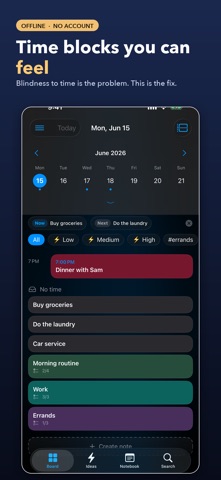
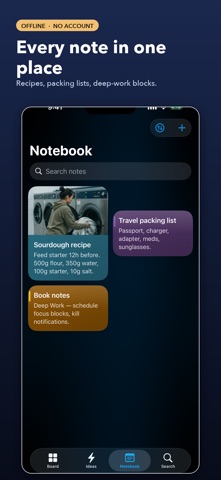
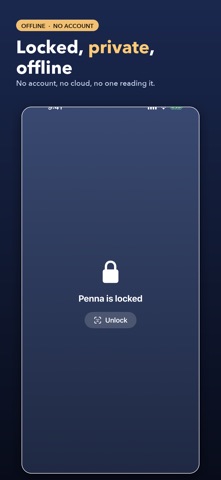
Penna is the ADHD planner that shows you time: your day as a visual board, a countdown for the task you're on, and AI that runs on your iPhone. 100% offline, no account, no one watching. SEE TIME (new in 1.4) • Estimated duration on every tile — 15, 30, 45, 60 min or your own • A countdown ring on the task you're doing right now • Countdown widget on the Home and Lock Screen: what's now, what's next, how long is left • Morning check-in in 3 taps: your energy today → a day that fits it • Start with a free trial ON-DEVICE AI (Apple Intelligence) • Magic Breakdown — a big scary task becomes 3–7 tiny first steps, each under 15 minutes • Organize — your Brain Dump sorts itself into tiles with dates and tags, you approve every change • Smart input understands "call mom tomorrow evening" — in English and Russian AI runs entirely on your iPhone. No cloud, no account — Data Not Collected stays true. Requires iPhone 15 Pro or newer with Apple Intelligence; everything else works on any iPhone with iOS 18. Most planners want your email and your data. Penna wants neither. Everything lives on your device. Your backups are encrypted and yours to keep. PRIVATE BY DESIGN • 100% offline — no account, no servers, no ads, no trackers • Data Not Collected — nothing leaves your device • Face ID lock on individual notes • AES-256 encrypted backups • Export to Markdown, JSON, PDF or calendar (.ics) PLAN VISUALLY • Snap-grid board — arrange note tiles in any cell, like icons on a home screen • Drag tiles between days on a collapsible week/month calendar • Timeline view for hour-by-hour day blocking CAPTURE THE WAY YOU THINK • Brain Dump — drop a thought in one tap, schedule it later • Smart text input — type “call mom tomorrow 6pm” and Penna sets the day and reminder • Checklists, photos, file attachments, tags, 10 colors STAY ON TRACK • Reminders with repeat (daily/weekly/monthly) and snooze • Habits grid with daily streak · Pomodoro focus timer • Home-screen & Lock Screen widget · Share extension PENNA PRO • Unlimited notes, Brain Dump and attachments • Repeating reminders and calendar events on your board • iCloud Sync — your data stays in YOUR private iCloud; we never see it Penna Pro: a yearly subscription, a weekly subscription with a 3-day free trial, or a one-time lifetime unlock. Subscriptions renew automatically unless cancelled at least 24 hours before the end of the current period; manage or cancel them in Settings. Terms of Use (EULA): https://www.apple.com/legal/internet-services/itunes/dev/stdeula/ Privacy Policy: https://telegra.ph/Penna--Privacy-Policy-06-07
What's new · 1.7
• Try it first: the app now opens straight into the free version — Pro is there when you want more • A short welcome tour on first launch • Stability improvements
Details