

Platterset
Robert Corbin · Utilities
Independent analytics for this App Store listing. AppTracker is not affiliated with Robert Corbin.
Chart standing · US
What changed · US
Listing changes AppTracker has observed for this app in this storefront — new versions, price moves, rating shifts, and store copy.
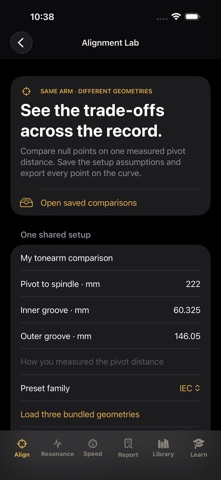
Alignment Lab Alignment Lab compares tonearm geometry trials across your chosen groove span. Inspect tracking-error curves and export every sampled point with the actual inputs. 1. Open Align → Alignment Lab. Enter the pivot distance and groove span for the record format. 2. Compare one to six trials using bundled null-point references or custom null radii. Inspect the curves and geometric values. 3. Save the comparison and export the CSV. Follow your turntable and cartridge instructions for actual adjustment. Curves sample 401 points and report sampled peak and unweighted RMS angular error. They are theoretical geometry, not audible distortion, cartridge compatibility, setup accuracy or sound-quality scores. One to six trials and up to 50 sessions. Earlier setup records remain accessible as historical heuristic worksheets.
Screenshots


Keywords this app targets
Search terms AppTracker associates with this app — estimates, not search volume. ❝ = in the app's title; a highlighted number is its current position for that term.
Similar apps
Competitors and close alternatives, as estimated by AppTracker.






About
Alignment Lab compares tonearm geometry trials across your chosen groove span. Inspect tracking-error curves and export every sampled point with the actual inputs. HOW TO USE THE UPGRADE 1. Open Align → Alignment Lab. Enter the pivot distance and groove span for the record format. 2. Compare one to six trials using bundled null-point references or custom null radii. Inspect the curves and geometric values. 3. Save the comparison and export the CSV. Follow your turntable and cartridge instructions for actual adjustment. Alignment references, overhang tools, record-format references and other turntable setup tools remain. Existing setup records are preserved under Earlier setup records. WHAT TO KNOW Curves sample 401 points and report sampled peak and unweighted RMS angular error. They are theoretical geometry, not audible distortion, cartridge compatibility, setup accuracy or sound-quality scores. One to six trials and up to 50 sessions. Earlier setup records remain accessible as historical heuristic worksheets. iPhone and iPad. No account required.
What's new · 3.0
Alignment Lab Alignment Lab compares tonearm geometry trials across your chosen groove span. Inspect tracking-error curves and export every sampled point with the actual inputs. 1. Open Align → Alignment Lab. Enter the pivot distance and groove span for the record format. 2. Compare one to six trials using bundled null-point references or custom null radii. Inspect the curves and geometric values. 3. Save the comparison and export the CSV. Follow your turntable and cartridge instructions for actual adjustment. Curves sample 401 points and report sampled peak and unweighted RMS angular error. They are theoretical geometry, not audible distortion, cartridge compatibility, setup accuracy or sound-quality scores. One to six trials and up to 50 sessions. Earlier setup records remain accessible as historical heuristic worksheets.
Details