

Text Editor
John Haas · Productivity
Independent analytics for this App Store listing. AppTracker is not affiliated with John Haas.
Chart standing · US
What changed · US
Listing changes AppTracker has observed for this app in this storefront — new versions, price moves, rating shifts, and store copy.
More ways to write, navigate, and share: • Free word count, cursor position, selection count, undo, and redo • Meeting notes, journal, checklist, and README templates • Plain Text, Markdown, and code language modes • Pro PDF and .rtf file exports, plus whole-file syntax colors • Pro regex search with capture-group replacement • Working heading links, local images, and synchronized iPad split scrolling This update also fixes paste, quote pairing, checklist continuation, preview state, dark mode, large-text layouts, and file encoding preservation. Editing large documents is more responsive.
Ratings breakdown · US
The star breakdown behind this app's rating in this storefront.
Screenshots

About
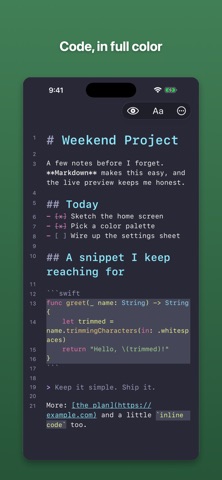
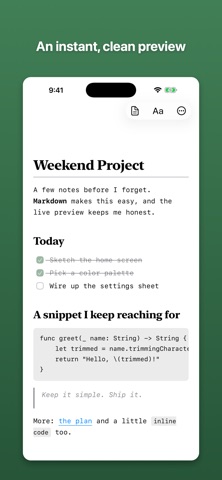
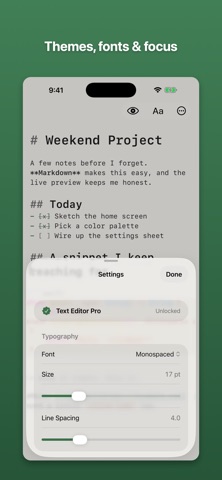
A simple, fast editor for Markdown, notes, and code. Open it and start typing. There's no account to make and nothing to set up. Your Markdown is highlighted as you write - headings, bold, links, lists, code blocks - and when you want to see how it'll look, switch to Preview. Everything saves as a normal file in the Files app and iCloud Drive, so your writing stays yours: open it anywhere, move it, or back it up however you like. It's free to use, with what you need for everyday writing: • Live Markdown highlighting and a clean Preview • Four themes: System, Light, Dark, and Sepia • Find in the editor or preview, a heading outline, and a live word count • Line and column position, selection count, undo, and redo • Meeting notes, journal, checklist, and README templates • Plain Text, Markdown, and code language modes • A Markdown cheat sheet for when the syntax slips your mind • Your choice of font, size, and line spacing • Share or export as Markdown Text Editor Pro adds more tools with a one-time purchase, no subscription: • Syntax highlighting in whole code files and fenced blocks for Swift, Python, JavaScript, JSON, HTML, CSS, and Shell • Five more themes: Paper, Solarized Light, Solarized Dark, Nord, and Dracula • Focus and Typewriter modes for heads-down writing • Split View on iPad with synchronized scrolling • Line numbers • Find & Replace with regular expressions, capture groups, and undoable Replace All • Writing stats: daily goals, streaks, and an all-time word count • Export to PDF, HTML, and .rtf files It's made for iPhone and iPad, works with a hardware keyboard, supports dark mode, and fits into iPad multitasking. There are no ads and no tracking, and the app doesn't collect anything about you. Made by one person who wanted a nicer place to write.
What's new · 1.1.0
More ways to write, navigate, and share: • Free word count, cursor position, selection count, undo, and redo • Meeting notes, journal, checklist, and README templates • Plain Text, Markdown, and code language modes • Pro PDF and .rtf file exports, plus whole-file syntax colors • Pro regex search with capture-group replacement • Working heading links, local images, and synchronized iPad split scrolling This update also fixes paste, quote pairing, checklist continuation, preview state, dark mode, large-text layouts, and file encoding preservation. Editing large documents is more responsive.
Details