

Note Sight — Note Trainer
Alexander Chervyakov · Education
Independent analytics for this App Store listing. AppTracker is not affiliated with Alexander Chervyakov.
Chart standing · US
What changed · US
Listing changes AppTracker has observed for this app in this storefront — new versions, price moves, rating shifts, and store copy.
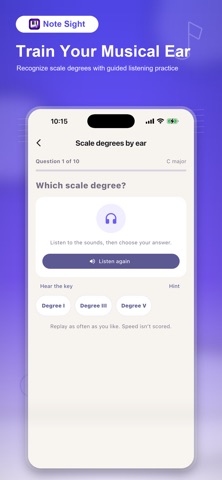
New: train your musical ear! • Scale degrees by ear: listen to a major-key reference and identify the note’s degree. • Intervals by ear: recognize the distance between two notes without reading a staff. • Three difficulty levels, sound examples, hints, and unlimited replays. • Compare your answer with the correct sound and practice at your own pace in sessions of 6, 10, or 20 questions. • Follow your listening progress with separate ear-training results. The new exercises are available in all 10 app languages.
Ratings breakdown · US
The star breakdown behind this app's rating in this storefront.
In-app purchases · US
No in-app purchases.
Screenshots





About
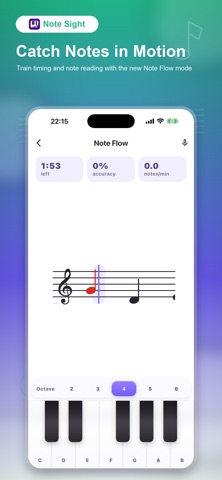
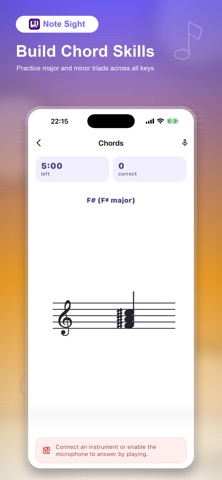
Learn to read sheet music and train your musical ear. Note Sight combines sight-reading, ear training, and piano practice in short daily sessions for beginners, music students, singers, and self-taught musicians. EAR TRAINING: SCALE DEGREES AND INTERVALS • Hear a short chord progression that establishes a major key, then identify the scale degree of the note that follows. • Listen to two notes and recognize the interval without clues on the staff. • Start with a few choices and progress through three difficulty levels. • Learn with sound examples, replay questions, and use hints when you need them. Compare your answer with the correct sound after each question. • Choose 6, 10, or 20 questions and track your ear-training accuracy separately from reading speed. No microphone or instrument needed for these listening exercises. SEE A NOTE, PLAY THE ANSWER Open a session, see a note, interval, chord, or flowing pattern on the staff, and answer the way that fits your practice: • Tap the on-screen piano keyboard • Play a connected MIDI keyboard or digital piano • Use the microphone — the app hears the notes and chords you play on a real instrument PRACTICE MODES • Note naming — see a note on the staff and name it • Landmark notes — memorize anchor notes, then read nearby notes from them • Interval reading — build the target note by interval from an anchor • Note Flow — play moving notes when they reach the timing window • Hanon — play Hanon exercises 1–20 with both hands at your own tempo • Speed run — name as many notes as you can before time runs out • Two-hand play — read treble and bass staves and play them together • Chords — triads, seventh chords, inversions, and chord progressions in all 12 keys • Weak spot review — 5 minutes on the notes you miss most TRACK REAL PROGRESS • Streaks, streak freeze, and a weekly practice goal • Accuracy, reading speed (notes per minute), and reaction time charts • Note map: a heatmap showing your mastery of every single note • Chord mastery, interval levels, and Hanon tempo records • Personal insights and records; share a progress card with friends MAKE IT A HABIT • Short sessions designed for daily practice • Smart reminders on the days you choose • Cloud backup and sync across your devices • Light and dark themes FULLY ADJUSTABLE • Treble clef, bass clef, or both • Note range and octaves, sharps and flats • Interval types and direction, chord qualities and inversions • Session length, tempo, and difficulty levels that grow with you Whether you are preparing for music lessons, learning piano, studying music theory, or returning to an instrument after years, Note Sight connects the notes on the staff with real playing — one short session at a time. Download Note Sight and start reading music with confidence.
What's new · 2.9
New: train your musical ear! • Scale degrees by ear: listen to a major-key reference and identify the note’s degree. • Intervals by ear: recognize the distance between two notes without reading a staff. • Three difficulty levels, sound examples, hints, and unlimited replays. • Compare your answer with the correct sound and practice at your own pace in sessions of 6, 10, or 20 questions. • Follow your listening progress with separate ear-training results. The new exercises are available in all 10 app languages.
Details