

Time Flow:Lyubishchev TM
承金 洪 · Utilities
Independent analytics for this App Store listing. AppTracker is not affiliated with 承金 洪.
Chart standing · US
What changed · US
Listing changes AppTracker has observed for this app in this storefront — new versions, price moves, rating shifts, and store copy.
Fixed iOS 18 compatibility issues.
Screenshots

About
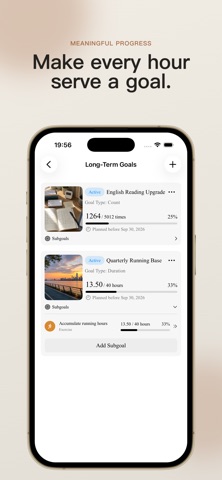
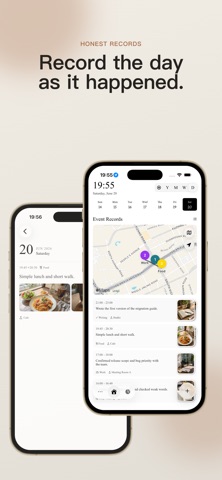
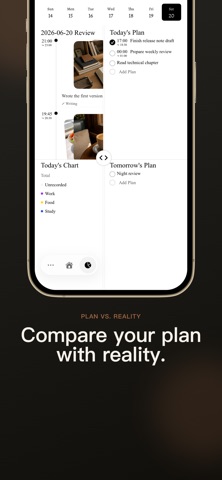
TimeFlow is a time tracking, planning, and review tool based on the Lyubishchev Time Management Method. It helps you not only organize what you plan to do, but also understand where your time actually goes. 「Core Features」 • Time Tracking Track your daily time usage by category. Switch between daily, weekly, monthly, and yearly views, and review the actual rhythm of your day through a visual timeline. • Planning Management Create plans for today, this week, this month, or the entire year. Supports plan templates and one-tap importing, so recurring schedules do not need to be entered repeatedly. • Statistics & Analysis Turn scattered records into meaningful insights. View the time distribution across different categories and discover how your time is actually divided among work, study, exercise, rest, and more. • Review Notes Write review summaries for days, weeks, months, and years. Transform thoughts like “something felt off today” into clearer observations and actionable improvements. • Long-Term Goals Break long-term goals into measurable progress and use your daily records to continuously move important goals forward. • Custom Categories Organize time according to your own lifestyle. Create categories such as Work, Study, Exercise, Meals, and Rest, and customize their order as needed. • Widgets & Reminders Quickly check your status through Home Screen widgets and maintain a consistent review habit with reminder notifications. 「Who Is It For?」 • People who want to know where their time really goes • People practicing the Lyubishchev Time Management Method • People who need planning, tracking, and reviewing in one place • People who want to turn long-term goals into daily actions • Students, freelancers, knowledge workers, and self-management enthusiasts 「Subscription Cancellation Information」 1. Subscriptions are auto-renewable services. After purchase confirmation, the fee will be charged to your iTunes account. 2. Within 24 hours before the end of the current subscription period, your account will be automatically charged and your membership will be extended for another month. 3. To avoid renewal, please turn off auto-renewal at least 24 hours before the current subscription period ends. 4. Cancellation path: Open iPhone “Settings” > Tap your Apple Account > “Subscriptions” > Find and cancel “TimeFlow Premium”. 「Privacy Policy & Terms of Service」 * Privacy Policy: https://logspot.hocgin.top/TimeFlow/?active=privacy-policy * Terms of Service: https://logspot.hocgin.top/TimeFlow/?active=terms-of-service
What's new · 1.1.0
Fixed iOS 18 compatibility issues.
Details