

AppTrailer: Video Editor
Leonardo Amora · Developer Tools
Independent analytics for this App Store listing. AppTracker is not affiliated with Leonardo Amora.
Chart standing · US
What changed · US
Listing changes AppTracker has observed for this app in this storefront — new versions, price moves, rating shifts, and store copy.
Effects now belong to the cut. FX, Filter, Adjustments, Voice FX and Reveal apply to the cut you selected. Select several cuts and they apply to all of them at once: a filter on three cuts, the neon on one, the rest clean. Marking several cuts: drag on the strip above the thumbnails, or tap a cut with a finger resting on the screen (Shift on the Mac) to take everything in between, Command to add one at a time, Command A to take them all. Drag one cut of the group and the whole group travels with it, in the order they are in. The transition panel works on the group too: the type and the length go on every selected cut. On/off effect, in the cut's options, has one switch per effect the cut has, named after it: Neon, VHS, Vintage, Adjustments, Trailer, Reveal. Turning it off keeps the setting and only takes the effect out of that cut. The effect now covers the whole frame. Shrink the video inside the canvas and the filter, the vignette, the drawn line and the Reveal line take the leftovers and the background too, instead of staying locked inside the video's rectangle. Also fixed: a project now opens at the file's own size no matter how you import it, a recording on devices before the M1 keeps its shape, a project saved by an older version comes back whole after an update, and the App Store screenshots setting stays the way you left it. Maximum effort!
In-app purchases · US
No in-app purchases.
Screenshots

Similar apps
Competitors and close alternatives, as estimated by AppTracker.
 iVideo - Video Editor Toolbox
天从 何
iVideo - Video Editor Toolbox
天从 何
 Motion Track: Video Stabilizer
Morning Avocado LLC
Motion Track: Video Stabilizer
Morning Avocado LLC
 ArtCut Pro
ENERHUB TRADE PRIVATE LIMITED
ArtCut Pro
ENERHUB TRADE PRIVATE LIMITED
 Videocraft: Video Maker
Mauricio Eastmond
Videocraft: Video Maker
Mauricio Eastmond
 Video Editor ·
Luni
Video Editor ·
Luni
 Mockup & Demo Maker: Screeny
Lazare Kolebka
Mockup & Demo Maker: Screeny
Lazare Kolebka
 Video Up! Video Editor & Maker
Video editor & maker app
Video Up! Video Editor & Maker
Video editor & maker app
 Adobe Premiere AI Video Editor
Adobe Inc.
Adobe Premiere AI Video Editor
Adobe Inc.
About
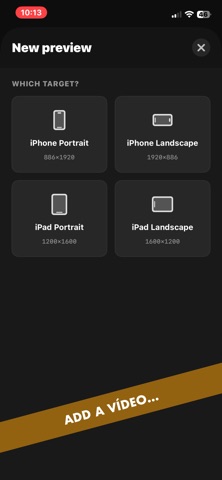
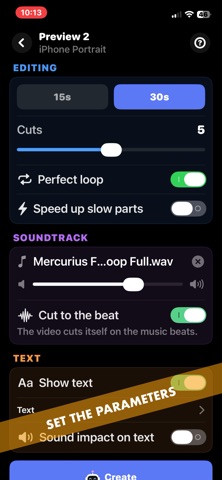
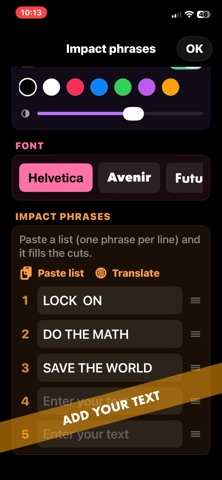
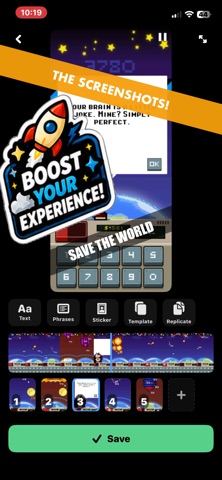
A real video editor you buy once. No subscription, no watermark, no cloud. Everything on a timeline you can see, with a preview that updates as you edit. And because it was born making App Previews, it exports in the exact sizes Apple asks for. Hi, I'm an indie developer. I built this for myself and use it every day. One purchase and it's yours. Got a feature idea? Email me. EDIT BY TALKING Nobody else does this. Talk over your footage and Auto Cut keeps every stretch of speech and drops every pause. It is the edit you would have made by hand, in seconds. Then Clean the voice runs a studio chain over it: EQ, levelling, de-esser and limiter. 13 AI VOICES, BUILT IN Rather not record? Write your Story and pick a voice: 7 American, 3 British, 3 Brazilian Portuguese. They ship inside the app and work in airplane mode. No account, no credits. Set tone, body and expression. THE TIMELINE In and Out, duration and speed per cut, no render to wait for. Reorder, duplicate, reverse, mirror, freeze the last frame, stabilize a shaky shot, rescue a dark one. Keyframe the framing, or let Spotlight zoom in. EFFECTS THAT STOP THE SCROLL Take On Me redraws your contour frame by frame, out of the a-ha video. Draw Effect draws the whole shot in pencil on paper. Neon keeps only the outline, glowing like a sign. VHS puts it on tape and plays it back on a tube TV. Plus New Retro, classic filters and Reveal. They stack. TEXT, MUSIC AND SOUND One phrase per cut, with 7 entrance animations. Free music (OpenGameArt CC0) and sound effects (Kenney, Mixkit), or bring your own. Your images can land on the beat. PHOTOS ONLY? SLIDESHOW Pick a handful and the sequence comes out finished: movement on each, your transitions, every change on the beat. FOR THE APP STORE Your App Preview in the exact size App Store Connect accepts. No rework, no rejected upload. SCREENSHOT EDITOR INSIDE Scrub to the right frame and capture it. The canvas is already store size. Text, stickers, arrows, subject cutout, official Apple device frames (iPhone 17, iPad Pro with the Pencil) and your background. Replicate the art across the set, then export one set per language, translated on device. EVERY FORMAT App Store, TikTok, Reels, Stories, Shorts, Instagram feed and YouTube. Duplicate into another format and the text and framing come along. BACKUP Your projects mirrored to Files or iCloud Drive, automatically. Restore anytime. FAQ One purchase? Yes. No subscription, no credits, no watermark. Updates included. Do I need to be a developer? No. It is a video editor first. The App Store tools are there when you need them. Does anything leave my device? No. Editing, effects, voices and export all run on your iPhone or iPad. Buy it once. Edit everything. Maximum effort!
What's new · 1.7.1
Effects now belong to the cut. FX, Filter, Adjustments, Voice FX and Reveal apply to the cut you selected. Select several cuts and they apply to all of them at once: a filter on three cuts, the neon on one, the rest clean. Marking several cuts: drag on the strip above the thumbnails, or tap a cut with a finger resting on the screen (Shift on the Mac) to take everything in between, Command to add one at a time, Command A to take them all. Drag one cut of the group and the whole group travels with it, in the order they are in. The transition panel works on the group too: the type and the length go on every selected cut. On/off effect, in the cut's options, has one switch per effect the cut has, named after it: Neon, VHS, Vintage, Adjustments, Trailer, Reveal. Turning it off keeps the setting and only takes the effect out of that cut. The effect now covers the whole frame. Shrink the video inside the canvas and the filter, the vignette, the drawn line and the Reveal line take the leftovers and the background too, instead of staying locked inside the video's rectangle. Also fixed: a project now opens at the file's own size no matter how you import it, a recording on devices before the M1 keeps its shape, a project saved by an older version comes back whole after an update, and the App Store screenshots setting stays the way you left it. Maximum effort!
Details