

ADBox for TV
永杰 刘 · Utilities
Independent analytics for this App Store listing. AppTracker is not affiliated with 永杰 刘.
Chart standing · US
What changed · US
Listing changes AppTracker has observed for this app in this storefront — new versions, price moves, rating shifts, and store copy.
• ADBox for Mac is available. One purchase works on iPhone and Mac • If the on-device helper quits, ADBox brings it back instead of waiting out every action • Packet capture shows download progress • Settings compares the built-in helper with the one on the device • Exported logs include the time in the file name • Connecting updates the on-device helper to 1.24
Price & rating history · US
Reconstructed from the listing changes AppTracker has observed in this storefront. A field is charted once it has changed more than once, and each line starts at the value it moved from.
Average rating · ★ 3.00 now · 2 changes on record
Ratings breakdown · US
The star breakdown behind this app's rating in this storefront.
In-app purchases · US
What this app sells inside itself, grouped by kind and priced for this storefront.
Screenshots



Keywords this app targets
Search terms AppTracker associates with this app — estimates, not search volume. ❝ = in the app's title; a highlighted number is its current position for that term.
Similar apps
Competitors and close alternatives, as estimated by AppTracker.






About
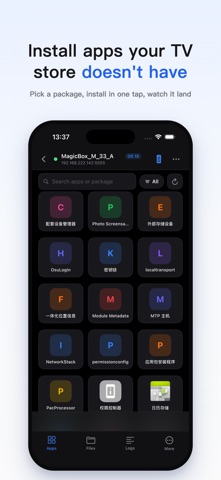
A visual ADB debugging tool. Works with phones, tablets, smart TVs and set-top boxes — anything that speaks ADB. Fully local client: no backend, no accounts, no ads, no data upload. WHAT IT DOES - Remote: D-Pad, Home / Back, volume, power — type with your iPhone keyboard - Apps: browse installed apps, install / uninstall APKs, launch or stop, export to share - Screenshot & recording: capture the device screen, save to Photos, share anywhere - Files: transfer between iPhone and device, no USB stick needed - Logs & debugging: live logcat, Shell terminal, processes and performance - Device info: model, OS version, resolution and storage at a glance WHY IT'S FAST AND STABLE ADB is only the bootstrap — operations run over a persistent local channel on the device. Fully local, no cloud, resilient on flaky Wi-Fi. PRICING Browsing, viewing and remote control are free forever. Pro tools (install / transfer / Shell and more) unlock with a one-time purchase. No subscriptions, no ads, no tracking.
What's new · 1.8.0
• ADBox for Mac is available. One purchase works on iPhone and Mac • If the on-device helper quits, ADBox brings it back instead of waiting out every action • Packet capture shows download progress • Settings compares the built-in helper with the one on the device • Exported logs include the time in the file name • Connecting updates the on-device helper to 1.24
Details