

ManualBook
Hashing LLC · Productivity
Independent analytics for this App Store listing. AppTracker is not affiliated with Hashing LLC.
Chart standing · US
What changed · US
Listing changes AppTracker has observed for this app in this storefront — new versions, price moves, rating shifts, and store copy.
What's new in 1.1 • Search results now open the manual at the exact page. • Ask your manuals finds the right pages for questions written in Chinese or Japanese. • Identify by camera shows more realistic match scores. • Long PDFs import using less memory. • A warmer look that matches the app icon, plus fixes throughout. AI answers and unlimited manuals are included in the one-time unlock. Thanks for using ManualBook!
In-app purchases · US
What this app sells inside itself, grouped by kind and priced for this storefront.
Screenshots
About
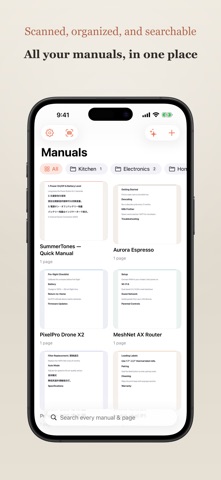
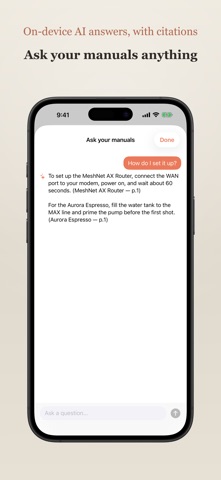
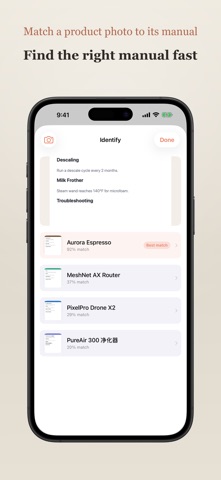
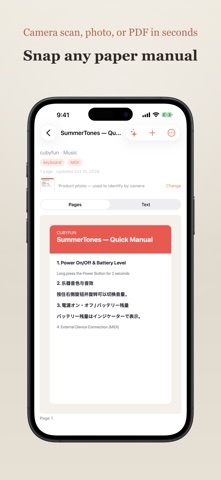
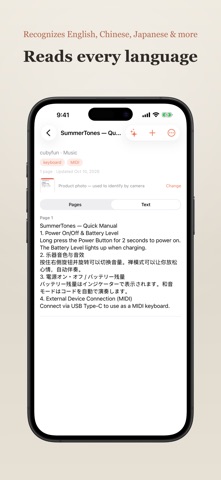
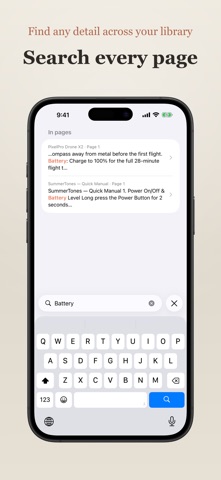
Paper manuals pile up in drawers — and the one you need is never there. ManualBook turns that pile into a searchable library on your phone. Now it also answers your questions and finds the right manual from a photo. Scan a manual with your camera, snap a photo, or import a PDF. ManualBook reads every word on the page — in English, Spanish, German, French, Chinese, Japanese, and more — entirely on your device, so you can find any detail in seconds. How it works • Capture: the built-in document scanner auto-detects edges and straightens the page. Or import straight from Photos or Files — images and PDFs alike. • Recognize: on-device text recognition reads each page, including mixed English / Chinese / Japanese, with no internet and nothing uploaded. • Search: full-text search across every manual and every page, with matches highlighted and a tap to jump right to the page. • Ask: ask a question in plain language and get an answer drawn from your own manuals — generated by on-device AI, with page citations, and nothing uploaded. • Identify: not sure which manual you need? Snap a photo of the product and ManualBook matches it to the right manual — on-device. • Organize: group manuals into folders, add tags, and keep brand and notes together. • Share to ManualBook: send a PDF or photo from any app — Safari, Files, Mail, Photos — straight into your library, scanned and filed automatically. • Export: turn any manual back into a shareable PDF. Private by design • Everything runs on your iPhone. Text recognition and AI answers happen on-device — your manuals are never uploaded to us, and there are no accounts, servers, analytics, or trackers. • Optional iCloud Sync keeps your library in your own private iCloud, encrypted by Apple, so it's there on all your devices. We never see it. Free to start • Your first manuals are on the house. A single one-time purchase unlocks unlimited manuals and AI answers — no subscription. Stop hoarding paper. Scan it once, find it forever.
What's new · 1.1
What's new in 1.1 • Search results now open the manual at the exact page. • Ask your manuals finds the right pages for questions written in Chinese or Japanese. • Identify by camera shows more realistic match scores. • Long PDFs import using less memory. • A warmer look that matches the app icon, plus fixes throughout. AI answers and unlimited manuals are included in the one-time unlock. Thanks for using ManualBook!
Details