

GLTF Viewer · Convert OBJ/STL
RUSH TOOLS LLC · Utilities
Independent analytics for this App Store listing. AppTracker is not affiliated with RUSH TOOLS LLC.
Chart standing · US
What changed · US
Listing changes AppTracker has observed for this app in this storefront — new versions, price moves, rating shifts, and store copy.
Minor refinements. (GLTF Viewer · Convert OBJ/STL)
Screenshots



About
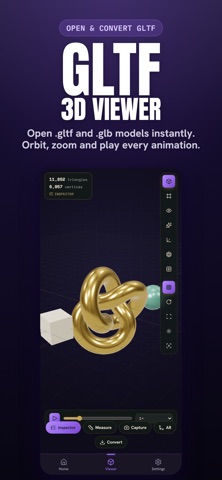
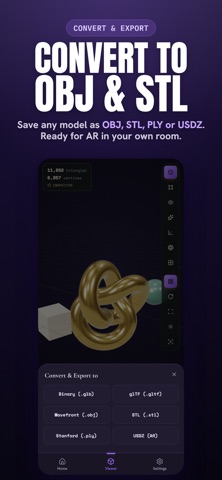
GLTF Viewer opens .gltf and .glb 3D model files and gives you a complete, professional inspector for the glTF format. VIEW YOUR MODEL • Orbit, pan and zoom with smooth touch controls • Solid, Wireframe, X-ray and Points render modes • Play back embedded animations: scrub, switch clips, change speed • Toggle grid, auto-rotate, and 3 lighting/environment presets • Works with Draco-compressed geometry and KTX2/Basis-compressed textures inside your glTF/GLB • Handles very large files gracefully: models over 400MB switch to a full data inspector even without a live 3D preview FULL glTF INSPECTOR • Scene graph / node structure • Every mesh, material (PBR values) and texture • Animation clips and accessor/buffer data • Raw glTF JSON viewer • Complete glTF 2.0 validation report with errors, warnings and exact JSON-pointer locations EXPORT, AR AND MEASURE These tools require an in-app purchase: • Export / convert your model to another format: GLB, glTF, OBJ, STL, PLY or USDZ • View your model in AR, right in your own space, with USDZ Quick Look • Tap-to-measure real-world distances on the model • Advanced render modes: Normals, Matcap, UV-checker • Hi-resolution screenshot capture Open a file from the Files app, iCloud Drive, Mail, AirDrop or any app's Share Sheet, or tap "Open File" inside GLTF Viewer. No account, no login required. Privacy Policy: https://rush.tools/privacy Terms of Use: https://rush.tools/terms
What's new · 1.5.1
Minor refinements. (GLTF Viewer · Convert OBJ/STL)
Details