

Trackdown: Days Counter
MARTIN IVAYLOV MIRCHEVSKI · Productivity
Independent analytics for this App Store listing. AppTracker is not affiliated with MARTIN IVAYLOV MIRCHEVSKI.
Chart standing · US
What changed · US
Listing changes AppTracker has observed for this app in this storefront — new versions, price moves, rating shifts, and store copy.
Meet the new Trackdown. Every screen has been redesigned to feel right at home on iPhone. THE DIAL Every event now has a dial, drawn from the app icon, that shows how far along you are. Open an event to see the whole wait laid out in dots. CALENDAR A new tab shows every event, repeat and milestone on a month view. Start an event on any day. MILESTONES 100 days, six months, a year, the halfway point. Each one earns a medal, and Trackdown can remind you when it arrives. TAP TO CHANGE UNITS Tap a count to see it in weeks, months, hours or live seconds. NEW WIDGETS Countdown, Dial and Up Next for your Home Screen, and new Lock Screen widgets, including the dial. SIRI, SHORTCUTS AND SPOTLIGHT Ask Siri how long until an event, or find it in Spotlight. AND MORE Share an event as a poster, add it to Calendar, start from suggestions with real holiday dates, and choose what time reminders arrive. Past events are grouped by year, and can become a count up or come back every year.
Screenshots


About
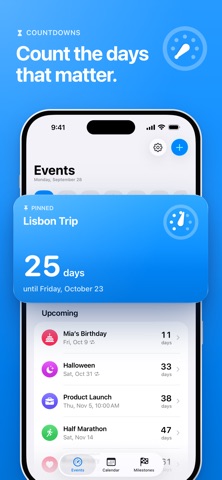
Trackdown is the days counter that feels like Apple made it. Count down to what’s coming. Count up from what matters. No account. No subscription. Just your days, beautifully counted. COUNT DOWN A trip, a birthday, a launch, a holiday. Pick a date and watch the number fall, while the dial shows how far along you are. COUNT UP Your first run, a new home, a fresh start. See how many days it has been, and every milestone along the way. MILESTONES 100 days, six months, a year, the halfway point. Each one earns a medal, and Trackdown can remind you when it arrives. TAP TO CHANGE UNITS See any count in days, weeks, months, hours or live seconds. CALENDAR Every event, repeat and milestone on a month view. Start a new event on any day. WIDGETS Countdown, Dial and Up Next on your Home Screen, and a gauge, a summary and the dial on your Lock Screen. SIRI, SHORTCUTS AND SPOTLIGHT Ask Siri how long until your trip, or find any event in Spotlight. MADE TO SHARE Share an event as a poster, or add it to Calendar. PRIVATE BY DESIGN No account. No server. No tracking. Your events stay on your iPhone.
What's new · 3.0
Meet the new Trackdown. Every screen has been redesigned to feel right at home on iPhone. THE DIAL Every event now has a dial, drawn from the app icon, that shows how far along you are. Open an event to see the whole wait laid out in dots. CALENDAR A new tab shows every event, repeat and milestone on a month view. Start an event on any day. MILESTONES 100 days, six months, a year, the halfway point. Each one earns a medal, and Trackdown can remind you when it arrives. TAP TO CHANGE UNITS Tap a count to see it in weeks, months, hours or live seconds. NEW WIDGETS Countdown, Dial and Up Next for your Home Screen, and new Lock Screen widgets, including the dial. SIRI, SHORTCUTS AND SPOTLIGHT Ask Siri how long until an event, or find it in Spotlight. AND MORE Share an event as a poster, add it to Calendar, start from suggestions with real holiday dates, and choose what time reminders arrive. Past events are grouped by year, and can become a count up or come back every year.
Details