
Chart standing · US
What changed · US
Listing changes AppTracker has observed for this app in this storefront — new versions, price moves, rating shifts, and store copy.
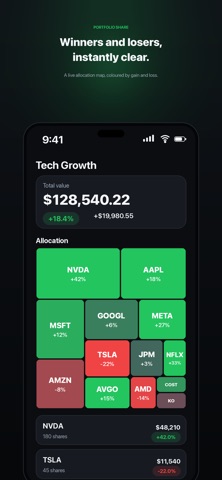
VISIBLE CHANGES Company logos on ticker rows Every holding row now shows the issuer’s mark beside its ticker, with a monogram fallback when there is no logo. All marks sit on one light tile, so a logo with a white background baked in no longer looks like a different component from one with a transparent background. Allocation maps carry real information Tile colour now scales with the size of the move, against a threshold that matches the window you are looking at: 5% saturates a 1D map, 60% a lifetime one. Previously everything used a single 40% scale, so a day map where nothing moves more than 3% painted every tile the same green or red. Cash and unpriced holdings stay neutral rather than being coloured as a gain of zero. Applied in the app, the home screen widget and the public web profile. Period returns tile The portfolio screen shows 1W, 1M, 1Y and YTD returns beside the total value. Total value no longer wraps A seven figure total was breaking across two lines mid number. It now shrinks to fit and stays whole. P/E is labelled The stats section showed two unlabelled numbers joined by a dot. They are now separate cells, P/E and Forward P/E, so a lone figure can no longer be mistaken for the other one. Activity events are separated Each event on the portfolio activity feed sits in its own card, so it is clear which detail belongs to which trade. Home no longer drags sideways The whole page could be dragged left and right and would spring back. Two causes: an option row taking a shared column it could not afford, and no floor under the page itself. Both fixed. Follow requests survive Requesting to follow a private account, then reopening that profile within a couple of seconds, showed “Follow” again — and because the button is a toggle, tapping it cancelled the request you had just made. Brokerage connection flow Tapping “Connect a broker” goes straight to a list of brokerages with logos; picking one starts its login immediately, with no intermediate selection step. Subtle gradient background A fixed ambient background behind the app’s screens. BEHIND THE SCENES Pricing reliability Share classes such as BRK/B and HEI/A were silently dropped and never priced, which also made every other holding’s allocation percentage wrong. A partially failed quote batch was treated as a success, leaving real tickers marked unpriced. US class shares written with a hyphen were being looked up on the London exchange. All three fixed and deployed. Seed data integrity Malformed tickers from SEC filings are cleaned at ingest with a check that stops one reaching a profile. A portfolio whose holding genuinely collapsed 98% is no longer mistaken for corrupted data. The nightly re-price now runs clean.
Ratings breakdown · US
The star breakdown behind this app's rating in this storefront.
Screenshots


About
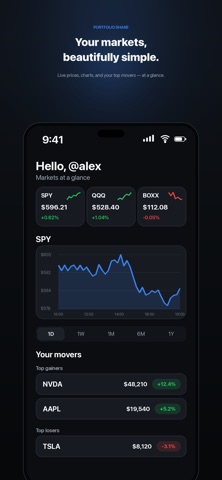
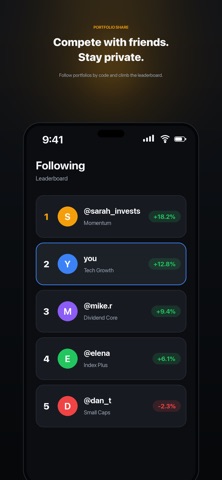
Social Portfolio is the elegant, private way to track your investments, compare performance, and compete with friends, without handing your holdings to anyone. Add your stock holdings by hand, or sync them automatically from Trading 212 and SnapTrade. See your whole portfolio at a glance with a finviz-style allocation heatmap that colours every position by gain or loss. Then share a read-only view of any portfolio with a simple code and climb private leaderboards with the people you follow. Your share counts never leave your device. Holdings live locally and can be backed up in an end-to-end encrypted cloud vault that only you can unlock with a recovery passphrase. The only thing we sync for sharing is a percentages-only snapshot — never your dollar amounts or share quantities. WHAT YOU CAN DO • Track multiple portfolios, each with its own holdings • Add lots by ticker with quantity, date, and purchase price • Sync Trading 212 (Live) positions in a single tap • Connect SnapTrade and aggregate holdings across multiple brokerage accounts • See a live allocation heatmap coloured by performance • Watch your top gainers and losers across every portfolio • Follow portfolios by share code and compete on leaderboards • Review every change with a built-in holdings history • Live market data and charts for major indices and your tickers PRIVATE BY DESIGN • Holdings are stored on your device • Optional encrypted cloud backup, unlocked only by your recovery passphrase • We sync only a percentages-only snapshot for sharing — never amounts • Broker API keys are stored in your device keychain and never sent to our servers BEAUTIFUL & FAST • Premium dark design inspired by Apple Stocks and Robinhood • A smooth, native iOS experience built for iPhone Portfolio Share is for informational and social comparison purposes only. It is not investment advice. Market data may be delayed or inaccurate. Always do your own research.
What's new · 1.0.217
VISIBLE CHANGES Company logos on ticker rows Every holding row now shows the issuer’s mark beside its ticker, with a monogram fallback when there is no logo. All marks sit on one light tile, so a logo with a white background baked in no longer looks like a different component from one with a transparent background. Allocation maps carry real information Tile colour now scales with the size of the move, against a threshold that matches the window you are looking at: 5% saturates a 1D map, 60% a lifetime one. Previously everything used a single 40% scale, so a day map where nothing moves more than 3% painted every tile the same green or red. Cash and unpriced holdings stay neutral rather than being coloured as a gain of zero. Applied in the app, the home screen widget and the public web profile. Period returns tile The portfolio screen shows 1W, 1M, 1Y and YTD returns beside the total value. Total value no longer wraps A seven figure total was breaking across two lines mid number. It now shrinks to fit and stays whole. P/E is labelled The stats section showed two unlabelled numbers joined by a dot. They are now separate cells, P/E and Forward P/E, so a lone figure can no longer be mistaken for the other one. Activity events are separated Each event on the portfolio activity feed sits in its own card, so it is clear which detail belongs to which trade. Home no longer drags sideways The whole page could be dragged left and right and would spring back. Two causes: an option row taking a shared column it could not afford, and no floor under the page itself. Both fixed. Follow requests survive Requesting to follow a private account, then reopening that profile within a couple of seconds, showed “Follow” again — and because the button is a toggle, tapping it cancelled the request you had just made. Brokerage connection flow Tapping “Connect a broker” goes straight to a list of brokerages with logos; picking one starts its login immediately, with no intermediate selection step. Subtle gradient background A fixed ambient background behind the app’s screens. BEHIND THE SCENES Pricing reliability Share classes such as BRK/B and HEI/A were silently dropped and never priced, which also made every other holding’s allocation percentage wrong. A partially failed quote batch was treated as a success, leaving real tickers marked unpriced. US class shares written with a hyphen were being looked up on the London exchange. All three fixed and deployed. Seed data integrity Malformed tickers from SEC filings are cleaned at ingest with a check that stops one reaching a profile. A portfolio whose holding genuinely collapsed 98% is no longer mistaken for corrupted data. The nightly re-price now runs clean.
Details