

OpenHTML: HTML, PDF & Markdown
吉帅 仇 · Utilities
Independent analytics for this App Store listing. AppTracker is not affiliated with 吉帅 仇.
Chart standing · US
What changed · US
Listing changes AppTracker has observed for this app in this storefront — new versions, price moves, rating shifts, and store copy.
• New Make One with AI: describe the tool you want, then copy a ready-made prompt into the AI you use. The prompt already tells it how pages run in OpenHTML. • Pages can now show alert, confirm and prompt dialogs, just like in Safari. If a page keeps opening them, you can stop them. • Copy for AI now includes OpenHTML's rules, so the fixed page works here the first time. • Add to Home Screen now explains what each method needs, and browser icons open offline after the first time. • Fixes: Pro is confirmed right after purchase, PDF export captures pages that scroll inside a panel, Desktop mode uses the desktop layout, and the share sheet now offers Save Image.
Ratings breakdown · US
The star breakdown behind this app's rating in this storefront.
In-app purchases · US
What this app sells inside itself, grouped by kind and priced for this storefront.
Screenshots



About
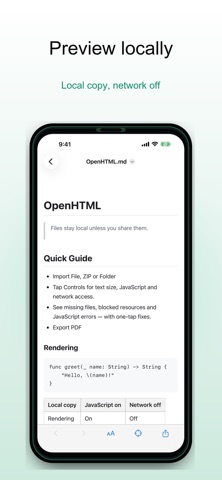
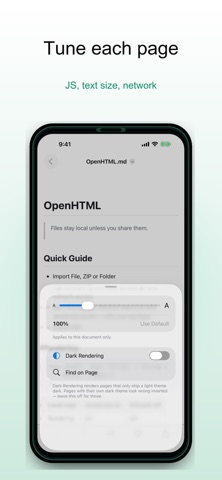
OpenHTML is a private, on-device viewer for HTML, Markdown, ZIP web projects and source files on iPhone and iPad. Open files from Files, Mail, chat apps, AI tools or Safari. Preview pages offline, inspect what went wrong when a file does not render, and export finished pages when you need a clean copy. What you can do: - Open .html, .htm, .xhtml and Markdown files - Import ZIP archives and multi-file web projects - Render LaTeX math in Markdown offline, with no scripts - Preview local pages with network access off by default - Diagnose missing files, blocked resources and JavaScript issues - View JSON, XML and source files with a code-friendly reader - Export full pages to PDF or long images with OpenHTML Pro - Keep selected files in your OpenHTML folder in iCloud Drive and open them on your other devices with OpenHTML Pro Private by default: OpenHTML has no accounts, no analytics and no ads. Files are copied into the app's private storage and stay on your device unless you add them to your own OpenHTML folder in iCloud Drive. Remote resources stay blocked unless you choose to allow them for a trusted document. OpenHTML is designed for developers, students, researchers, writers and anyone who receives HTML reports, AI-generated pages, saved webpages or packaged web projects and wants to inspect them safely on iOS.
What's new · 1.7.1
• New Make One with AI: describe the tool you want, then copy a ready-made prompt into the AI you use. The prompt already tells it how pages run in OpenHTML. • Pages can now show alert, confirm and prompt dialogs, just like in Safari. If a page keeps opening them, you can stop them. • Copy for AI now includes OpenHTML's rules, so the fixed page works here the first time. • Add to Home Screen now explains what each method needs, and browser icons open offline after the first time. • Fixes: Pro is confirmed right after purchase, PDF export captures pages that scroll inside a panel, Desktop mode uses the desktop layout, and the share sheet now offers Save Image.
Details