

Simple Daybook
Duncan Pollock · Productivity
Independent analytics for this App Store listing. AppTracker is not affiliated with Duncan Pollock.
Chart standing · US
What changed · US
Listing changes AppTracker has observed for this app in this storefront — new versions, price moves, rating shifts, and store copy.
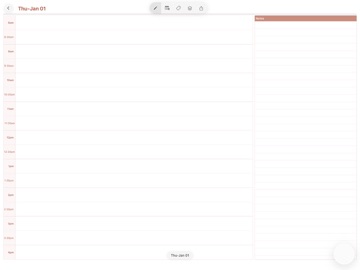
Version 1.3 adds two big features: 1. the ability to add a text box to the page for some typed notes. You need to be in Text mode to be able to select and move textboxes on the page. 2. iCloud sync (enabled in the settings) so you can sync your planners between multiple iPads signed into the same Apple Account. 3. Import Google Calendar timetables after your diary has been created. 4. Sync with calendars on your iPad so events show up in your diary 5. On Day to page templates you can view the timetable for the week
In-app purchases · US
No in-app purchases.
Screenshots


About
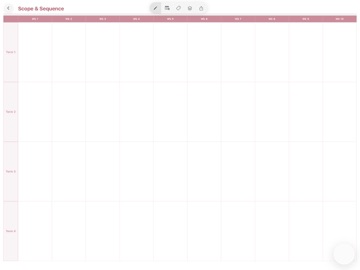
Your lesson planning diary, reimagined for iPad. Simple Day Book brings the familiar, comforting feel of a paper teacher's diary to your iPad, without giving up any of the planning power you need. Flip through pages with a natural page curl, write and sketch directly with Apple Pencil, and organise your school year exactly the way you always have, just digitally. Built for the way teachers actually plan Choose between a day to page layout or a weekly overview, and Simple Day Book generates a beautifully laid out template for your entire term, ready for you to fill in. Cover colours, period slots, and timetable cycles are all set up in a quick guided wizard when you create a new diary, so your book matches your real school timetable from day one. Import your timetable in minutes Already have your timetable as a CSV file from Edval? Import it directly and Simple Day Book will automatically populate your diary pages with your classes, including fortnightly and rotating timetable cycles. Write, draw, and attach with ease Use Apple Pencil to write notes straight onto the page, just like a paper diary. Add photos, mark holidays, tag classes for quick reference, and set reminders, all layered cleanly on top of your template without ever feeling cluttered. Take it anywhere, on paper too When you need a physical copy, export your diary to a fully interactive PDF, complete with clickable links between your calendar overview and individual day or weekly pages. Simple Day Book also supports export for reMarkable Paper Pro Move, so your planning travels with you wherever you work. A bookshelf of your own Keep every term, every class, every year organised on your own digital bookshelf, with custom covers so you can find the right diary at a glance. Simple Day Book. The diary you already know how to use, built for iPad.
What's new · 1.3
Version 1.3 adds two big features: 1. the ability to add a text box to the page for some typed notes. You need to be in Text mode to be able to select and move textboxes on the page. 2. iCloud sync (enabled in the settings) so you can sync your planners between multiple iPads signed into the same Apple Account. 3. Import Google Calendar timetables after your diary has been created. 4. Sync with calendars on your iPad so events show up in your diary 5. On Day to page templates you can view the timetable for the week
Details