

DoseDiary
OUT WEST AI PTY LTD · Health & Fitness
Independent analytics for this App Store listing. AppTracker is not affiliated with OUT WEST AI PTY LTD.
Chart standing · US
What changed · US
Listing changes AppTracker has observed for this app in this storefront — new versions, price moves, rating shifts, and store copy.
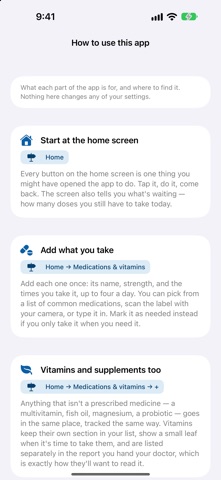
Vitamins and supplements Track them alongside your medications. They keep their own section in your list, show a small leaf when it is time to take them, and are listed separately in the report you share with your doctor — which is how a doctor wants to read them. A pain diary Turn it on in Settings and a Pain level button appears on your home screen. One tap, one number out of ten, done. Charts in your doctor's report Your scores over time, with each dose marked underneath, above the table of numbers. Far easier to read in a short appointment than forty rows. A proper welcome New users get a short walkthrough, and "How to use this app" is there whenever you want it — it tells you what each part is for and where to find it. Also fixed: a crash on opening the app after updating.
Screenshots


About
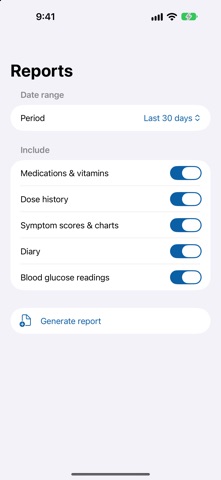
Medication Diary is a private record of what you take, when you took it, and how you felt afterwards. It is built for the appointment. Everything you log comes back out as a PDF you can print, email, or hand across a desk. WHAT YOU CAN TRACK • Medications on fixed times, up to four a day, or as needed • Vitamins and supplements, kept in their own section • How you are feeling: pain, anxiety, nausea, fatigue, mood and sleep • A pain diary, if that is the thing you are really tracking • Bowel movements, if a medication affects your gut • Blood glucose, typed in or read from Apple Health Every optional tracker is off until you turn it on. ADDING WHAT YOU TAKE Pick from a list of common Australian medications, scan the label with your camera, or type it in. Record the strength, the times, and whether you want a reminder at each one — that is decided per medication, so you can log something without being nagged about it. Chart, so "is this doing anything?" has something behind it when your doctor asks. THE REPORT Choose a date range and what to include. You get your medications and vitamins, your dose history, your diary, your scores charted over time, and whichever trackers you switched on. ALSO • Reminders at your scheduled times • Refill tracking, counting down as you log doses • Log a dose from your Apple Watch • Ask Siri to log a dose or tell you what is next • Syncs across your devices through your own iCloud account YOUR DATA Everything stays on your device and in your private iCloud account. There is no account to create, no analytics, and nothing is ever sent to us or to anyone else. Medication Diary is a personal logging tool. It is not a medical device. It does not diagnose, treat, or recommend any medication, dose, or course of action. Always follow the directions of your doctor and pharmacist. Made in Australia by Out West AI.
What's new · 3
Vitamins and supplements Track them alongside your medications. They keep their own section in your list, show a small leaf when it is time to take them, and are listed separately in the report you share with your doctor — which is how a doctor wants to read them. A pain diary Turn it on in Settings and a Pain level button appears on your home screen. One tap, one number out of ten, done. Charts in your doctor's report Your scores over time, with each dose marked underneath, above the table of numbers. Far easier to read in a short appointment than forty rows. A proper welcome New users get a short walkthrough, and "How to use this app" is there whenever you want it — it tells you what each part is for and where to find it. Also fixed: a crash on opening the app after updating.
Details