

Collage Maker: Grid & Layout
Grima Hdez · Graphics & Design
Independent analytics for this App Store listing. AppTracker is not affiliated with Grima Hdez.
Chart standing · US
What changed · US
Listing changes AppTracker has observed for this app in this storefront — new versions, price moves, rating shifts, and store copy.
• Watch one short video and get 30 minutes with no ads at all — the sponsored card now really does go away • Pro stays unlocked even when you have no signal • No more full-screen ad when you come back from picking your photos • Home Screen shortcuts now speak your language • Every plan shows its real price in your own currency, and you can manage your subscription without leaving the app • One layout promised six photos but had room for only four. Two of your photos disappeared without a word. All six fit now. • Layout names are in your language. A third of them were still in English, and a few of the others said the wrong thing.
Ratings breakdown · US
The star breakdown behind this app's rating in this storefront.
In-app purchases · US
What this app sells inside itself, grouped by kind and priced for this storefront.
Screenshots


About
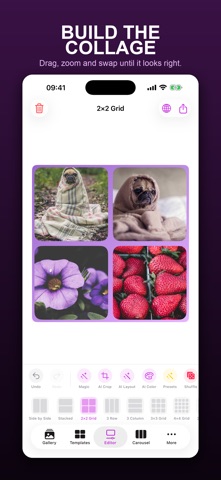
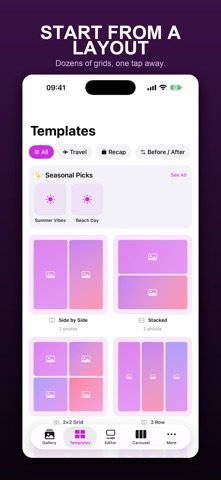
Make stunning photo collages, Instagram carousels, and story layouts in seconds — fast, private, and 100% on your device. No account, no uploads, no watermark. CollageCraft gives you 280+ professional layouts for 2 to 20 photos, an AI-powered editor, and viral templates built for the way people actually post today. — CREATE IN 30 SECONDS — Pick your photos, tap a layout, export. Smart Layout AI arranges your photos into a balanced collage automatically, and Smart Crop keeps faces and subjects perfectly framed. — INSTAGRAM CREATOR TOOLS — • Instagram Carousel Maker — build swipeable multi-slide posts • Story and post templates sized for Instagram, TikTok, Pinterest and more • Pixel-perfect export for every platform — 280+ LAYOUTS & VIRAL TEMPLATES — Travel Recap • Vacation & Summer Recap • Year in Review • Before & After • Fitness Progress • Pet Memories • Wedding • Birthday • Baby Timeline • Hiking, MTB & Road Trip • Photo Dump & Scrapbook — POWERFUL, EASY EDITOR — • Drag, scale, rotate, mirror and layer photos • Backgrounds: solid colors and beautiful gradients • Rounded corners, borders, spacing and frames • 15 filters plus fine adjustments (brightness, contrast, warmth, vignette) • Text, fonts and stickers • Unlimited undo / redo — ON-DEVICE AI (NO INTERNET NEEDED) — • AI Background Removal — cut out any subject with one tap • Smart Layout — the most balanced collage, automatically • Smart Crop — faces and subjects always centered — EXPORT IN STUNNING QUALITY — • HD export, free, with no watermark • 4K and Poster resolution • PNG, JPEG and Transparent PNG • Save to Photos or share anywhere — PRIVATE BY DESIGN — Everything happens on your iPhone or iPad. Your photos never leave your device. No sign-up, no tracking, no cloud. — FREE VS PRO — The free version is genuinely generous: every one of the 280+ layouts, the full editor, Instagram carousels, and HD export with no watermark. CollageCraft Pro unlocks: • AI Background Removal • Smart Layout AI • 4K, Poster and Transparent PNG export • An ad-free app Pro is available as a monthly or annual subscription, a Family plan, or a one-time Lifetime purchase. Download CollageCraft and turn your photos into something worth sharing — in seconds. — Subscriptions auto-renew unless cancelled at least 24 hours before the end of the period. Manage or cancel anytime in your App Store account settings. Lifetime is a one-time purchase. Privacy Policy and Terms of Use are available in Settings. Terms & Conditions: https://ghapps1.wordpress.com/terms-condition/ Privacy Policy: https://ghapps1.wordpress.com/privacy-policy/
What's new · 1.3.0
• Watch one short video and get 30 minutes with no ads at all — the sponsored card now really does go away • Pro stays unlocked even when you have no signal • No more full-screen ad when you come back from picking your photos • Home Screen shortcuts now speak your language • Every plan shows its real price in your own currency, and you can manage your subscription without leaving the app • One layout promised six photos but had room for only four. Two of your photos disappeared without a word. All six fit now. • Layout names are in your language. A third of them were still in English, and a few of the others said the wrong thing.
Details