

Bowling Score Keeper Tracker
紫妍 连 · Sports
Independent analytics for this App Store listing. AppTracker is not affiliated with 紫妍 连.
Chart standing · US
What changed · US
Listing changes AppTracker has observed for this app in this storefront — new versions, price moves, rating shifts, and store copy.
What’s New in Version 1.2.0 • Edit saved games with live score updates and refreshed results after saving. • Delete games and sessions with confirmation to prevent accidental removal. • Organize sessions by Practice, League, Tournament, or Competition, and filter your history by category. • Enjoy improved iPad layouts in both portrait and landscape. • Refined score entry, statistics, and navigation for a smoother experience.
Screenshots



About
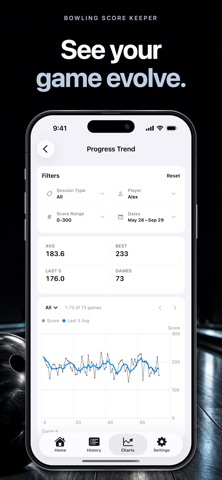
Bowling Score Keeper Tracker helps you record every bowling session quickly, whether you only know the final score or want a full frame-by-frame scorecard. Use it at practice, league night, tournaments, or casual games with friends. Add players, choose the number of games, enter scores, review the session, and save your history locally. Key features: - Fast final score entry - Detailed scorecard entry with strike, spare, miss, and 10th frame support - Pin-by-pin entry with a visual pin deck - Multi-player sessions - Local history with filters - Average, high score, recent trend, and player stats - Pro charts for score trends, distributions, skill mix, first-ball quality, frame breakdown, and pin analysis - Shareable scorecard images - No account required Bowling Score Keeper Tracker is built for bowlers who want a clean score tracker without extra setup. Record the game while you bowl, check your average later, and keep your progress easy to review. Upgrade to Lifetime Pro to unlock advanced charts, Pro share card styles, and remove the Bowling Score Keeper Tracker mark from shared cards.
What's new · 1.2.0
What’s New in Version 1.2.0 • Edit saved games with live score updates and refreshed results after saving. • Delete games and sessions with confirmation to prevent accidental removal. • Organize sessions by Practice, League, Tournament, or Competition, and filter your history by category. • Enjoy improved iPad layouts in both portrait and landscape. • Refined score entry, statistics, and navigation for a smoother experience.
Details