

Interstitial Journal App
ComunAI Ltd · Productivity
Independent analytics for this App Store listing. AppTracker is not affiliated with ComunAI Ltd.
Chart standing · US
What changed · US
Listing changes AppTracker has observed for this app in this storefront — new versions, price moves, rating shifts, and store copy.
1.3 — now on Apple Watch - Write a line from your wrist: dictate or scribble it, add a tag or a mood, done. - Start, pause and finish tasks on your watch, with the same wrap-up as iPhone: what's next, tags and how you feel. - Complications: one tap from your watch face to a new entry, or keep the task you're in — and its timer — in view. While a task runs, it also appears in your Smart Stack. - Ask Siri on your watch to "log an entry in Interstitial Journal" and just say it. - In the watch app, double-tap opens a new entry (Apple Watch Series 9, Ultra 2 and later). On watchOS 26, add New Entry or Active Task to Control Center or the Action button. Also new everywhere: - Changes from your other devices now show up while the app is open — no need to reopen it. - Finishing a task now asks how you feel on iPhone, iPad and Mac, too. Your journal syncs through your own iCloud. The watch app is included in your purchase.
Price & rating history · US
Reconstructed from the listing changes AppTracker has observed in this storefront. A field is charted once it has changed more than once, and each line starts at the value it moved from.
Price · 3.99 USD now · 2 changes on record
In-app purchases · US
No in-app purchases.
Screenshots



Keywords this app targets
Search terms AppTracker associates with this app — estimates, not search volume. ❝ = in the app's title; a highlighted number is its current position for that term.
Similar apps
Competitors and close alternatives, as estimated by AppTracker.
 Chronicle - A Personal Journal / Writing Diary
Steven Romej
1 shared topic · 1 shared title word
Chronicle - A Personal Journal / Writing Diary
Steven Romej
1 shared topic · 1 shared title word
 Figmint
Joshua Langberg
3 shared topics
Figmint
Joshua Langberg
3 shared topics
 DrawerJournal - Private Diary
ToastPlanet Inc.
1 shared topic
DrawerJournal - Private Diary
ToastPlanet Inc.
1 shared topic
 Day One: Daily Journal & Diary
Bloom Built Inc
1 shared topic · 1 shared title word
Day One: Daily Journal & Diary
Bloom Built Inc
1 shared topic · 1 shared title word
 Capture It
adam rogan
1 shared topic
Capture It
adam rogan
1 shared topic
 A Line a Day: Daily Journal
Michelle Mares
1 shared topic · 1 shared title word
A Line a Day: Daily Journal
Michelle Mares
1 shared topic · 1 shared title word
 Hexis: Morning Evening Journal
GoldenBerry Software OU
Hexis: Morning Evening Journal
GoldenBerry Software OU
 One Line in Time
sthreelabs LLC
1 shared topic
One Line in Time
sthreelabs LLC
1 shared topic
About
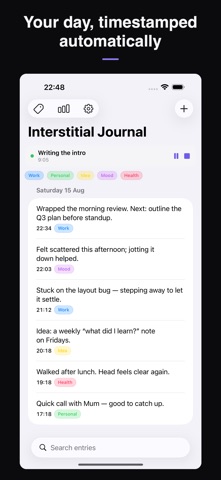
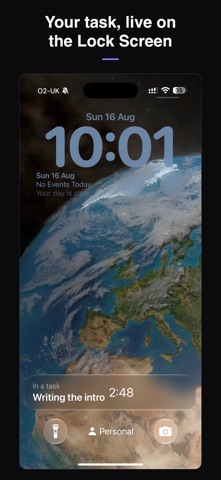
Capture the moments between tasks. Interstitial Journal is a small, private notebook for the gaps in your day — before you start, when you switch, when you get stuck, when you finish. Type a line or speak it; it's timestamped automatically and it's entirely yours. Pay once — no subscription, no account, and everything stays in your own iCloud. THE IDEA The transitions between tasks are where focus leaks away. A quick note — what you just did, what's next, how you feel — helps you land in the next thing instead of carrying the last one with you. Interstitial Journal makes that note effortless. HOW IT WORKS - Open a blank note and write a line, or tap the keyboard mic and say it - Add a tag, and optionally how you're feeling - There's no Save button — it's kept the moment you're done - Your day reads back as a running timeline, newest first WHAT'S INSIDE - Type or speak (system dictation to text; no audio is stored) - Automatic timestamps on every entry - Editable tags — five to start (Work, Personal, Idea, Mood, Health); rename, recolor, reorder, or add your own - Start a task to see it live on your Lock Screen, Dynamic Island, widgets, and the Mac menu bar; finishing logs the time — and the running task stays in step across your devices - On Apple Watch: dictate a line, see your recent entries, start and finish tasks, and add complications to your watch face — synced through your own iCloud, on your wrist whenever you open the app - On-device insights: entries per day, when in the day you write, focus time, and patterns by tag and mood — by week, month, or all time - Export everything to JSON or Markdown anytime PRIVATE BY DESIGN - No account and no subscription - Your entries live in your own iCloud (a private CloudKit database) and on your devices - There's no server we control and nothing we can read - Turn on Apple's Advanced Data Protection for full end-to-end encryption A NOTE ON THE SCIENCE Built on research into attention, reflection, and habit. Interstitial journaling itself hasn't been formally trialed, and this app is for reflection, not treatment. Requires iOS 17 / iPadOS 17 or later. Also on Mac (macOS 14+) and Apple Watch (watchOS 10+) — one purchase covers iPhone, iPad, Mac, and Apple Watch. From comun.ai, a London studio.
What's new · 1.3
1.3 — now on Apple Watch - Write a line from your wrist: dictate or scribble it, add a tag or a mood, done. - Start, pause and finish tasks on your watch, with the same wrap-up as iPhone: what's next, tags and how you feel. - Complications: one tap from your watch face to a new entry, or keep the task you're in — and its timer — in view. While a task runs, it also appears in your Smart Stack. - Ask Siri on your watch to "log an entry in Interstitial Journal" and just say it. - In the watch app, double-tap opens a new entry (Apple Watch Series 9, Ultra 2 and later). On watchOS 26, add New Entry or Active Task to Control Center or the Action button. Also new everywhere: - Changes from your other devices now show up while the app is open — no need to reopen it. - Finishing a task now asks how you feel on iPhone, iPad and Mac, too. Your journal syncs through your own iCloud. The watch app is included in your purchase.
Details