

Dirigo
Bit 0100 Bit Software LLC · Utilities
Independent analytics for this App Store listing. AppTracker is not affiliated with Bit 0100 Bit Software LLC.
Chart standing · US
What changed · US
Listing changes AppTracker has observed for this app in this storefront — new versions, price moves, rating shifts, and store copy.
Dirigo 3.2 backs up your settings and lets you add your own buttons to Home. ICLOUD BACKUP • Your receivers, inputs, custom remotes, Activities, Home layouts and templates are backed up to your own iCloud, automatically • Restore them on a new iPhone or iPad, or after reinstalling Dirigo • Backups stay in your private iCloud. Nobody else, including Dirigo's developer, can see them • Apple TV and Android TV pairings never leave the device they were made on. After a restore, Dirigo asks you to pair each one again • Turn it off any time in App Settings > iCloud Backup ADD YOUR OWN BUTTONS TO HOME • Add extra buttons to the Home screen: a Home Assistant device, a key from an Apple TV or Android TV remote, or a button from a custom remote • Move and resize them like everything else on Home. A small button shows just its symbol
In-app purchases · US
What this app sells inside itself, grouped by kind and priced for this storefront.
Screenshots


About
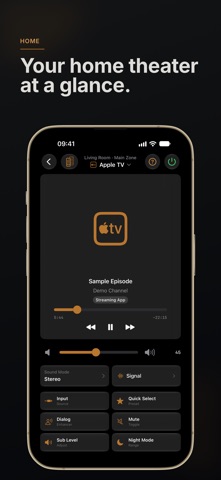
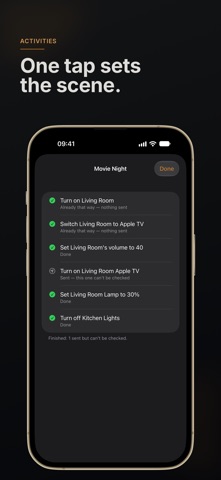
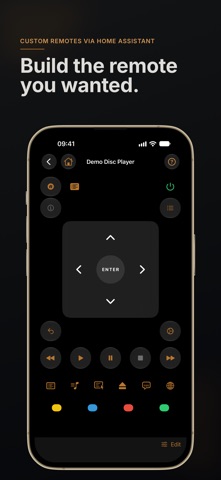
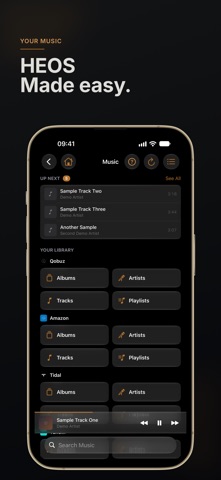
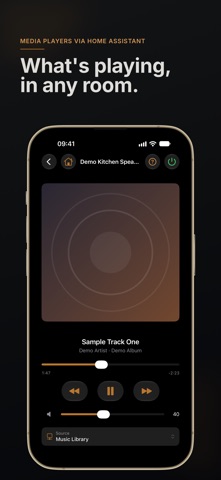
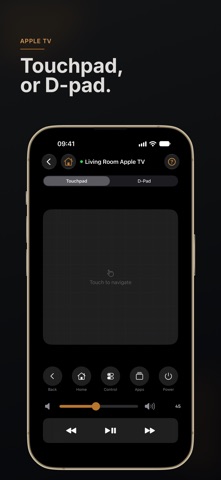
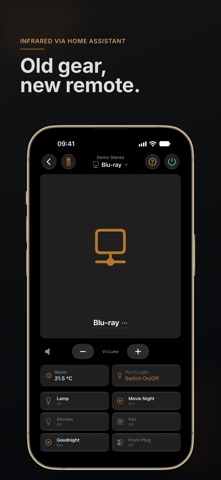
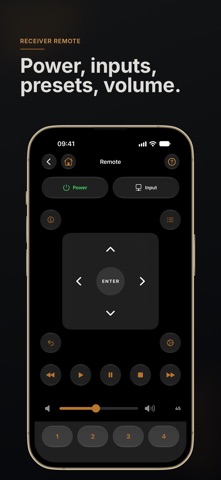
Dirigo is one remote for your home theater, on iPhone, iPad and Apple Watch. It controls current Marantz and Denon AV receivers directly over Wi-Fi, well beyond what the bundled remote can do, and with Home Assistant it works without one. WHAT YOU CAN DO • Power, volume, every input and every surround mode your receiver supports • Browse and play HEOS streaming sources — Qobuz, TIDAL, Amazon Music, TuneIn, and the rest • Manage the queue, see what is playing, skip tracks, view history • Control each zone on multi-zone receivers • Configure room correction, speaker levels, HDMI output, video settings, and the deep menus your physical remote pretends don't exist • Activate Quick Selects you have programmed on the receiver • Home Screen and Lock Screen widgets, and an Apple Watch app • Siri and Shortcuts ("Toggle mute with Dirigo", "Set volume with Dirigo") ACTIVITIES One tap sets the whole room: turn on the receiver and the TV, pick the input, set the volume and the lights. Every step reports what actually happened, and Activities run from Shortcuts too. TELEVISION REMOTES Pair the television or streaming box in the same room and Dirigo becomes its remote too. Apple TV gets a touchpad — swipe to navigate, tap to select — along with transport buttons and the Apple TV's own Control Centre and app switcher. Android TV, Google TV and NVIDIA Shield get a D-pad, Back and Home, and play, pause and skip. Dirigo tells you which app is on screen. Volume routes back to your receiver, and a now-playing card on your home screen shows what is on — title, artist, artwork, and how far through it is. Drag the progress bar to jump to a moment. Pairing is a one-time setup: Dirigo finds the television on your network and you type in the code it puts on screen. CUSTOM REMOTES (HOME ASSISTANT) Build remotes from the devices on your own Home Assistant server. • Add lights, switches, fans, buttons, scenes, scripts and sensor readings, and arrange them your way • Add a D-pad or a transport row and choose what each button drives • A Now Playing remote for a Home Assistant media player: artwork, progress, play and skip, volume • Show an infrared appliance on the Home screen: its inputs, volume and power, with a full remote for everything else • Put Home Assistant lights and scenes on your receiver's Home screen buttons • No Denon or Marantz receiver? Choose "Connect Home Assistant" when you first open Dirigo DEMO MODE No receiver to test against? Tap "Explore Demo Mode" on the Welcome screen to explore the app with a synthetic receiver, Apple TV and Android TV. PRIVACY Dirigo collects nothing. No analytics, no identifiers, no third-party tracking SDKs, no Dirigo account. All receiver, television and Home Assistant control happens on your local Wi-Fi network; Dirigo refuses Home Assistant Cloud and internet addresses. If you connect Home Assistant, its access token is stored in your iPhone's keychain and sent only to your own Home Assistant server. The only public-internet activity is album art: when you browse a HEOS streaming source, or show a Home Assistant media player whose cover is hosted by a music service, iOS loads the picture from that service's own image address, anonymously. Full policy at bit0100bitsoftware.com/dirigo-privacy. REQUIREMENTS A current-generation Denon or Marantz AV receiver with HEOS (Cinema 50, SR-series, AVR-X-series and similar), or a Home Assistant server. iOS 18 or later. Your receiver or Home Assistant server must be on the same Wi-Fi network as your iPhone. Apple TV pairing requires tvOS 18 or later. Android TV pairing works with Android TV and Google TV devices that support the built-in remote pairing service, including NVIDIA Shield. Dirigo is an independent third-party app and is not affiliated with, endorsed by, or sponsored by Sound United, Denon, Marantz, Apple, Google, NVIDIA, or the Open Home Foundation. Home Assistant is a trademark of the Open Home Foundation.
What's new · 3.2
Dirigo 3.2 backs up your settings and lets you add your own buttons to Home. ICLOUD BACKUP • Your receivers, inputs, custom remotes, Activities, Home layouts and templates are backed up to your own iCloud, automatically • Restore them on a new iPhone or iPad, or after reinstalling Dirigo • Backups stay in your private iCloud. Nobody else, including Dirigo's developer, can see them • Apple TV and Android TV pairings never leave the device they were made on. After a restore, Dirigo asks you to pair each one again • Turn it off any time in App Settings > iCloud Backup ADD YOUR OWN BUTTONS TO HOME • Add extra buttons to the Home screen: a Home Assistant device, a key from an Apple TV or Android TV remote, or a button from a custom remote • Move and resize them like everything else on Home. A small button shows just its symbol
Details