

Agent Limbo: AI Coding
雨川 甘 · Developer Tools
Independent analytics for this App Store listing. AppTracker is not affiliated with 雨川 甘.
Chart standing · US
What changed · US
Listing changes AppTracker has observed for this app in this storefront — new versions, price moves, rating shifts, and store copy.
- Syncs the selected pixel companion between iPhone and Apple Watch and applies its accent color across supported screens. - Adds a shake-to-roll interaction to the iPhone Dashboard Buddy card. Users confirm before changing companions. Each roll starts a 26-minute cooldown, including when the confirmation is canceled. - Adds a double-tap interaction to the iPhone Buddy card and Apple Watch pet canvas. When the companion is idle, a heart animation may appear; a successful interaction on Apple Watch also increases mood, up to level 4. - Shows the agent provider alongside the tool name in approval and tool-call views, and localizes decision states such as allowed, denied, waiting, and expired. - Lets users open the approval list from a waiting tool call. - Unifies colors and interaction feedback across iPhone and Apple Watch.
In-app purchases · US
No in-app purchases.
Screenshots


Similar apps
Competitors and close alternatives, as estimated by AppTracker.
 Vibe Pocket
, LLC
Vibe Pocket
Vibe Pocket, LLC
 CodeAgents Mobile
Ievgen Pyvovarov
CodeAgents Mobile
Ievgen Pyvovarov
 Agent Code Pager
Jacob Hargus
Agent Code Pager
Jacob Hargus
 Alpha Overmind: Run AI Agents
Pied Apps AB
Alpha Overmind: Run AI Agents
Pied Apps AB
 LimitWatch
圣宝 蔡
LimitWatch
圣宝 蔡
 Agent Approve
 LLC
Agent Approve
Agent Approve LLC
 AgentsRoom: Dev Remote Control
CHAUVIN Jean-Baptiste Thibault
AgentsRoom: Dev Remote Control
CHAUVIN Jean-Baptiste Thibault
 Lody - Run Code Agent Anywhere
Shanghai Zhouchan Information Technology Co., Ltd.
Lody - Run Code Agent Anywhere
Shanghai Zhouchan Information Technology Co., Ltd.
About
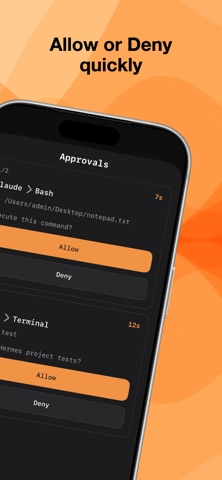
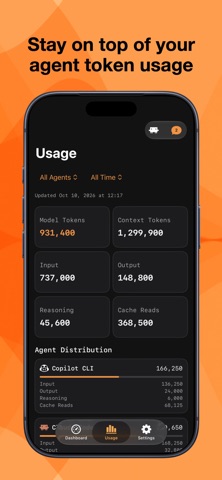
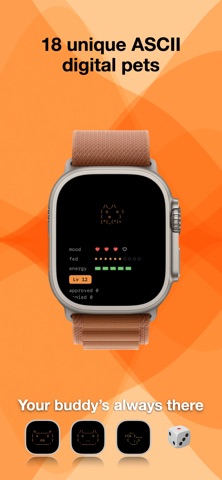
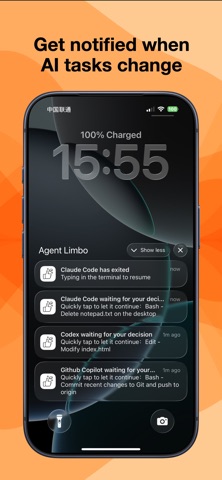
Agent Limbo is an AI workflow product built for Vibe Coding. It brings approvals for critical local agent actions and runtime status alerts to iPhone and Apple Watch, so you can stay in control of AI coding tasks anytime, even when you are away from your computer. Key features: - Real-time approvals: Receive approval requests on iPhone and Apple Watch, then allow or deny quickly. - Status monitoring: Check online status, pending approval queue, and recent tool calls. - Multi-agent support: Works with Claude Code, Codex, Copilot, and more. - Remote alerts: Get notified when tasks complete or fail, so you can stop watching the screen. - Simple pairing: Pair your iPhone/Apple Watch with your desktop agent in one step. - 18 built-in digital pets: Bring 18 unique pixel companions to your Apple Watch, each reacting to your AI workflow state. Best for: - Developers who use AI coding tools daily - People running long Vibe Coding sessions or long tasks - Users who want remote control over agent workflows Notes: - After installing and signing in, complete pairing on desktop first (Mac and Windows supported). - Some features depend on local network connectivity and notification permissions.
What's new · 1.4
- Syncs the selected pixel companion between iPhone and Apple Watch and applies its accent color across supported screens. - Adds a shake-to-roll interaction to the iPhone Dashboard Buddy card. Users confirm before changing companions. Each roll starts a 26-minute cooldown, including when the confirmation is canceled. - Adds a double-tap interaction to the iPhone Buddy card and Apple Watch pet canvas. When the companion is idle, a heart animation may appear; a successful interaction on Apple Watch also increases mood, up to level 4. - Shows the agent provider alongside the tool name in approval and tool-call views, and localizes decision states such as allowed, denied, waiting, and expired. - Lets users open the approval list from a waiting tool call. - Unifies colors and interaction feedback across iPhone and Apple Watch.
Details