

Niello - AI Sticker Journal
Shanghai TacticSpace Technology Co., Ltd. · Lifestyle
Independent analytics for this App Store listing. AppTracker is not affiliated with Shanghai TacticSpace Technology Co., Ltd.
Chart standing · US
What changed · US
Listing changes AppTracker has observed for this app in this storefront — new versions, price moves, rating shifts, and store copy.
[New] iPhone Duo support: Home, Journal, Settings, and Mochi layouts adapt to the cover and unfolded displays. [New] Photo journal creations: start with a photo and a short description, choose memory collage, colored pencil, paper cut, or quiet watercolor, then preview the finished page before saving it to your journal. [New] Duo facing-page editing: open two pages side by side and arrange text, photos, and stickers on each page. [Improved] Creative drafts: keep and reopen photo journal drafts to continue working on your page. [Improved] Navigation and editing: clearer sidebar selection, more reliable taps, and refined editor layouts in iPhone landscape.
Screenshots



About
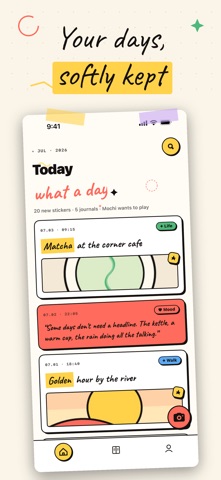
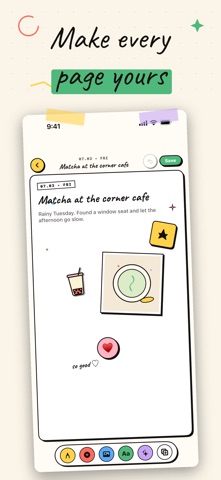
Point your camera at anything — it becomes a die-cut sticker on your journal page. Niello is an AI journal where Mochi, your kitten assistant, makes every page feel just right. SNAP IT. STICK IT. DONE. A coffee. A wildflower. A napping cat. Niello reads the subject in your photo, cuts clean edges automatically, and drops it onto your page as a sticker — in one tap. No separate cutout app. No editing. Just shoot and go. MEET MOCHI, YOUR AI LAYOUT PARTNER Mochi is a tiny AI kitten who knows how to journal. Tell her how your day went and she will: · Match your mood to a set of stickers and colors · When you're not sure what to write, Mochi drafts a line or two from your title and photo to get you started · Arrange your photos, stickers, and words into a spread that just works IPAD + APPLE PENCIL: YOUR BIG-SCREEN CANVAS On iPad, Niello opens into a split-view canvas — browse your journal on one side, design freely on the other. Pick up your Apple Pencil and handwrite directly on the page, draw borders, doodle in the margins. It feels like the real thing. YOUR JOURNAL IS YOURS ALONE Every page, sticker, and photo you create stays on your device, visible only to you. With Niello Pro, your journal also syncs through your own private iCloud across your devices. We never copy your content to our servers. We never use it to train AI. MADE TO FEEL HANDMADE Hard shadows. Handwritten type. Bold color blocks. Every Niello page has the warmth of something you made yourself — because you did. NIELLO PRO Subscribe to Niello Pro for unlimited AI sticker generation and smart page layout. Monthly and yearly plans available, each with a free trial. After your trial, the subscription renews automatically. Manage or cancel anytime in your Apple account settings. CONTACT & SUPPORT Questions, ideas, feedback? We would love to hear from you. Write to us at support@nielloai.com. Terms of Use: https://nielloai.com/tos Privacy Policy: https://nielloai.com/privacy
What's new · 1.8
[New] iPhone Duo support: Home, Journal, Settings, and Mochi layouts adapt to the cover and unfolded displays. [New] Photo journal creations: start with a photo and a short description, choose memory collage, colored pencil, paper cut, or quiet watercolor, then preview the finished page before saving it to your journal. [New] Duo facing-page editing: open two pages side by side and arrange text, photos, and stickers on each page. [Improved] Creative drafts: keep and reopen photo journal drafts to continue working on your page. [Improved] Navigation and editing: clearer sidebar selection, more reliable taps, and refined editor layouts in iPhone landscape.
Details