

PingInsight
LiChuan Lin · Utilities
Independent analytics for this App Store listing. AppTracker is not affiliated with LiChuan Lin.
Chart standing · US
What changed · US
Listing changes AppTracker has observed for this app in this storefront — new versions, price moves, rating shifts, and store copy.
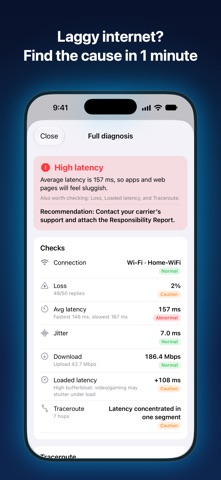
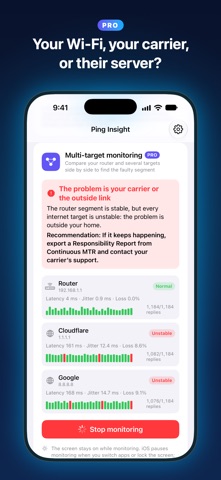
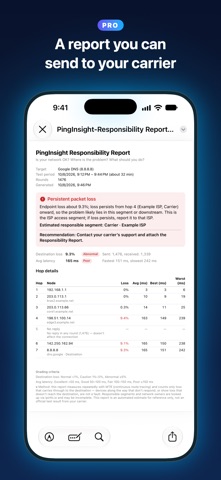
This update adds a one-tap full diagnosis and two new Pro features, and removes all ads: • New: Full diagnosis (free). One button checks your connection, stability, route and speed, and in about a minute tells you in plain words whether there's a problem, where it is and what to do. Pro users can export a diagnosis report (PDF). • New: Multi-target monitoring (Pro). Ping your router, public DNS and the services you use at the same time to tell whether the problem is your home network, your carrier or the server on the other end. Export a multi-target report (PDF) when you stop. • New: Trends & time-of-day analysis (Pro). See long-term trends in latency, jitter, packet loss and speed, find the worst times of your week, and compare your home Wi-Fi, office Wi-Fi and cellular. • No more ads: neither the free version nor Pro shows ads, and the app no longer asks for tracking permission. • Redesigned responsibility report (PDF): the verdict and advice come first, values show units and Normal / Caution / Abnormal grades, and the test period is included. Intermediate hops that don't respond (usually normal) are now shown in gray instead of looking like failures. • Text in PDF reports can now be searched and copied correctly. • Better health history CSV: no more garbled text in Excel, times in your local time zone, and new Wi-Fi name, grade and remarks columns. • Carrier detection now uses the country you're in: local carriers in each country (such as NTT docomo and OCN in Japan) are no longer mistaken for the international backbone. • When you change the app language, connection names in your health history change too, and the same type of connection is no longer split into two groups. • Translation fixes and various refinements.
Screenshots



About
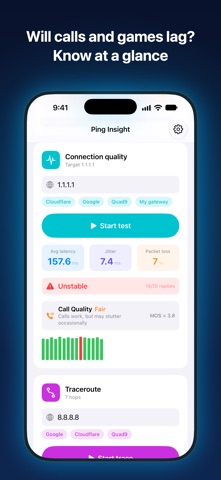
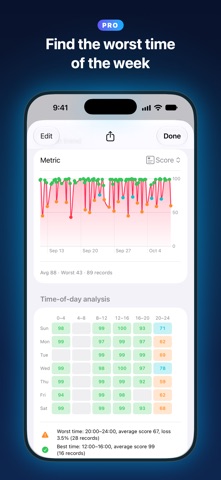
Slow Wi-Fi, lag in games, choppy video calls? PingInsight is more than a speed test — it finds which part of the network is at fault and whose responsibility it is, then tells you in plain words what to do next. FULL DIAGNOSIS IN ONE TAP One button checks your connection, stability, route and speed (including latency under load). In about a minute you get a clear verdict: is there a problem, where is it, and what should you do. FIVE QUESTIONS, ANSWERED • What connection you're on: Wi-Fi, 4G, 5G or Ethernet, detected live (Wi-Fi name shown with location permission) • How fast it is: download and upload, plus latency under load with an A–F bufferbloat grade • How stable it is: latency, jitter and packet loss, translated into expected video and voice call quality; switches to TCP automatically when a network blocks ping • Where it breaks: hop-by-hop traceroute labeling each hop as your local network, your carrier, the international backbone or a cloud service • Whose fault it is: recognizes the local carriers of the country you're in and estimates which segment is to blame HEALTH SUMMARY & HISTORY A one-tap check turns connection quality into a 0–100 health score and grade, and keeps your history and score trend. PRO (one-time purchase, unlocked forever) • Continuous MTR: probes every hop in parallel each round and tracks long-term per-hop loss and latency, for a responsibility verdict far more reliable than a single test • Multi-target monitoring: ping your router, public DNS and the services you use at the same time to tell whether the problem is your home network, your carrier or the server on the other end • Trends & time-of-day analysis: long-term latency, jitter, loss and speed trends, the worst times of your week, and a comparison of your home Wi-Fi, office Wi-Fi and cellular • Export a responsibility report (PDF): verdict, advice and per-hop details, ready to file with your ISP • Export a diagnosis report (PDF): the full diagnosis — verdict, speed, stability and route — in one document • Export a multi-target report (PDF): your router and every target side by side, showing where the problem is • Export health history as CSV: opens straight in Excel, with local times, grades and remarks The screen stays on while monitoring. Switch to another app and come back, and monitoring resumes automatically, with paused periods marked in results and reports. PRIVACY No ads, no tracking, no ad or analytics SDKs. Path analysis sends only public IPs to ipinfo.io to look up network ownership; private IPs are classified on-device, and your health history stays on your device. Available in 17 languages, switchable inside the app. Works on iPhone and iPad. Note: Cellular details such as signal strength, band and SA/NSA aren't available to third-party apps on iOS, and iOS doesn't allow continuous measurement in the background.
What's new · 1.6
This update adds a one-tap full diagnosis and two new Pro features, and removes all ads: • New: Full diagnosis (free). One button checks your connection, stability, route and speed, and in about a minute tells you in plain words whether there's a problem, where it is and what to do. Pro users can export a diagnosis report (PDF). • New: Multi-target monitoring (Pro). Ping your router, public DNS and the services you use at the same time to tell whether the problem is your home network, your carrier or the server on the other end. Export a multi-target report (PDF) when you stop. • New: Trends & time-of-day analysis (Pro). See long-term trends in latency, jitter, packet loss and speed, find the worst times of your week, and compare your home Wi-Fi, office Wi-Fi and cellular. • No more ads: neither the free version nor Pro shows ads, and the app no longer asks for tracking permission. • Redesigned responsibility report (PDF): the verdict and advice come first, values show units and Normal / Caution / Abnormal grades, and the test period is included. Intermediate hops that don't respond (usually normal) are now shown in gray instead of looking like failures. • Text in PDF reports can now be searched and copied correctly. • Better health history CSV: no more garbled text in Excel, times in your local time zone, and new Wi-Fi name, grade and remarks columns. • Carrier detection now uses the country you're in: local carriers in each country (such as NTT docomo and OCN in Japan) are no longer mistaken for the international backbone. • When you change the app language, connection names in your health history change too, and the same type of connection is no longer split into two groups. • Translation fixes and various refinements.
Details