

Stage Cards
Robert Corbin · Productivity
Independent analytics for this App Store listing. AppTracker is not affiliated with Robert Corbin.
Chart standing · US
What changed · US
Listing changes AppTracker has observed for this app in this storefront — new versions, price moves, rating shifts, and store copy.
Small improvements and fixes.
In-app purchases · US
No in-app purchases.
Screenshots




Keywords this app targets
Search terms AppTracker associates with this app — estimates, not search volume. ❝ = in the app's title; a highlighted number is its current position for that term.
Similar apps
Competitors and close alternatives, as estimated by AppTracker.
 Cue Cards
Steve Brost
3 shared topics · 1 shared title word
Cue Cards
Steve Brost
3 shared topics · 1 shared title word
 Cue Cards: AI Speech Notes
Cuer
Cue Cards: AI Speech Notes
Cuer
 Klappo
Miguel Furst
Klappo
Miguel Furst
 Speeches App
The Mental Faculty
1 shared topic
Speeches App
The Mental Faculty
1 shared topic
 Prompter Never Lose Your Place
akira kawakami
2 shared topics
Prompter Never Lose Your Place
akira kawakami
2 shared topics
 HintApp - Cue Cards & Notes
Fedor Guryanov
1 shared title word
HintApp - Cue Cards & Notes
Fedor Guryanov
1 shared title word
 Smart Prompter App
OutTasker, LLC
Smart Prompter App
OutTasker, LLC
 Readglide: Teleprompter
Kohei Omori
Readglide: Teleprompter
Kohei Omori
About
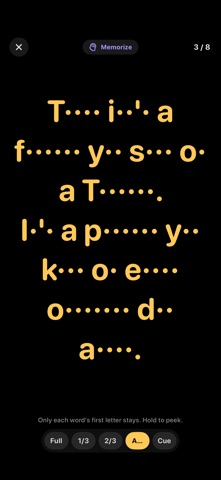
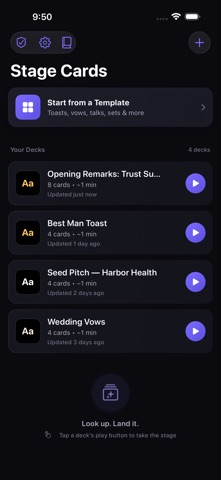
NEW IN 4.0 Turn cards with a clicker, stay on time without looking at a clock, and learn your talk by heart. • Clicker, pedal & keyboard control: Bluetooth presentation remotes, page-turner pedals and keyboards turn cards in Present, Rehearse and Memorize. Press B or "." to black out the screen. • Pace Guard: set a target and a green, amber and red light plus an "ahead / behind" readout keep you on schedule, planned from your own rehearsed pace. • Silent time cues: a haptic tap as you enter the last minute and a stronger one at time, even with the ringer on silent. • Memorize Mode: practice with the script fading card by card: a third of the words hidden, then two thirds, then first letters, then only the first word. Hold to peek. The end-of-pass summary tells you when to move up a level. • Rehearsal History: each finished rehearsal keeps its time and pace (never audio) and charts your progress against the target. • Import from Files: plain text, Markdown, RTF, PDF and Word (.docx) scripts become cue cards. Headings become sections, and you can edit the split before creating the deck. • Deck files & backup: share a .stagecards deck with a co-presenter over AirDrop or Mail, or back up every deck in one file. • Print Index Cards: a paper backup on 3×5 or 4×6 card stock, or four per sheet with cut marks, each card numbered with its section. • Stage Look: typeface, left or centered text, line spacing, a peek at the next card, the time of day, and Brightness Boost for stage lights. • Siri & Shortcuts: "Present Best Man Toast in Stage Cards." • Stage Check: battery, brightness and a last-minute checklist before you walk on. WHAT STAGE CARDS IS Stage Cards turns your iPhone or iPad into a stack of big, swipeable cue cards for live speaking: toasts, vows, sermons, eulogies, stand-up sets, sales pitches, class presentations and conference talks. It is not a scrolling teleprompter. You flip one card at a time, the text auto-sizes to fill the screen, and private notes appear only while you hold the screen. BUILT FOR THE STAGE • Auto-sizing cards on a pure-black stage in high-contrast colors • One-handed tap zones, swipes, or a clicker • Hold-to-reveal private notes • Progress, card counter, elapsed timer and countdown to your goal • Optional auto-advance and mirror mode for teleprompter glass • Section cards for acts, turns and Q&A PREPARE AND REHEARSE • Templates for toasts, vows, officiant scripts, sermons, pitches, talks, roasts, reunions and eulogies • Rehearsal mode with per-card pacing, words per minute and progress over time • Prep Desk readiness score with long-card flags and a run of show • Beat Split cuts dense cards into glanceable beats • Time Cuts builds a shorter version of a talk as a separate deck • Share as text, Markdown, PDF or a deck file PRIVATE BY DESIGN No account, ads, analytics or tracking. No microphone or camera. Decks stay on your device and the app works offline. Your 3.x decks open unchanged. Stage Cards is a writing, rehearsal and presentation utility. It does not provide medical, legal, financial or professional advice.
What's new · 4.0.2
Small improvements and fixes.
Details