

VoiceType: Dictation Keyboard
SHARATH KAMMARI · Utilities
Independent analytics for this App Store listing. AppTracker is not affiliated with SHARATH KAMMARI.
Chart standing · US
In-app purchases · US
What this app sells inside itself, grouped by kind and priced for this storefront.
Screenshots




About
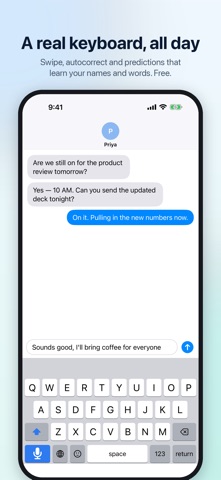
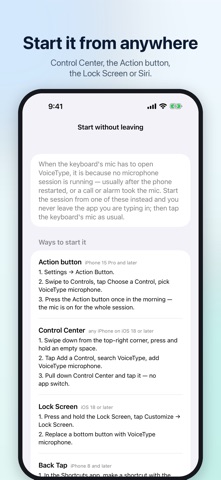
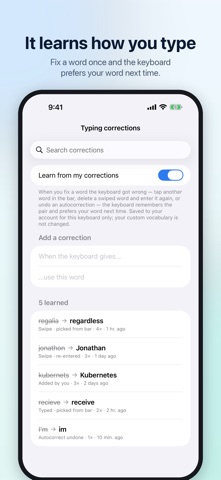
Speak and it types — in every app. VoiceType is a full iPhone keyboard with voice dictation built in: tap the mic, talk, and a live transcript fills the keyboard, then lands exactly where you were typing. What you said, not an AI's rewrite of it. VOICE THAT TYPES WHAT YOU SAID • A live transcript while you speak, big enough to read at a glance • Fast, accurate cloud speech recognition, chosen and kept up to date for you — or turn AI features off and Apple's on-device recognizer does it all, never sending your voice anywhere • Optional clean-up, one switch each: fix the spelling of your names and terms, tidy obvious grammar, or change the tone. Tone is off unless you choose it — VoiceType never rewrites your words behind your back • Every dictation saved every few seconds to your history, so a dropped connection can't take a long thought with it. Search it, copy it, paste it again • See how many words you have dictated and how much time voice saved you • Works with Bluetooth headsets, and it never makes a sound DICTATE WITHOUT SWITCHING APPS • Start the mic once and keep talking from the keyboard in Messages, Mail, Slack, WhatsApp, Notes — anywhere you type • Start it from Control Center, the Action button, the Lock Screen or Siri, without leaving the app you're in • A Live Activity on the Lock Screen and Dynamic Island shows when the mic is on, with Stop and Resume A REAL KEYBOARD, ALL DAY — FREE • Full QWERTY with swipe typing trained on thousands of real human swipes • Autocorrect and predictions that learn your names, products and acronyms • Typing corrections: fix a word once and the keyboard prefers your word next time • Emoji search, a number pad, space-bar cursor control and smart spacing • Typing, autocorrect, swipe and emoji work offline and without Full Access. What you type stays on your iPhone PRIVACY FIRST • Your keystrokes are never sent anywhere • Voice goes only to VoiceType's speech service, and only after you allow AI features. Turn them off any time and VoiceType runs entirely on your iPhone • No ads, no tracking, and your data is never sold • Delete your account and its data in the app at any time PRICING Typing is free. Voice dictation needs VoiceType Monthly: $1.00 per month (prices vary by country), with a one-week free trial for new subscribers. Payment is charged to your Apple Account when you confirm the purchase, or when the free trial ends. The subscription renews automatically unless you cancel it at least 24 hours before the end of the current period; your account is charged for the renewal within the 24 hours before the period ends. Manage or cancel it in Settings > [your name] > Subscriptions. Terms of Use (EULA): https://www.apple.com/legal/internet-services/itunes/dev/stdeula/ Privacy Policy: https://voicetype-keyboard.web.app/privacy
What's new · 1.2.2
See what voice typing saves you: a new card on Home shows how many words you have dictated, the time that saved compared with typing, and your level from Beginner to Pro. Only the counts are kept, on your iPhone. Fixed: dictation clean-up now only tidies your own words. A request or question you dictate is typed as you said it, tidied up, and is never answered or turned into an email of its own. VoiceType now picks the speech service for you. With no internet connection, dictation uses Apple's on-device speech and clean-up. Fixed: with AI features turned off, dictation now always stays on your iPhone. Better starting settings for new installs. Anything you have changed yourself stays exactly as you set it.
Details