

Personalized Alarm
KUREHO · Health & Fitness
Independent analytics for this App Store listing. AppTracker is not affiliated with KUREHO.
Chart standing · US
What changed · US
Listing changes AppTracker has observed for this app in this storefront — new versions, price moves, rating shifts, and store copy.
You can now set a different wake time for each day of the week. - In Weekly mode, each day from Monday to Sunday has its own row. Tap a day to change only that day's time. - "Use this time for every day" sets every day to the same time. - The wake-up mission ("Keep ringing until solved") can now be turned on from the Settings tab. - Fixed an issue where the wake time chosen during setup wasn't saved, so the alarm rang at 7:00. - Other minor fixes
In-app purchases · US
What this app sells inside itself, grouped by kind and priced for this storefront.
Screenshots




About
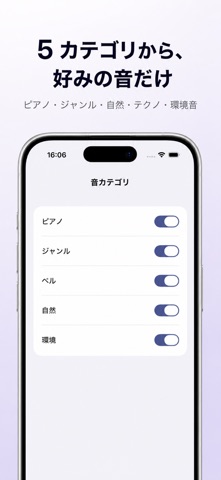
When the alarm sound never changes, your brain files it under "safe to ignore". When it's too loud, your heart spikes and you wake up wired. The right wake-up sound is personal — and it shifts over time. Personalized Alarm picks a fresh wake-up sound each morning and learns which ones actually work for you. ■ 60 wake-up sounds 30 sounds are free, and Plus unlocks 30 more. With Plus you can also add your own sounds. ■ Multi-armed bandit personalization Your daily rating ("Felt good" / "Hard to wake") and an implicit signal (how soon you open the app after the alarm) feed a multi-armed bandit. Once the cold-start counter fills, the sounds that work for you start surfacing on top. ■ Rings reliably via AlarmKit Built on AlarmKit, introduced in iOS 26. It rings under Silent switch and Focus modes through the system itself — not as a background timer that quietly dies. ■ Three repeat modes Off / Once / Weekly. "Once" mirrors Apple Clock by auto-disabling after firing. In Weekly mode, each day can have its own wake time (for example, 6:30 on weekdays and 8:00 on weekends). ■ Personalized Alarm Plus (one-time purchase) Adds 30 more sounds, the learning graph (success-rate trend and best sounds), wake-time suggestions from your sleep data, Siri, your own sounds, and iCloud sync, and removes the banner ads. One-time purchase, no subscription, ever. ■ Privacy All learning data stays on your iPhone and is never sent to a server. No account needed. With Plus, your alarm settings sync via iCloud. ■ Requirements iOS 26.1 or later on iPhone This app is not a medical device. Do not use it to diagnose or treat sleep disorders.
What's new · 1.5.0
You can now set a different wake time for each day of the week. - In Weekly mode, each day from Monday to Sunday has its own row. Tap a day to change only that day's time. - "Use this time for every day" sets every day to the same time. - The wake-up mission ("Keep ringing until solved") can now be turned on from the Settings tab. - Fixed an issue where the wake time chosen during setup wasn't saved, so the alarm rang at 7:00. - Other minor fixes
Details