

PlanBridge: Measure Plans
Gravity Hero LLC · Productivity
Independent analytics for this App Store listing. AppTracker is not affiliated with Gravity Hero LLC.
Chart standing · US
What changed · US
Listing changes AppTracker has observed for this app in this storefront — new versions, price moves, rating shifts, and store copy.
Existing PDF attachments now open as plan sets with measurement and markup tools. Verify the scale before measuring. Improved plan positioning gives you more room to reach sheet edges when taking measurements, including when zoomed out.
Price & rating history · US
Reconstructed from the listing changes AppTracker has observed in this storefront. A field is charted once it has changed more than once, and each line starts at the value it moved from.
Average rating · ★ 5.00 now · 3 changes on record
Ratings breakdown · US
The star breakdown behind this app's rating in this storefront.
Screenshots




About
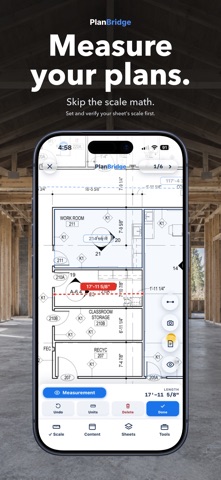
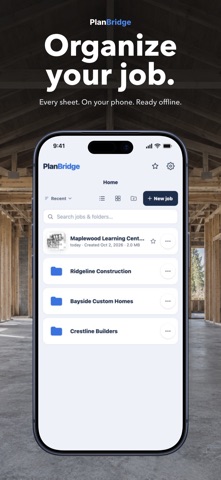
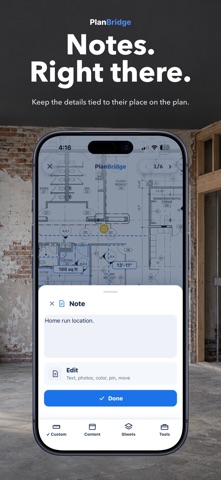
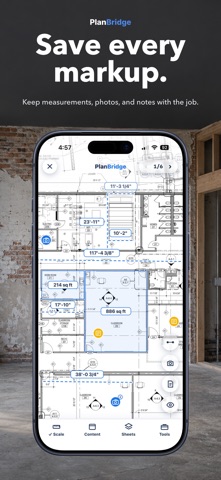
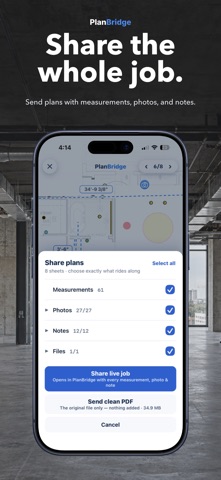
Every measurement you need is already drawn on the plans. PlanBridge pulls it off, right on your phone. THE OLD WAY Pull out the ruler. Find the sheet's scale. Lay it on the drawing. Read the number. Convert it in your head. Five steps, every measurement, all day. In PlanBridge it's two taps. MEASURE OFF THE PLANS • Open a plan PDF or a photo of a sheet • Set and verify the scale against a known dimension on each sheet. Results depend on the scale and drawing; verify critical dimensions on site • Tap two points for a real dimension. Trace an area for square footage • Feet and inches, or metric • Big sets stay in order, cover sheet to final page MARK UP THE PLAN • Take photos in the app, or import them from your camera roll • Pin photos and notes to the exact spot on the drawing • Photos save to the job, so the shots that matter stop drowning in your camera roll • Labels switch on and off, and any measurement shows its number with a tap, so the drawing stays readable • Checklists and numbered lists, with your own saved templates THE JOB KEEPS A MEMORY • Sort photos and notes into phases of the job: rough in, inspection, drywall, finish • Turn phases on and off to see any stage of the work • A year after the walls close up, open the plan and see what's behind them • Hand the record to the homeowner, the GC, or the next trade YOUR WORK STAYS YOURS • Plans and measurements are stored locally. Files can leave your device when you choose to export or share them. Keep a separate copy of important work • Works offline. No signal needed on site • No account required. Open the app and start measuring SHARE THE WHOLE JOB • Send a set to anyone by text, email or AirDrop, straight from the app • Your measurements, photos and notes ride along, at full plan quality • Recipients can view the PDF in a PDF reader. To keep working with a compatible job export, they import it into PlanBridge using the file's share or open options PRICING, STRAIGHT Try one set of plans free for 30 days. After your trial, or when you add a second set, unlock lifetime access with a one-time in-app purchase: $9.99 in the US. Unlimited jobs, plan sets, measurements and areas, with photos and notes pinned to your plans. No subscription. No automatic charge. The store shows your local price before you choose to purchase. After the trial expires, saved plans and markups remain viewable; measuring and editing require the unlock. Existing purchases remain valid, and existing trials keep their original expiration. Available device storage still applies. Built for electricians, plumbers, HVAC, framers, concrete, drywall, builders, estimators, architects, engineers, project managers, inspectors, and homeowners who read plans.
What's new · 1.1.4
Existing PDF attachments now open as plan sets with measurement and markup tools. Verify the scale before measuring. Improved plan positioning gives you more room to reach sheet edges when taking measurements, including when zoomed out.
Details