

AgePony
Kevin Stewart · Utilities
Independent analytics for this App Store listing. AppTracker is not affiliated with Kevin Stewart.
Chart standing · US
What changed · US
Listing changes AppTracker has observed for this app in this storefront — new versions, price moves, rating shifts, and store copy.
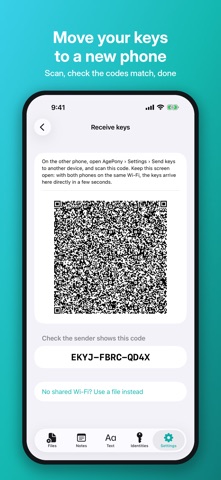
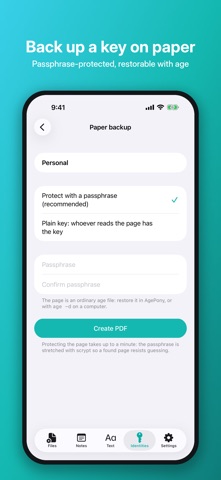
AgePony 5.0.1 brings keys that live in hardware, keys you can move to another phone or put on paper, and every fix from a full security audit. New - Hardware keys: make a decryption key inside this iPhone's Secure Enclave, published as an age 1.3 recipient. A quantum-safe form adds ML-KEM-768. - Decrypt with a hardware security key over NFC. - Encrypt to age 1.3 tag recipients. - Move keys to another phone: scan a code and your keys go straight across the same Wi-Fi, encrypted to a one-time key, or as a file. Both phones show matching codes before anything is imported. - Paper backup: a printable page with your key as a QR code and text, protected with a passphrase by default. - Continue without unlocking: passphrase text and files work with the vault locked. - "Also encrypt to" a backup key on every encrypt. Changed - Signed files are plain age files: the signature rides in an encrypted header stanza that covers who the file was encrypted to, so age -d returns your original bytes. Older signed files still verify. - Saved recipients no longer count as trusted signers. Fixed - A duress password now makes the vault password-only, so Face ID can't skip it. - The vault is kept out of iCloud and computer backups, and an app password is tied to this iPhone. - Wrong password attempts slow down, with an optional erase after 10. - The app switcher and screen recordings no longer show keys in sheets. - Setup works on an iPhone with no passcode. - Stricter file parsing, and leftover shared files are cleaned up. Everything still runs on your device. No tracking, no ads.
Price & rating history · US
Reconstructed from the listing changes AppTracker has observed in this storefront. A field is charted once it has changed more than once, and each line starts at the value it moved from.
Average rating · ★ 3.33 now · 2 changes on record
Ratings breakdown · US
The star breakdown behind this app's rating in this storefront.
In-app purchases · US
No in-app purchases.
Screenshots

About
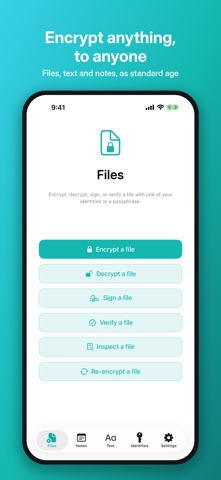
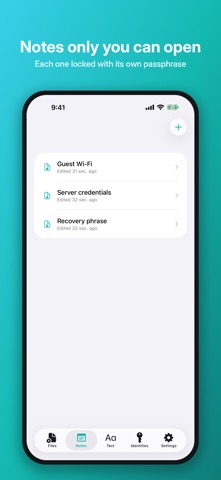
Modern file encryption and signing for iPhone, built on the age protocol. Encrypt anything to anyone, sign files so others can verify they came from you, and keep every byte on your device. No accounts, no servers, no key-management headaches. POST-QUANTUM Hybrid ML-KEM-768 + X25519 recipients, so a file captured today stays private even if X25519 falls to a quantum computer years from now. Interoperable with the age CLI 1.3 and newer. Files already on a classical key? The re-encrypt tool moves them across. ANY SIZE Encrypt, decrypt, sign and verify files of any size. Nothing is held in memory, so a 1 GB video behaves like a text file. ENCRYPT TO ANYONE • Anyone's published SSH keys, fetched by their username • Any age public key, classical (X25519) or post-quantum • Any SSH public key (ed25519 or RSA) • A passphrase, when you don't need recipient keys at all SIGN FILES Prove a file came from you and hasn't been altered. Sign on its own, producing a detached signature anyone can check without AgePony. Or sign and encrypt in one step, sealing the signature inside the file so the ciphertext never reveals who sent it. Signatures are verified automatically as a file decrypts. • Sign with an in-app SSH key (ed25519 or RSA) • Sign with a Secure Enclave key, generated in hardware and never exportable • Sign with an external hardware security key over NFC, including keys protected by a PIN • Standard SSHSIG signatures, verifiable with the usual SSH command-line tools • Verify signatures from other people right inside the app BUILT ON AGE A clean-room implementation of the age v1 file format, a modern, simpler alternative to older encryption tools. X25519 key agreement, ChaCha20-Poly1305 authenticated encryption, scrypt for passphrase-protected files. Bit-perfect with the reference age CLI: encrypt on your phone, decrypt on your laptop, and back again. HARDWARE, PAPER, NEXT PHONE • Secure Enclave decryption keys, quantum-safe if you like • Decrypt with a security key over NFC • Move keys to your next phone over Wi-Fi • Passphrase-protected paper backups ENCRYPTED NOTES Passphrase-locked notes for secrets that never need to leave your device: recovery phrases, API keys, server credentials. Each note has its own passphrase, stretched through scrypt into its wrapping key. Forget it and the body is gone for good. That is the point. EVERY KIND OF DATA • Files: encrypt anything from the Files app • Several at once: one archive, or one encrypted file each, your choice • Text: armored age blocks for paste-into-email use • Inspect: see what any age file is encrypted to, without decrypting it • .age files: tap "Open in AgePony" from the Files app LOCAL-FIRST, ZERO BACKEND No accounts. No cloud sync. No telemetry. No analytics. No advertising. No third-party SDKs. Your vault stays on your device, encrypted at rest with a master key in the iOS Keychain that Face ID or Touch ID unlocks. The only internet request AgePony ever makes is fetching someone's published SSH keys, when you ask. FOR THE DEVELOPER SECURITY COMMUNITY If you have ever wished file encryption were simpler, age is the answer and AgePony is age on your phone. Sending someone an encrypted file without coordinating keys first takes one tap and their username. The interface is deliberately minimal: files, notes, text, identities, settings. OPEN SOURCE Apache 2.0. Source code linked from agepony.com. COMPATIBILITY • Any age v1 implementation, including the reference command-line tool • Post-quantum recipients need age CLI 1.3 or newer • Reads and writes both binary and PEM-armored age files • Requires iPhone with iOS 17.0 or later PRIVACY AgePony collects nothing and there is no server. Your data never leaves your device unless you export it. Policy: agepony.com/privacy. SUPPORT Documentation, FAQ, and contact: agepony.com/support Email: NorseHorse@norsehor.se Built quietly in Alabama by NorseHorse. Sibling to PGPony, the same idea for OpenPGP keys.
What's new · 5.0.1
AgePony 5.0.1 brings keys that live in hardware, keys you can move to another phone or put on paper, and every fix from a full security audit. New - Hardware keys: make a decryption key inside this iPhone's Secure Enclave, published as an age 1.3 recipient. A quantum-safe form adds ML-KEM-768. - Decrypt with a hardware security key over NFC. - Encrypt to age 1.3 tag recipients. - Move keys to another phone: scan a code and your keys go straight across the same Wi-Fi, encrypted to a one-time key, or as a file. Both phones show matching codes before anything is imported. - Paper backup: a printable page with your key as a QR code and text, protected with a passphrase by default. - Continue without unlocking: passphrase text and files work with the vault locked. - "Also encrypt to" a backup key on every encrypt. Changed - Signed files are plain age files: the signature rides in an encrypted header stanza that covers who the file was encrypted to, so age -d returns your original bytes. Older signed files still verify. - Saved recipients no longer count as trusted signers. Fixed - A duress password now makes the vault password-only, so Face ID can't skip it. - The vault is kept out of iCloud and computer backups, and an app password is tied to this iPhone. - Wrong password attempts slow down, with an optional erase after 10. - The app switcher and screen recordings no longer show keys in sheets. - Setup works on an iPhone with no passcode. - Stricter file parsing, and leftover shared files are cleaned up. Everything still runs on your device. No tracking, no ads.
Details