

SharkTTY: SSH & Mosh
Jingjing Li · Developer Tools
Independent analytics for this App Store listing. AppTracker is not affiliated with Jingjing Li.
Chart standing · US
What changed · US
Listing changes AppTracker has observed for this app in this storefront — new versions, price moves, rating shifts, and store copy.
Put a folder from your Mac on the servers you work on, and see your AI coding agents at a glance. • Mount a folder from your Mac onto a server: long-press a host, choose Mount a Folder Here, and the app sets the server up for you. Started it on the server instead? Approve it under New connection > Authorize Terminal Mount… by entering the code or scanning the QR code the server shows. Needs SharkTTY Desk 1.0.0 on your Mac • On a server that can't mount folders, you get a read-only copy that keeps up with every change you make on your Mac • Long-press a host and choose Herdr Agents to see the AI coding agents running there and which ones need you. No herdr yet? The app can install it with one tap • A connection set to use a jump host now always goes through it, and you confirm the jump host's identity the first time you connect • The first-connection identity card and the password and connection-error cards are easy to read in every theme, light or dark, and the fingerprint copies with one tap • Microphone, camera, voice and bell-notification permissions work more reliably: letting go before recording starts no longer records, blocked access tells you why, and bells that ring before you allow notifications aren't lost. If your device language isn't one SharkTTY offers, the app now uses English
In-app purchases · US
What this app sells inside itself, grouped by kind and priced for this storefront.
Screenshots


About
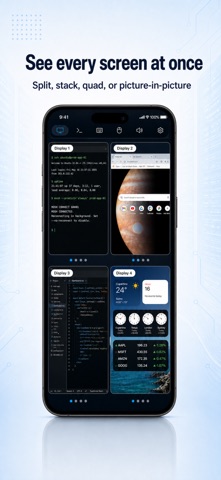
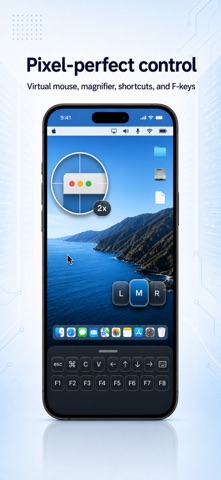
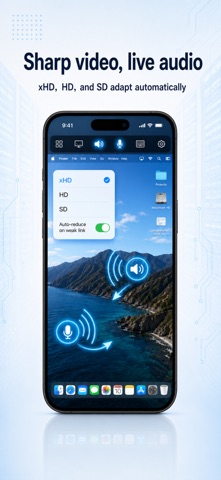
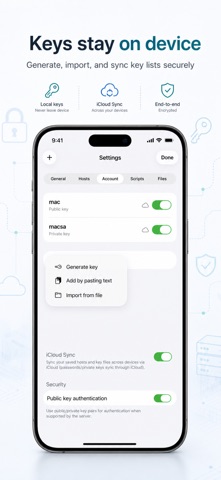
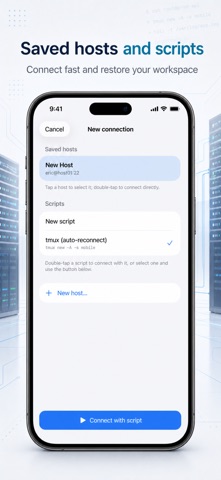
SharkTTY keeps your servers and your desktop within reach — a fast, native SSH & Mosh terminal and a full remote desktop for your Mac computer, in one app. All of it free. And now it listens — hold to talk, and AI turns your words into commands. CONTROL YOUR DESKTOP FROM ANYWHERE Sign in on your iPhone or iPad device and your desktop is right there. Tap to see its screen and take over — on the same Wi-Fi or from the other side of the world. SharkTTY finds the best way to connect, so you don't have to think about it. • A smooth, low-lag screen with full keyboard and mouse • See every display at once — side by side, stacked, quad or picture-in-picture, arranged your way • A virtual mouse with a built-in magnifier for pixel-perfect taps • A floating on-screen keyboard you can move, resize and dim — full symbols, ⌘⌥⌃ modifiers, F-keys, six layouts (US, UK, JIS, AZERTY, QWERTZ, Spanish) and smart command suggestions • Hear your Mac computer's sound live, and turn your device into its microphone • Copy on one device, paste on the other • Pick xHD, HD or SD — and let it ease off on its own when the signal drops • End-to-end encrypted, so your screen stays yours A TERMINAL THAT KEEPS UP • Connect to any server over SSH — there's nothing to install on the other end • Mosh keeps you typing through dropped Wi-Fi, network switches and lag • Lock your device or jump to another app, come back, and your session is still there • Drop straight back into your tmux session with a saved startup command • Experimental Eternal Terminal (ET) support — persistent sessions over TCP, for networks where Mosh's UDP is blocked • A bell in a background tab becomes a notification — know the moment a long task finishes SPEAK, AND IT TYPES • Hold to talk — your words are recognized right on the device: free, private, works offline • Trim a segment, re-recognize it, or bring back past recordings from history • AI polishes what you said into clean text or a ready-to-run command — bring your own AI provider, or use the built-in official models • Ask the AI anything in the built-in chat panel, without leaving your session KEYS, FILES, AND PEACE OF MIND • Create or import SSH keys right on your device — private keys never leave it • Get a clear heads-up the moment a server's identity changes • Browse and move files over iCloud Drive, shared folders and WebDAV, without leaving the app • Developer fonts and themes, a handy shortcut-key row, and full external keyboard and trackpad support on iPad • Keep your hosts and keys in sync across your devices with iCloud, if you like You never need an account to reach your own servers. SharkTTY — your servers and your desktop, always in your pocket. Every feature is free, including on-device voice recognition. The built-in official AI service uses AI Points; with your own API key, everything stays free. And if you'd like to leave a tip and buy me a coffee — thank you so much! Tips (one-time or monthly) unlock nothing; the monthly tip auto-renews until cancelled in your Apple Account settings. Terms of Use (EULA): https://safafish.com/sharktty/eula.html · Privacy Policy: https://safafish.com/sharktty/privacy.html
What's new · 2.0
Put a folder from your Mac on the servers you work on, and see your AI coding agents at a glance. • Mount a folder from your Mac onto a server: long-press a host, choose Mount a Folder Here, and the app sets the server up for you. Started it on the server instead? Approve it under New connection > Authorize Terminal Mount… by entering the code or scanning the QR code the server shows. Needs SharkTTY Desk 1.0.0 on your Mac • On a server that can't mount folders, you get a read-only copy that keeps up with every change you make on your Mac • Long-press a host and choose Herdr Agents to see the AI coding agents running there and which ones need you. No herdr yet? The app can install it with one tap • A connection set to use a jump host now always goes through it, and you confirm the jump host's identity the first time you connect • The first-connection identity card and the password and connection-error cards are easy to read in every theme, light or dark, and the fingerprint copies with one tap • Microphone, camera, voice and bell-notification permissions work more reliably: letting go before recording starts no longer records, blocked access tells you why, and bells that ring before you allow notifications aren't lost. If your device language isn't one SharkTTY offers, the app now uses English
Details