

Velya
Christine Martin · Productivity
Independent analytics for this App Store listing. AppTracker is not affiliated with Christine Martin.
Chart standing · US
What changed · US
Listing changes AppTracker has observed for this app in this storefront — new versions, price moves, rating shifts, and store copy.
Velya 1.4.0 — designed for iPhone Duo. • iPhone Duo: a two-zone home (alarm list and detail), plus an editor, bedside display and “Your day” that adapt to both the open and the outer screen. • Bedside: a softer night clock, private details hidden by default and shown for 30 seconds on request. • Your day: play, pause, resume and stop for your briefing are always visible. • Wake light: a new “5 minutes before” option, clearer on and off settings, and an honest status when Home Assistant has not confirmed yet. • Your alarm sound is saved before any home connection, so a network failure no longer delays arming. • Apple Watch: fixes for deadline alerts when sleep readings are unavailable and scheduling during a transition to the background; local stop from the watch. • Server time: manually check your alarm and wake light, see the last attempt and a clear connection warning. After changing the time in your portal, verify it in Velya. Skipping a recurring occurrence remains temporarily unavailable to preserve future repetitions.
Screenshots


About
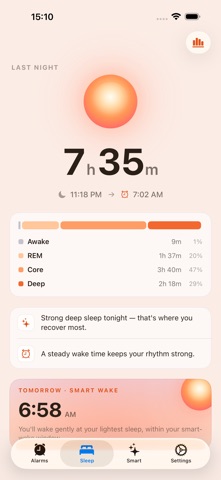
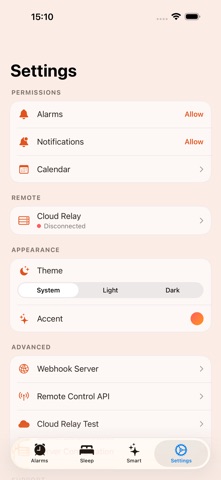
Velya helps your alarm fit your morning. Velya uses AlarmKit, Apple’s system alarm framework available from iOS 26. Choose your time, days and rules, then review your next planned wake. Alarm permission is required; keep your device powered on and check your settings before going to sleep. RELIABLE BY DESIGN • System alarms designed to sound through Silent mode and Focus, with your permission. • Contextual wake: use your calendar and travel estimates to plan your departure. Data may be unavailable or change. • No Velya account required. Basic alarms do not need an internet connection; some integrations and sync do. APPLE WATCH • A standalone-capable watch app: next wake, sleep, and routine on your wrist. • Create and edit alarms right on the watch, plus complications for your watch face. • View and manage alarms on your watch. A preview received from your iPhone does not mean an alarm is armed on your Watch. POWER NAP • Presets for every break — Micro (10), Power (20), Coffee nap, and a Full cycle (~90). • An optional early-wake attempt on the watch uses available sleep signals. It does not replace your configured nap limit. • A system alarm accompanies the nap limit you configure. • Start or end a nap from Siri and Shortcuts. SMART WAKE • Wake-up window: allow an early-wake attempt while retaining your configured deadline. • Sunrise lighting: prepare a gradual wake with Home Assistant and its compatible component. Capabilities depend on your equipment; gradual HomeKit lighting requires Velya to remain active. • Snooze: choose your reminder interval. The system interval remains the one set when the alarm was scheduled. • Weather routines: use available forecasts to prepare your wake time, with an explicit backup time. • Optional sleep data: review your Apple Health history and use available estimates for your settings. Velya is not a medical device. • Optional mood check-in to start the day with intention. AUTOMATIONS • Build rules from conditions you choose (time, steps, charger, location, Home Assistant sensors) to turn alarms on or off automatically. • Rules depend on permissions and available data; iOS limits their evaluation in the background. PRIVATE BY DEFAULT • Access to Health, calendar and location data depends on your permissions. • No advertising or usage-analytics SDK. Features you configure may communicate with iCloud, Apple services or your equipment. • From Help, voluntarily send feedback, a bug or an idea and follow a private conversation. Optional technical codes default off; automatic diagnostic collection is inactive. See the privacy policy for retention and deletion.
What's new · 1.4.0
Velya 1.4.0 — designed for iPhone Duo. • iPhone Duo: a two-zone home (alarm list and detail), plus an editor, bedside display and “Your day” that adapt to both the open and the outer screen. • Bedside: a softer night clock, private details hidden by default and shown for 30 seconds on request. • Your day: play, pause, resume and stop for your briefing are always visible. • Wake light: a new “5 minutes before” option, clearer on and off settings, and an honest status when Home Assistant has not confirmed yet. • Your alarm sound is saved before any home connection, so a network failure no longer delays arming. • Apple Watch: fixes for deadline alerts when sleep readings are unavailable and scheduling during a transition to the background; local stop from the watch. • Server time: manually check your alarm and wake light, see the last attempt and a clear connection warning. After changing the time in your portal, verify it in Velya. Skipping a recurring occurrence remains temporarily unavailable to preserve future repetitions.
Details