

Flash Dog: Dog Recall
Jose Manuel Casabona Martin · Utilities
Independent analytics for this App Store listing. AppTracker is not affiliated with Jose Manuel Casabona Martin.
Chart standing · US
What changed · US
Listing changes AppTracker has observed for this app in this storefront — new versions, price moves, rating shifts, and store copy.
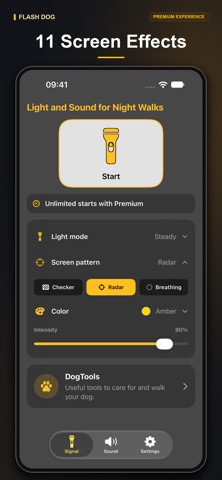
- A clearer dark gray interface with golden accents. - A fixed Start button with a larger, gently animated flashlight. - Compact light, screen and color selectors that expand when tapped. - 5 free signal starts per day, up from 2. - 3 new light modes: double flash, triple flash and long flash. - 3 new screen effects: radar, breathing and vertical wave. - 4 new colors: mint, lime, indigo and coral rose. - Updated free selection: 3 sound cues, plus white and yellow screen colors. - Play and stop sounds from the same button. - Improved text readability, consistent icons and clearer access to Premium.
Screenshots





About
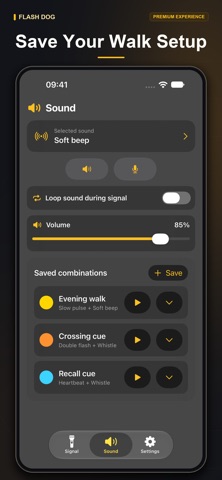
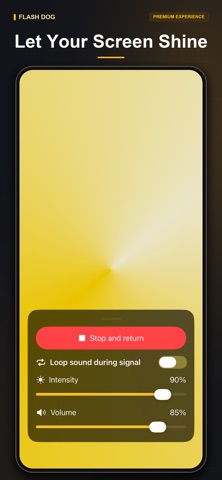
Bring light and sound together for your dog's night walks. Flash Dog helps you create visual and audio cues to get your dog's attention in low-light surroundings. Combine your device's flashlight, animated screen patterns and sound cues, then adjust the setup to suit your walk and the signals your dog already knows. LIGHT, SCREEN AND SOUND IN ONE PLACE Choose screen and flashlight together, screen only or flashlight only. Add sound when you want an audio cue, or keep the signal visual. Screen effects work on iPhone and iPad; the physical flashlight requires compatible hardware. 11 LIGHT MODES Use steady light, pulses, blinking, slow pulses, heartbeat, sparkle, alert, SOS, double flash, triple flash or a long flash. Adjust the flashlight intensity and choose the rhythm that suits your routine. SOS is a light pattern; it does not contact emergency services. 11 SCREEN PATTERNS AND 13 COLORS Choose a solid screen, wave, strobe, beacon, split, rings, sweep, checkerboard, radar, breathing or vertical wave. Explore white, yellow, red, blue, green, purple, cyan, pink, orange, mint, lime, indigo and coral rose. Colors apply to the screen. They do not change the color of the device's physical flashlight. Screen brightness and flashlight intensity can be adjusted with the intensity control. 10 BUILT-IN SOUND CUES Choose from beeps, clicks, a whistle, voice-like tones, rhythmic pulses and a chime. Preview a sound with one tap and stop it using the same button. Adjust volume independently and choose whether the sound repeats while the light signal is active. YOUR VOICE, YOUR FAVORITE SETUPS With Premium, record a short custom sound, give it a name and use it as a cue. Keep several recordings ready for different routines, such as calling your dog toward you or signaling that it is time to head home. Save your preferred light mode, screen pattern, color, intensity and sound as a named combination. Start a saved setup with one tap, rename it or remove it when your routine changes. A CLEARER INTERFACE FOR EVERY WALK The refreshed dark gray interface uses golden accents and readable controls. A large flashlight button with a subtle animation stays visible while you scroll through the home screen. Light mode, screen pattern and color show your current selection; tap a section to reveal its options. GET STARTED IN A FEW TAPS 1. Choose your light mode, screen pattern and screen color. 2. Adjust intensity and select a sound if you want one. 3. Choose screen, flashlight or both in Settings. 4. Tap Start. Tap the active screen to reveal controls and stop the signal or adjust sound and intensity. FREE ACCESS AND PREMIUM The free plan includes 5 signal starts per day, steady and pulse light modes, solid and wave screen patterns, white and yellow screen colors, and the first 3 sounds: Soft beep, Double beep and Training click. Premium is an optional one-time purchase that unlocks unlimited signal starts, every light mode, screen pattern, color and built-in sound, custom recordings and saved combinations. It also removes advertising. Eligible options or unlimited starts can alternatively be unlocked for one hour through an optional rewarded video, when available. Saving combinations requires Premium. USE FAMILIAR CUES RESPONSIBLY Use Flash Dog alongside your dog's established recall and training routine. A light or sound cue does not guarantee a response. The app does not replace training, a leash or suitable pet safety equipment. Avoid shining the flashlight into anyone's eyes, keep volume comfortable and remain aware of your surroundings.
What's new · 2.0
- A clearer dark gray interface with golden accents. - A fixed Start button with a larger, gently animated flashlight. - Compact light, screen and color selectors that expand when tapped. - 5 free signal starts per day, up from 2. - 3 new light modes: double flash, triple flash and long flash. - 3 new screen effects: radar, breathing and vertical wave. - 4 new colors: mint, lime, indigo and coral rose. - Updated free selection: 3 sound cues, plus white and yellow screen colors. - Play and stop sounds from the same button. - Improved text readability, consistent icons and clearer access to Premium.
Details