

Cloudling: AI Photo Cleaner
炳光 鲍 · Photo & Video
Independent analytics for this App Store listing. AppTracker is not affiliated with 炳光 鲍.
Chart standing · US
What changed · US
Listing changes AppTracker has observed for this app in this storefront — new versions, price moves, rating shifts, and store copy.
- Landscape videos now display in full, with a one-tap full-screen landscape view - Swipe cards now show the whole photo, uncropped - Live Photos now play: press and hold, or tap the Live badge - Photos stored in iCloud now load in full quality automatically - Smarter best-photo pick in similar groups: it avoids closed eyes and other clearly bad shots - Interrupted scans pick up where they left off, and your selections are kept - More reliable scanning for large libraries, with fixes for possible crashes while scanning or deleting - Smoother month browsing: flick harder to jump several months at once - Move through the intro at your own pace. Fixed the subscribe screen occasionally not responding
Screenshots




About
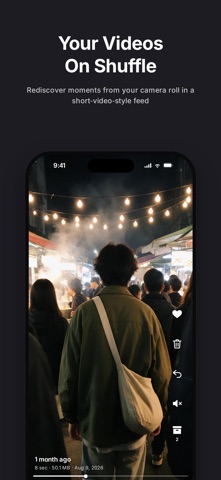
Your storage is full. You open Photos meaning to delete something, scroll for about ten seconds, and close the app again. It's not that you're lazy. It's that a few thousand photos all look equally deletable, and none of them look like a place to start. So Cloudling starts for you. Screenshots, screen recordings, the clip you shot from inside your pocket, the seven near-identical frames of one moment - it pulls those out first. Glance, confirm, delete in bulk. CHECK THE WEATHER FIRST Open the app and you get a sky. Too much junk piled up and you're under thunderstorms. Clear it out and the weather lifts - rain, then sun, then a rainbow. No gigabytes, no percentages. Just look up. WHAT IT FINDS FOR YOU - Similar photos and videos - the burst you shot of one moment - Screenshots and screen recordings - Clips under 5 seconds - pocket recordings, accidental taps - Panoramas and 4K videos Each type gets its own group. Select the whole group, or go through it one by one. SEVEN SHOTS OF ONE MOMENT. KEEP ONE. This is the part that eats your evening, and the part Cloudling put the most work into. At thumbnail size those seven frames look identical. To pick one you open each, zoom in, check who blinked and which is sharp. Half an hour, gone. Cloudling groups them for you. It checks twice - a fast pass over the overall look of each frame, then a careful pass through Apple's Vision framework on the fine details. A photo joins a group only if both passes agree. It also only compares shots taken close together in time. Photos from one dinner, one trip, are minutes apart. Something from last year won't get lumped in with a similar frame from this year. Every group arrives with one shot recommended to keep and the rest already selected. Confirm and they're gone. It's a recommendation, not a verdict - the last word is always yours. WHEN THE CLEANING IS DONE There's a video feed in Cloudling that works the way a short-video app works. Everything in it is yours, and the order is completely random - the last clip might be dinner last week, the next an afternoon three years ago you'd forgotten you recorded. Swipe past what you don't want. Sit with the ones you forgot. Beats scrolling through someone else's life at midnight. SOME PHOTOS A MACHINE SHOULDN'T DECIDE Screenshots and stray clips - a machine handles those fine. Delete in bulk, move on. But that one photo you can't explain why you're keeping? No algorithm gets that. So there's a second way in: flip through your library month by month, one card at a time. Swipe left to drop it, right to keep it. Slower. But everything you delete is something you actually meant to delete. NOTHING IS GONE FOR GOOD Everything you delete goes to the iOS Recently Deleted album and sits there for 30 days. Pull it back from the system Photos app any time in that window. Cloudling never deletes anything outside the system. YOUR PHOTOS NEVER UPLOAD, BECAUSE THERE'S NOWHERE TO UPLOAD THEM Every bit of analysis runs on your iPhone. It isn't that we promise not to upload your photos - there is no server to upload them to. No third-party SDKs. No device identifiers. No usage tracking. No ads. MEMBERSHIP Free gets you a full scan, every category to browse, the most recent month in the organizer, and the first few clips in the feed. Membership unlocks bulk deletion, every month, and the full feed. - Weekly - $1.99 - Yearly - $29.99, with a 3-day free trial - Lifetime - $59.99, one time, never renews Subscriptions renew automatically unless canceled at least 24 hours before the current period ends. Manage or cancel any time in iPhone Settings > Apple ID > Subscriptions. Terms of Service: https://legal.cloudling.top/terms_en.html Privacy Policy: https://legal.cloudling.top/privacy_en.html
What's new · 1.0.2
- Landscape videos now display in full, with a one-tap full-screen landscape view - Swipe cards now show the whole photo, uncropped - Live Photos now play: press and hold, or tap the Live badge - Photos stored in iCloud now load in full quality automatically - Smarter best-photo pick in similar groups: it avoids closed eyes and other clearly bad shots - Interrupted scans pick up where they left off, and your selections are kept - More reliable scanning for large libraries, with fixes for possible crashes while scanning or deleting - Smoother month browsing: flick harder to jump several months at once - Move through the intro at your own pace. Fixed the subscribe screen occasionally not responding
Details