

Plume!
Dylan Mathurin · Entertainment
Independent analytics for this App Store listing. AppTracker is not affiliated with Dylan Mathurin.
Chart standing · US
What changed · US
Listing changes AppTracker has observed for this app in this storefront — new versions, price moves, rating shifts, and store copy.
Plume 2.0 is a new look and a lot more to play with. up to 9x improvement in some games • Redesigned library, game menu, and settings. Pick Tiles or List for every menu. • FSR 3 frame generation for smoother motion. • Cheats: add codes by hand or import them for each game. • Extract music, videos, and pictures from your own discs. • Play songs from your Apple Music library as menu music. • Every controller port can be an arcade stick, twin stick, racing, fishing, light gun, maracas, train, rhythm, or dance controller, keyboard, or mouse, each with its own touch layout. • Add any game to your Home Screen. • ZIP and 7Z archives import straight into the library.
Ratings breakdown · US
The star breakdown behind this app's rating in this storefront.
In-app purchases · US
What this app sells inside itself, grouped by kind and priced for this storefront.
Screenshots
Keywords this app targets
Search terms AppTracker associates with this app — estimates, not search volume. ❝ = in the app's title; a highlighted number is its current position for that term.
Similar apps
Competitors and close alternatives, as estimated by AppTracker.
 SUMEE!
Getzemani Cruz Garcia
3 shared topics
SUMEE!
Getzemani Cruz Garcia
3 shared topics
 Psimulator - DC Game Emulator
ZODTTD LLC
Psimulator - DC Game Emulator
ZODTTD LLC
 Delta - Game Emulator
Testut Tech
3 shared topics
Delta - Game Emulator
Testut Tech
3 shared topics
 GGEMU Retro Go
Shuai Yuan
3 shared topics
GGEMU Retro Go
Shuai Yuan
3 shared topics
 Parlor: Retro Game Emulator
DBL Studio
Parlor: Retro Game Emulator
DBL Studio
 Manic EMU - Game Emulator
Shenzhen Aoshuang Future Technology Co., Ltd
Manic EMU - Game Emulator
Shenzhen Aoshuang Future Technology Co., Ltd
 Gamuroid: All Game Emulator
UNIVERSAL TECHLAB
1 shared topic
Gamuroid: All Game Emulator
UNIVERSAL TECHLAB
1 shared topic
 iMSX2
Enrique Enguix
2 shared topics
iMSX2
Enrique Enguix
2 shared topics
About
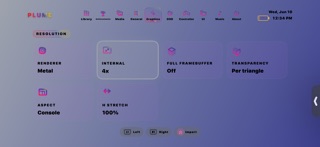
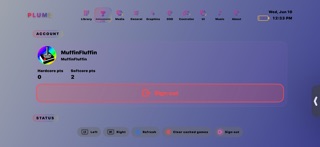
Plume is a Dreamcast emulator for iPhone, iPad, and Mac. A polished library, deep graphics options, and controls for handheld play and couch co-op. Add games through the Files app, AirDrop, or the Share sheet. Supported formats include GDI, CDI, CHD, CUE, BIN, ZIP, 7Z, and ELF. Retail BIOS files are optional. Turn on Fast Boot to skip the splash, or add dc_boot.bin and dc_flash.bin from hardware you own for the full boot sequence. LIBRARY Your collection lives in one place with cover art, metadata, favorites, and play time. Every menu can show as Tiles or a List. After you run a game, Plume grades how it performs on your device (Excellent, Good, Playable, and more) so you know what to expect before you boot. Add any game to your Home Screen. CONTROLS Use fully customizable on-screen controls, or pair a Bluetooth gamepad in iOS Settings and remap every button in Plume. Dreamcast has four controller ports, and each port can hold a standard controller, arcade stick, twin stick, racing controller, fishing controller, light gun, maracas, train, rhythm or dance controller, keyboard, or mouse, each with its own touch layout. Touch controls fill port 1 when nothing else is connected. Rumble and haptics are built in. CONSOLE MODE Mirror your screen to a TV over AirPlay or HDMI. In Console mode the game renders on the big screen while your iPhone stays the controller. GRAPHICS AND PERFORMANCE Tune internal resolution, aspect ratio, CRT shaders, texture filtering, HDR, and upscaling. MetalFX upscaling and FSR 3 frame generation are available on supported devices. HD texture packs, neural upscale models, and Upscale Studio help older games look sharper. A live HUD shows FPS, frame time, CPU, RAM, and more. SAVE STATES AND VMU Save and load states from the in-game menu. Slots appear on library covers for quick resume. Per-game VMU files keep memory cards where they belong. CHEATS Add cheat codes by hand or import them for each game. RETROACHIEVEMENTS Sign in to RetroAchievements and earn badges while you play. Hardcore mode disables save states for a classic challenge. EXTRACT Hold a game in the library to extract its music, videos, and pictures from your own disc. CAPTURE AND SHARE Take screenshots and record gameplay in-game. Save them to Documents or Photos, or attach a capture to a save-state slot as a visual bookmark. SOUND AND STYLE Menu music from downloadable tracks, your own imports, or songs from your Apple Music library. Themes give you control over colors, fonts, corners, and accessibility, including Bold Text and Button Shapes when iOS has them on. REQUIREMENTS Plume runs on iPhone and iPad with iOS 17 or later, and on Mac computers with Apple silicon running macOS 14 or later. Your device may warm up during play, and heavy 3D games may not reach full speed on older devices. LEGAL Plume does not include commercial games or a retail BIOS. You are responsible for content you import. Only use game files and firmware you legally own. Dreamcast is a trademark of SEGA. Plume is not affiliated with or endorsed by SEGA.
What's new · 2.0
Plume 2.0 is a new look and a lot more to play with. up to 9x improvement in some games • Redesigned library, game menu, and settings. Pick Tiles or List for every menu. • FSR 3 frame generation for smoother motion. • Cheats: add codes by hand or import them for each game. • Extract music, videos, and pictures from your own discs. • Play songs from your Apple Music library as menu music. • Every controller port can be an arcade stick, twin stick, racing, fishing, light gun, maracas, train, rhythm, or dance controller, keyboard, or mouse, each with its own touch layout. • Add any game to your Home Screen. • ZIP and 7Z archives import straight into the library.
Details