

Greyline FT8
JONATHAN MARK SCHULMAN · Utilities
Independent analytics for this App Store listing. AppTracker is not affiliated with JONATHAN MARK SCHULMAN.
Chart standing · US
What changed · US
Listing changes AppTracker has observed for this app in this storefront — new versions, price moves, rating shifts, and store copy.
1.5.0 “The one that adds high-velocity POTA features” Love Greyline? Stop by my Ko-Fi! https://ko-fi.com/kb0rb **NOTE** - The WRL logging API is a work in progress, and I will continue to improve the app as their API evolves! What we have here now takes full advantage of what the service currently supports. Stay tuned for more features! Be sure to check the release notes for prior versions to see what's new! I update the app regularly in response to feedback like yours. Read them at https://greylineft8.com/changelog.html Remember that Greyline now has a comprehensive user manual at https://greylineft8.com/userguide.html - you’ll also find a button in the Settings view to take you there Shoutouts: JH2KAG - Pointing out how high-velocity Japanese POTA activators prefer to work Features: - Call any station, from any row, by long pressing that row in the Band Activity view. This will let you call a station who never calls CQ easily; a popular operating mode in Japan - Note that if you haven’t heard the station, calling it from a long press may be disabled as there would be no signal report to include with your call - Recheck uploads. Tired of a badge saying you have 90 pending uploads to QRZ? Now Greyline can re-check your remote log and ensure everything is in sync. This works with QRZ and WRL; Cloudlog does not support a re-check capability - Clear pending upload badge. If you’re sure you don’t need to be reminded to upload your logs, you can clear the badge counter. Log entries that weren’t uploaded will still be marked pending for manual upload if you want later. Fixes: - Gatherer keeps running when you tap a row. While you have Gatherer mode active, tapping a CQ call or a pending roger report will add those actions to your queue, rather than draining it and starting a Standard mode session - Correction to how the cloud upload pending badge was counting. Previously it was counting every pending log item times every pending configured service. So 1 QSO pending upload to 3 services would show up as a 3, which was just bonkers. Now it counts the number of log entries pending upload instead. - Improved QRZ error messaging; if your key is invalid, we now return a proper “invalid key” error rather than just a generic one - In some cases, Hunter mode may not have been able to call a station you hadn’t heard before. We’ve now fixed the glitch, but the jury is still out on whether Milton will find his stapler. That’s it, that’s all, folks! Thanks for bringing me on your activations - now get out there and POTA on. 73!
Price & rating history · US
Reconstructed from the listing changes AppTracker has observed in this storefront. A field is charted once it has changed more than once, and each line starts at the value it moved from.
Average rating · ★ 4.83 now · 2 changes on record
Ratings breakdown · US
The star breakdown behind this app's rating in this storefront.
In-app purchases · US
No in-app purchases.
Screenshots


Keywords this app targets
Search terms AppTracker associates with this app — estimates, not search volume. ❝ = in the app's title; a highlighted number is its current position for that term.
Similar apps
Competitors and close alternatives, as estimated by AppTracker.
 SimpleFT8
Jeroen Rombouts
1 shared topic
SimpleFT8
Jeroen Rombouts
1 shared topic
 HamLog
Pignology, LLC
1 shared topic
HamLog
Pignology, LLC
1 shared topic
 HAM QuickLog
Mircules
1 shared topic
HAM QuickLog
Mircules
1 shared topic
 Digi Voices
Fatih ONDER
2 shared topics
Digi Voices
Fatih ONDER
2 shared topics
 OpLine
Justin Calvert
1 shared topic
OpLine
Justin Calvert
1 shared topic
 RUMlogNG2Go
Thomas Lindner, DL2RUM
1 shared topic
RUMlogNG2Go
Thomas Lindner, DL2RUM
1 shared topic
 HAM-Toolbox
Marcus Roskosch
HAM-Toolbox
Marcus Roskosch
 DX Cluster monitor
Martin Kuera
1 shared topic
DX Cluster monitor
Martin Kuera
1 shared topic
About
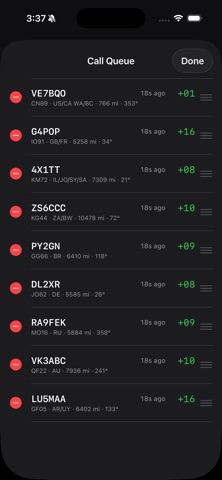
Greyline FT8 is a highly portable, capable amateur radio app designed specifically for field operation with an iOS device. I designed this app because I got very used to my full-stack FT8 solution: GridTracker, WSJT-X, PSK Reporter, WRL Desktop, several browser tabs, and more. But I didn't want the bulk and weight of a full Windows PC in the field. At the same time, while there are excellent and lightweight FT8 iOS solutions out there, they were lacking features I really wanted. Greyline is everything you need and nothing you don't. It automatically locates your grid square, performs callsign and calling station DXCC lookups (internet access required), and can even show you real-time spot data from PSK Reporter. Want to adjust your directional antenna? Now you've got the info you need to do it! Greyline also incorporates automated calling features. Gatherer mode calls CQ, responds to the first reply it gets, finishes the QSO and returns to calling CQ all without your input. On the other side of things, Hunter mode listens for CQ calls and pounces on them, finishing a QSO then returning to the live band to find the next. Or, take control of the conversation yourself with standard mode. That's the experience you're already used to from WSJT-X and other digital mode apps. Some other noteworthy features are: - Intelligent automatic free frequency selection - Dynamically adjusted audio delay for virtually drift-free message timing - PSK Reporter integrated Live Spots - Direct-to-QRZ, WRL and private Cloudlog logging and ADI export - Configurable waterfall settings - CQ addendums - CQ filtering for contesting and general courteous operation - Configurable retransmissions - Intelligent log recovery (didn't get that last 73 but want to log the contact anyway? Now you can!) - Log import and export - Antenna tuning - POTA Autospotting - One touch POTA activation and POTA.app-compatible ADIF export - Multiple POTA activation support - And so much more! Greyline uses audio VOX and not serial PTT. Most radios support this with simple cabling or an audio interface like a Digirig. For helpful tips on cabling and configuring popular radios, visit the Support URL below. Built by a ham, for hams, I'm very open to your feedback and hope Greyline can be your field companion. Want to share your own Field Notes (https://greylineft8.com/fieldnotes.html)? Email me at support@greylineft8.com!
What's new · 1.5.0
1.5.0 “The one that adds high-velocity POTA features” Love Greyline? Stop by my Ko-Fi! https://ko-fi.com/kb0rb **NOTE** - The WRL logging API is a work in progress, and I will continue to improve the app as their API evolves! What we have here now takes full advantage of what the service currently supports. Stay tuned for more features! Be sure to check the release notes for prior versions to see what's new! I update the app regularly in response to feedback like yours. Read them at https://greylineft8.com/changelog.html Remember that Greyline now has a comprehensive user manual at https://greylineft8.com/userguide.html - you’ll also find a button in the Settings view to take you there Shoutouts: JH2KAG - Pointing out how high-velocity Japanese POTA activators prefer to work Features: - Call any station, from any row, by long pressing that row in the Band Activity view. This will let you call a station who never calls CQ easily; a popular operating mode in Japan - Note that if you haven’t heard the station, calling it from a long press may be disabled as there would be no signal report to include with your call - Recheck uploads. Tired of a badge saying you have 90 pending uploads to QRZ? Now Greyline can re-check your remote log and ensure everything is in sync. This works with QRZ and WRL; Cloudlog does not support a re-check capability - Clear pending upload badge. If you’re sure you don’t need to be reminded to upload your logs, you can clear the badge counter. Log entries that weren’t uploaded will still be marked pending for manual upload if you want later. Fixes: - Gatherer keeps running when you tap a row. While you have Gatherer mode active, tapping a CQ call or a pending roger report will add those actions to your queue, rather than draining it and starting a Standard mode session - Correction to how the cloud upload pending badge was counting. Previously it was counting every pending log item times every pending configured service. So 1 QSO pending upload to 3 services would show up as a 3, which was just bonkers. Now it counts the number of log entries pending upload instead. - Improved QRZ error messaging; if your key is invalid, we now return a proper “invalid key” error rather than just a generic one - In some cases, Hunter mode may not have been able to call a station you hadn’t heard before. We’ve now fixed the glitch, but the jury is still out on whether Milton will find his stapler. That’s it, that’s all, folks! Thanks for bringing me on your activations - now get out there and POTA on. 73!
Details