

PictoPlanning By Cedmad
Cedric Maduli · Education
Independent analytics for this App Store listing. AppTracker is not affiliated with Cedric Maduli.
Chart standing · US
What changed · US
Listing changes AppTracker has observed for this app in this storefront — new versions, price moves, rating shifts, and store copy.
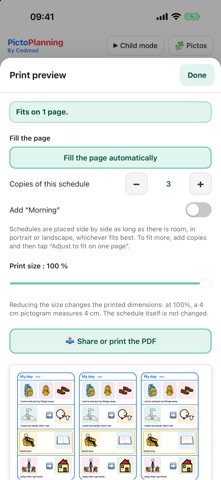
Print several strips or several schedules side by side on the same sheet: in the print preview, Fill the page sets the number of copies and the schedules to add. Hide the ready-made templates you do not use, and show them again whenever you want. New in Settings, Backup: Export my schedules saves your schedules, templates and My pictos in a single file; Import a backup adds them or replaces everything, so you get everything back after a reinstall or on another device.
In-app purchases · US
No in-app purchases.
Screenshots


About
PictoPlanning is a visual schedule maker based on pictograms, completely free. Build a schedule as a grid or as a strip, step by step, with ARASAAC pictograms or your own photos, show it to your child in full screen, then print it at the exact size, in centimeters. Designed for children, autistic people (ASD), people with disabilities, their parents, caregivers, teachers and teaching assistants. - More than 14,000 ARASAAC pictograms, with search by word (internet connection required for the search) - Your own photos, taken with the camera or picked from the photo library - My pictos: your photos and customized pictograms are kept and can be reused in all your schedules - Strip layout: rounded colored frame, schedule name and first name as a title, a line between steps, to print and cut out - One sentence per step, under one or several pictures, and a colored highlight to make a step stand out - Arrows and symbols to place between two pictograms - Child mode: the schedule in full screen, the child taps a pictogram when it is done, and a counter shows progress - 6 ready-made templates (morning routine, evening routine, school day, washing hands, day strip, first / then) and your own templates - Free grid: add or remove rows and columns - Several schedules, saved automatically - Backup: a single file with your schedules, templates and My pictos, to export and import again to get everything back after a reinstall or on another device - Square, wide or tall pictograms, with width and height in centimeters for each column; a pictogram can span two boxes - Customization: rounded, square or round corners, outline color and thickness or no outline, colored or transparent background, name above or below, bold or regular, text size, photo filled or whole - Print preview: number of pages, print size setting, fit on one page - Fill the page: several strips or several schedules printed side by side on the same sheet, in portrait or landscape - PDF at real size, to print or share (AirPrint, AirDrop, email) - In English and French - On iPhone and iPad - 100% free, no ads, no account, no in-app purchase Your schedules and photos stay on your device. Pictograms: author Sergio Palao. Origin: ARASAAC (arasaac.org). License: CC BY-NC-SA 4.0. Owner: Government of Aragon (Spain). Made by Cedmad.
What's new · 2.2.2
Print several strips or several schedules side by side on the same sheet: in the print preview, Fill the page sets the number of copies and the schedules to add. Hide the ready-made templates you do not use, and show them again whenever you want. New in Settings, Backup: Export my schedules saves your schedules, templates and My pictos in a single file; Import a backup adds them or replaces everything, so you get everything back after a reinstall or on another device.
Details