

Magnifier · Baro
Euiseok Kim · Utilities
Independent analytics for this App Store listing. AppTracker is not affiliated with Euiseok Kim.
Chart standing · US
What changed · US
Listing changes AppTracker has observed for this app in this storefront — new versions, price moves, rating shifts, and store copy.
Smart Cross-Promotion Hub: Discover companion precision tools (Level, Sound Meter, Document Scanner) seamlessly from the About and OCR review screens.
Price & rating history · US
Reconstructed from the listing changes AppTracker has observed in this storefront. A field is charted once it has changed more than once, and each line starts at the value it moved from.
Price · Free now · 2 changes on record
Average rating · ★ 2.00 now · 5 changes on record
Ratings breakdown · US
The star breakdown behind this app's rating in this storefront.
In-app purchases · US
No in-app purchases.
Screenshots


About
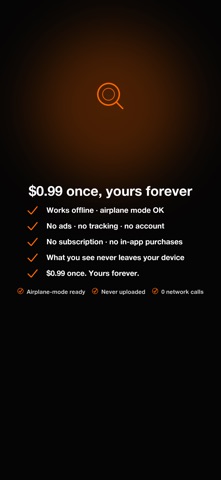
■ The tools you reach for first. Your camera never leaves your phone. Magnifier reads text entirely on your device — no internet, no account, no tracking. You can verify it in airplane mode: turn off Wi-Fi and cellular, and it still works. Nothing is ever uploaded. Point your camera at any small print and it becomes huge, bold, and easy to read. It opens straight to the camera — the screen is there the moment you tap the icon. No ads. No subscriptions. No in-app purchases. ------------------------------- ● Private by design (the whole point) ------------------------------- • Photos and camera frames never leave your device — verifiable in airplane mode. • Text recognition runs 100% on your phone. Nothing is sent to Google or any cloud server. • Zero analytics. Zero telemetry. Zero third-party SDKs. • No account, no login, no data collection. Privacy label: Data Not Collected. • An OFFLINE badge sits on the main screen at all times, so you never have to wonder. ------------------------------- ● What it does ------------------------------- 1) Live text recognition (real-time) Point the camera at any printed text — within a fraction of a second the words appear in huge, bold letters across the top of the screen. Great for books, menus, medication labels, and mail. 2) One-tap zoom & flashlight Smooth hardware zoom up to 8×. One big button for the light. No menus to dig through. 3) Freeze the image Tap once and the magnified picture holds still — bring the phone closer, or set it down, and read at your own pace. Tap again to go live. 4) Screen filters One tap cycles Normal, Grey, Contrast and Invert. Cuts glare on shiny paper, helps in dim light, and lets you read white-on-black if that suits your eyes. 5) Adjustable result text After capturing, resize recognized text from 18 pt up to 96 pt. Your preferred size is remembered. 6) Copy & share Copy text in one tap, or send it to Messages, Mail, Notes, or any app. 7) Smart adaptive speed Auto mode measures recognition time on YOUR phone and picks the smoothest cadence, so the interface never stutters — even on older devices. ------------------------------- ● Built to be readable ------------------------------- • Every button is at least 64 × 64 pt — easy to hit. • High-contrast, AMOLED-friendly black background that sips battery. • Minimum 24 pt text everywhere. • No double-taps, no swipes, no hidden gestures — just tap. ------------------------------- ● Great for ------------------------------- • Newspapers and books with fine print • Medication instructions and dosages • Restaurant menus in dim light • Mail and shipping labels • Product labels and expiration dates • Anyone who values privacy, battery, and quiet design ------------------------------- ● Languages ------------------------------- UI: English · Korean · Japanese · German · French · Simplified Chinese Text recognition: English · Korean · Japanese · Chinese · Latin scripts. The best model is selected automatically from your phone's language. ------------------------------- ● The Baro promise ------------------------------- Magnifier is part of Baro — lightweight tools that respect your data, your battery, and your time. "The tools you reach for first."
What's new · 1.2.24
Smart Cross-Promotion Hub: Discover companion precision tools (Level, Sound Meter, Document Scanner) seamlessly from the About and OCR review screens.
Details