

Sketudio: Animated Comic Maker
Jun Park · Graphics & Design
Independent analytics for this App Store listing. AppTracker is not affiliated with Jun Park.
Chart standing · US
What changed · US
Listing changes AppTracker has observed for this app in this storefront — new versions, price moves, rating shifts, and store copy.
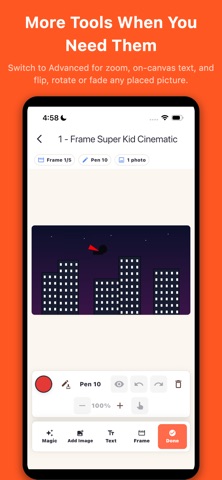
Sketudio 1.1.1 is all about pictures. PICTURES YOU CAN KEEP EDITING - Place a photo and it stays yours: move it, resize it, and in Advanced mode flip, rotate or fade it. It is no longer baked into the drawing. - Undo a placement if you change your mind, and fit up to 12 pictures on a frame. - Import a picture once, then reuse it on any frame — the picker shows your project's own pictures first. - Manage pictures: rename the ones you keep, delete the ones you don't. - Hide pictures and text with one tap so your pen has the whole frame to itself. DUPLICATE A FRAME - Copy a frame with everything on it — artwork, effects, bubbles and their voices, captions and pictures — placed right after the original. MORE SOUND, MORE STYLE - Import your own sound effects (mp3, m4a, wav, aac) instead of only recording them. - Make a bubble's fill see-through so your artwork shows behind it. - Custom bubble colors now preview in a live swatch as you choose them. FIXES - Placed pictures now appear in Comic mode, in frame thumbnails and on project covers. - Clear now removes placed pictures too. - Imported photos use far less memory, so picture-heavy projects stay smooth. As always, everything stays on your device — no accounts, no ads.
Price & rating history · US
Reconstructed from the listing changes AppTracker has observed in this storefront. A field is charted once it has changed more than once, and each line starts at the value it moved from.
Average rating · ★ 4.00 now · 2 changes on record
Ratings breakdown · US
The star breakdown behind this app's rating in this storefront.
Screenshots




About
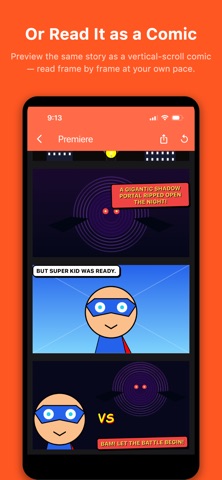
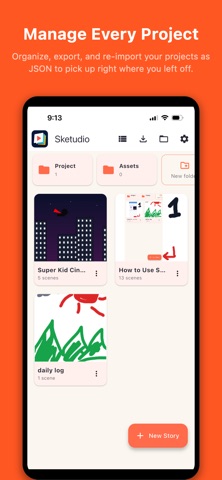
Sketudio is where your drawings start to move. Sketch a scene, bring it to life with motion and sound, add speech bubbles and your own voice, then share the whole story as a single file that plays in any web browser — no app required on the other end. Sketudio is a draw-first storytelling studio. You build your story one frame at a time, exactly the way you imagine it, and Sketudio turns those frames into a cinematic comic you can play and share. DRAW EVERY SCENE YOUR WAY - Sketch with pen and color tools, pick your frame shape (square, wide, or tall) - Drop in photos from your library as backgrounds - Cut out the subject from any photo you import — the background is removed on your device - Add captions and text labels with built-in text tools - Start in Simple mode, or switch to Advanced for canvas zoom, layered photos, and on-canvas text BRING IT TO LIFE WITH MAGIC - Add cinematic motion — zoom, pan, and playful spins - Layer in sound effects and screen flashes - Add speech, thought, shout, and narration bubbles - Record your own voice, or generate on-device English speech for any bubble MAKE IT INTERACTIVE - Turn a frame into a choice — show two buttons and let your reader pick which frame to jump to - Mark a frame as an ending so every branch of your story can finish its own way - Build branching, choose-your-own-adventure comics that play right in a browser PLAY IT TWO WAYS - Animated Comic: scene-by-scene autoplay with motion, flashes, sound, and bubble reveals - Comic: a vertical-scroll page where every scene is visible at once SHARE WITH ANYONE - Export to a single self-contained file that keeps your motion, timing, audio, and bubbles in one shareable story - The person you send it to just opens it in any browser. No account, no app, no sign-up - Keep every export in your Exports Library to replay, re-share, or reopen later - Back up or move a whole project as a single file — export it to JSON and re-import to pick up right where you left off PRIVATE BY DESIGN - Your comics, drawings, photos, and voice clips stay on your device - Works fully offline — create anywhere, no internet needed - No accounts, no ads, no tracking Whether you're sketching a quick gag strip or directing a multi-scene animated comic, Sketudio gives you the studio — you bring the story. Start with the built-in "How to Use Sketudio" walkthrough and make your first comic right away.
What's new · 1.1.1
Sketudio 1.1.1 is all about pictures. PICTURES YOU CAN KEEP EDITING - Place a photo and it stays yours: move it, resize it, and in Advanced mode flip, rotate or fade it. It is no longer baked into the drawing. - Undo a placement if you change your mind, and fit up to 12 pictures on a frame. - Import a picture once, then reuse it on any frame — the picker shows your project's own pictures first. - Manage pictures: rename the ones you keep, delete the ones you don't. - Hide pictures and text with one tap so your pen has the whole frame to itself. DUPLICATE A FRAME - Copy a frame with everything on it — artwork, effects, bubbles and their voices, captions and pictures — placed right after the original. MORE SOUND, MORE STYLE - Import your own sound effects (mp3, m4a, wav, aac) instead of only recording them. - Make a bubble's fill see-through so your artwork shows behind it. - Custom bubble colors now preview in a live swatch as you choose them. FIXES - Placed pictures now appear in Comic mode, in frame thumbnails and on project covers. - Clear now removes placed pictures too. - Imported photos use far less memory, so picture-heavy projects stay smooth. As always, everything stays on your device — no accounts, no ads.
Details