

Curvly - Text on Path
Alper Albayrak · Utilities
Independent analytics for this App Store listing. AppTracker is not affiliated with Alper Albayrak.
Chart standing · US
What changed · US
Listing changes AppTracker has observed for this app in this storefront — new versions, price moves, rating shifts, and store copy.
NEW DESIGNS • 7 new examples in Get Inspired: anniversary, cat portrait, mountain summit, pizza logo, podcast cover, above the clouds and surf. • Seasonal designs for Diwali, Thanksgiving and Black Friday appear as each day gets closer. HOME SCREEN • Get Inspired now sits right below the main actions, so ready-made designs are one tap away. Recent Projects moved to the bottom. CURVLY AI • Prompt suggestions now appear in your language and start from the correct side in right-to-left languages. FIXES • Minor fixes and improvements.
Ratings breakdown · US
The star breakdown behind this app's rating in this storefront.
Screenshots




About
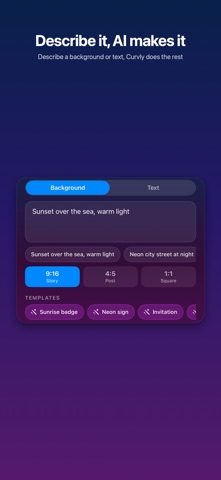
Turn your photos into eye-catching designs with curved, flowing text. Curvly lets you draw any freehand path on your photo and instantly places your text along it — creating unique, professional-looking results in seconds. HOW IT WORKS • Choose a photo from your gallery, camera, or search millions of free photos from Unsplash — or describe one and let Curvly AI create it • Pick your canvas: keep the original, or crop to story, post or square before you start • Draw a path with your finger — any shape, any curve, or take a Smart Placement suggestion • Type your text and watch it flow along the path • Style it: one-tap effects, fonts, colors, letter shape and spacing • Export and share your creation FEATURES • Freehand path drawing — complete creative freedom • Smart Placement: on-device suggestions for where your text fits best — arches, waves, lines and badges that steer clear of faces • Canvas ratios: original, 4:5, 9:16, 1:1, 3:4 and 1.91:1 — crop first so your design fits where you'll post it • True typography: real kerning, ligatures, and OpenType shaping • Full Arabic & Urdu support with connected letterforms • Multiple text layers on a single photo • Rotate and resize a layer with two fingers — the path turns with the text • Duplicate a layer with its style: same font, color and effects • Set where the text starts along the path • Rich text styling: fonts, colors, stroke outlines, shadows • Text effects: neon glow, 3D depth, long shadow and outline • Stretch letters taller or wider, open letter spacing, lift text off the path • Drag or pinch right on the preview to fine-tune • Auto-fit text to path length • Wide color (P3) exports that keep your photo's original quality • Pinch-to-zoom export preview • Save and reopen your projects anytime • Built-in Unsplash photo search CURVLY AI • Describe the backdrop you have in mind and get an image in seconds • Add the words you want on it — Curvly AI sets them on curved paths as editable layers, never baked into the image • Choose where the text goes and its style, or start from a ready-made template • Story, post and square sizes, ready to keep designing • Optional weekly or monthly subscription; AI credits renew every period and every Pro feature is included • Only your description and text are sent to create the image — your photos never leave your device CURVLY PRO • Export without watermark • High-resolution export, up to 4K • Premium font collection • 10 Curvly AI credits included • One-time purchase Perfect for social media posts, stories, greeting cards, invitations, quotes, and any creative project where flat text just isn't enough. Terms of Use: https://definetelyhuman.com/apps/curvly/terms.html Privacy Policy: https://definetelyhuman.com/apps/curvly/privacy.html
What's new · 2.0
NEW DESIGNS • 7 new examples in Get Inspired: anniversary, cat portrait, mountain summit, pizza logo, podcast cover, above the clouds and surf. • Seasonal designs for Diwali, Thanksgiving and Black Friday appear as each day gets closer. HOME SCREEN • Get Inspired now sits right below the main actions, so ready-made designs are one tap away. Recent Projects moved to the bottom. CURVLY AI • Prompt suggestions now appear in your language and start from the correct side in right-to-left languages. FIXES • Minor fixes and improvements.
Details