

VaultDrive: USB Backup
Coticsy LLC · Utilities
Independent analytics for this App Store listing. AppTracker is not affiliated with Coticsy LLC.
Chart standing · US
What changed · US
Listing changes AppTracker has observed for this app in this storefront — new versions, price moves, rating shifts, and store copy.
• Unplugged by accident? Plug the same drive back in within about 20 seconds and the backup carries on by itself. If it stays unplugged, tap Resume to finish the rest. • Organize by date: photos and videos can go into year and month folders, like Photos/2024/03-March. Or keep your albums, as before. • Each iPhone now has its own folder on the drive, so backups from two iPhones stay apart. • Files already on the drive are skipped instead of copied twice. • Incremental backups check the drive first and copy again anything deleted from it. • The summary and History now list the files that weren't backed up, and why. • Files with characters like / or : in their names now back up. • When the drive fills up, VaultDrive tells you how many files were copied and what's left. • Files & Documents now sits under "What to back up", and Statistics & History is higher up in Settings. • Performance improvements and bug fixes.
Ratings breakdown · US
The star breakdown behind this app's rating in this storefront.
Screenshots




About
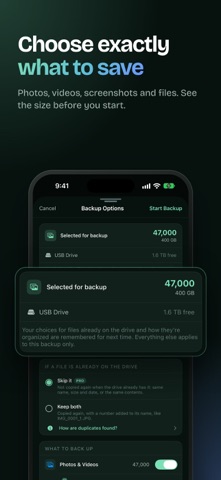
Back up your photos, videos and files straight to a USB flash drive, SSD or SD card. No cloud, no account, no subscription: your memories stay on a drive you own. Plug in your drive, choose what to back up and tap Start Backup. VaultDrive copies your originals in full quality, directly from your phone to the drive. WHAT YOU GET • Direct to your drive: no uploads and no waiting for cloud storage • Original quality: files are copied as they are, never compressed • Fresh or Incremental: back up everything, or only what's new since last time • Files already on your drive are skipped automatically • Organized your way: folders by date or by album, with one folder per phone • Back up your whole library, selected albums, or files and folders • Resume anytime: if the drive is unplugged or the backup is interrupted, pick up where you left off • Clear summaries, backup history and reminders when new photos are ready • Photos, videos, Live Photos, screenshots and, if you choose, your Hidden album • Works with iPhone 15 and later over USB-C, and with earlier iPhones through a Lightning to USB adapter • Downloads originals stored only in iCloud first, over Wi-Fi only if you prefer • App Lock with Face ID or Touch ID DRIVE TIPS Format your drive as exFAT: it works with Windows and Mac computers and stores files larger than 4 GB. FREE TO TRY, PRO ONCE VaultDrive is free to try. Upgrade to Pro once for unlimited and incremental backups. It's a one-time purchase, with no subscription, ever. PRIVATE BY DESIGN Your photos and files are never uploaded to a cloud or server. No account or sign-up is needed, and backing up to your drive works without an internet connection. Keep your memories safe, on your own drive.
What's new · 7.0
• Unplugged by accident? Plug the same drive back in within about 20 seconds and the backup carries on by itself. If it stays unplugged, tap Resume to finish the rest. • Organize by date: photos and videos can go into year and month folders, like Photos/2024/03-March. Or keep your albums, as before. • Each iPhone now has its own folder on the drive, so backups from two iPhones stay apart. • Files already on the drive are skipped instead of copied twice. • Incremental backups check the drive first and copy again anything deleted from it. • The summary and History now list the files that weren't backed up, and why. • Files with characters like / or : in their names now back up. • When the drive fills up, VaultDrive tells you how many files were copied and what's left. • Files & Documents now sits under "What to back up", and Statistics & History is higher up in Settings. • Performance improvements and bug fixes.
Details