

UpAI Clock
Ali Tanriyar · Utilities
Independent analytics for this App Store listing. AppTracker is not affiliated with Ali Tanriyar.
Chart standing · US
Screenshots


About
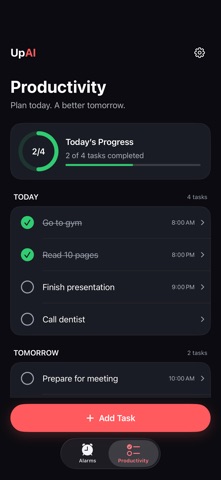
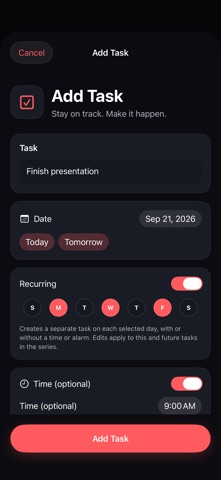
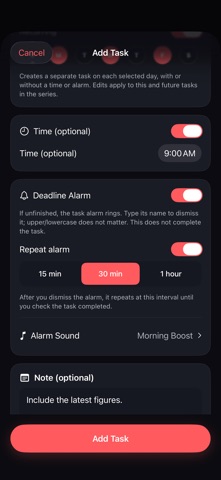
UpAI Clock brings wake-up missions and daily tasks into one place. Start your morning with an alarm, then follow through on the things you planned to do. PLAN YOUR DAY Create tasks with a date and an optional time, note, and deadline alarm. See tasks grouped by day and track today's progress. Set recurring tasks for the days you choose, even without a time or deadline alarm. REMINDERS THAT KEEP TASKS OPEN For a timed task, choose an optional deadline alarm and repeat interval: 15 minutes, 30 minutes, or 1 hour. Typing the task text dismisses the current alert without completing the task. Mark the task complete separately to stop its repeat reminders. WAKE-UP MISSIONS Choose how you complete an alarm: • Math — solve questions at your chosen difficulty. • QR Code — scan your saved code at a location you choose. • Object AI — use the camera to verify a selected everyday object. • Typing — type the displayed text; capitalization does not matter. Create a one-time alarm for a selected date or choose recurring days. Personalize labels and sounds. Recovery options help you finish a mission if camera or network verification fails. ACCOUNTLESS BY DESIGN No UpAI account or password is required. Your Apple Account manages purchases. With iCloud enabled, alarm definitions, your QR code, streak, history, and supported preferences can sync across your Apple devices. Imported alarms arrive disabled for you to enable on each device. Productivity tasks are stored on the device. UPAI PRO Choose a monthly or annual auto-renewing subscription for Pro features. Available plans, local prices, trial eligibility, and renewal terms appear before purchase. Restore Purchases and Manage Subscription are available in the app. Cancel through Apple subscription settings. Alarm delivery depends on iOS permissions and device settings. Task reminders use a limited scheduling window that refreshes when the app runs. Object AI requires camera permission and an internet connection; verification is subject to a daily usage limit. Privacy: https://upai-support.pw8b9fd8nn.chatgpt.site/privacy Support: https://upai-support.pw8b9fd8nn.chatgpt.site/support Terms of Use (EULA): https://www.apple.com/legal/internet-services/itunes/dev/stdeula/
What's new · 1.0.1
Fixes long Math equations being cut off and keeps Math and Typing Proof answer fields and Submit buttons above the keyboard. Also improves common-object photo verification, clarifies photo-sharing permission during setup, and fixes a camera and volume-monitoring crash on some iOS versions.
Details