

Audio Layrs - AI Vocal Remover
辉豹 张 · Music
Independent analytics for this App Store listing. AppTracker is not affiliated with 辉豹 张.
Chart standing · US
What changed · US
Listing changes AppTracker has observed for this app in this storefront — new versions, price moves, rating shifts, and store copy.
- New Share page: pick exactly what to send — the original song, your current mix, or any individual stems (vocals, drums, bass and more). Select several at once and share them together. - The original file is shared as-is, with no re-encoding and no quality loss. - Sharing is now free for everyone. - Playback now pauses automatically when you open Share. - Fixed known issues.
Ratings breakdown · US
The star breakdown behind this app's rating in this storefront.
Screenshots
About
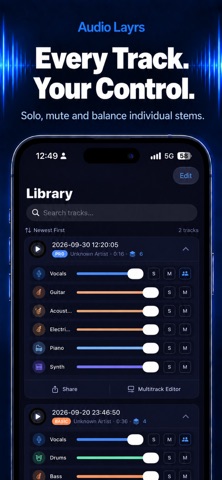
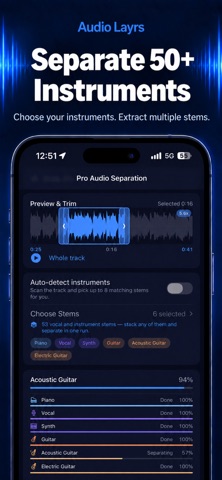
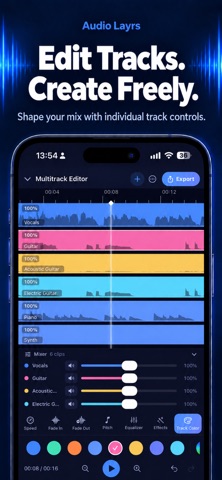
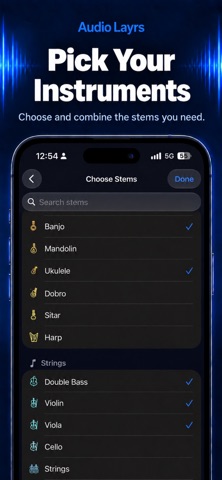
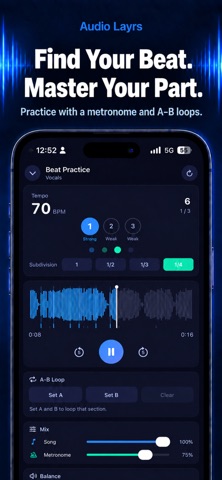
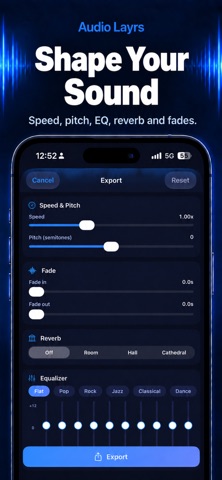
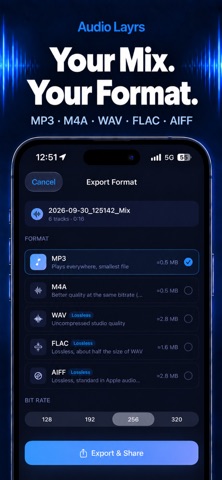
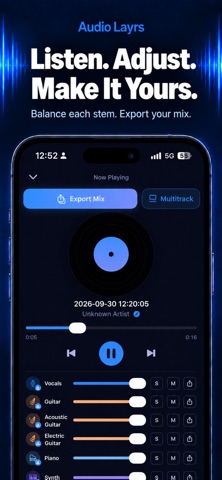
Split any song into separate tracks — then edit, mix, and record your own. All on your iPhone, no uploads, no account. Studio-grade AI stem separation runs entirely on your device. Start with the classic four-track split, go deep with Pro Audio Separation for up to 50+ parts, then take those stems into a full multitrack editor. TWO WAYS TO SEPARATE Quick Split — 4 Tracks Vocals, drums, bass, and instruments in seconds. The fast path for karaoke, practice, and remixing. Pro Audio Separation — up to 50+ Tracks Isolate specific parts, not broad groups: lead and backing vocals, acoustic and electric guitar, piano, organ, violin, cello, strings, saxophone, trumpet, flute, kick, snare, toms, and more. Pick any combination and separate them in one run. SEPARATED. NOW EDIT. Every stem drops into a multitrack editor — no export, no round trip through another app. — Trim clips and slide them along the timeline — Volume, mute, and fades per clip — Change speed and pitch independently — Graphic EQ, reverb, and delay on any track — Colour-code tracks to keep a busy session readable — Mix it all down to one file Record into a new track too, and play over the stems you pulled apart. RECORD CLEAN, IN REAL TIME The recorder removes noise while you record — keyboard clatter, fan hum, and room echo are gone as they happen, not cleaned up afterwards. When you stop, A/B the original against the denoised take and keep the one you prefer. KEY FEATURES 100% On-Device Your audio never leaves your iPhone. No cloud uploads, no accounts — separation, editing, and noise removal all run offline. Pick Exactly What You Need Search 53 stems by name, stack any combination, and trim the section you want first. Only the models you pick get downloaded. Professional Mixer Volume, mute (M), and solo (S) per track, with multi-track solo. Hear the mix change in real time as you move each fader. Split Male and Female Vocals Split a duet's vocal track again into male and female parts, each with its own fader. (Requires a recent iPhone.) More Tools Echo removal, chord detection, notation, and a beat grid to practise against. Export in the Format You Need MP3, M4A, WAV, FLAC, or AIFF — 128 to 320 kbps, or lossless. Share to Messages, AirDrop, and social apps, or save to Files. Import From Anywhere Music library (non-DRM), Files, Photos, the mic, or a pasted URL. PERFECT FOR — Singers who need instrumental backing tracks — Producers and DJs building remixes and mashups — Musicians learning a part by ear, one instrument at a time — Songwriters recording over stems they just split — Creators who need a clean voice take — Karaoke fans removing vocals from any track WHY AUDIO LAYRS Most stem splitters upload your music to a server — slow, and your files sit on someone else's machine. Audio Layrs runs the whole pipeline locally: fast, private, and yours. And it doesn't stop there. Most apps hand you four files and leave. This one lets you cut, tune, mix, and record on top of them. NOTES Pro Audio Separation downloads a model the first time you use a given instrument (about 80 MB each, once, over Wi-Fi); real-time noise removal does the same. After that everything runs offline. On-device AI requires a recent iPhone; performance varies by device. SUBSCRIPTION Weekly: $1.99 Monthly: $3.99 Yearly: $14.99 — includes a 7-day free trial Free trials are available to new subscribers only. If you have already used a free trial in this subscription group, your subscription starts at the regular price. Payment is charged to your Apple Account at confirmation of purchase. Subscriptions renew automatically unless canceled at least 24 hours before the end of the current period. Manage or cancel in iOS Settings → your name → Subscriptions. Terms of Service https://htmlpreview.github.io/?https://github.com/ozy1000/page/blob/main/agreement.html Privacy Policy https://htmlpreview.github.io/?https://github.com/ozy1000/page/blob/main/AudioLayrsPrivacy.html
What's new · 2.8
- New Share page: pick exactly what to send — the original song, your current mix, or any individual stems (vocals, drums, bass and more). Select several at once and share them together. - The original file is shared as-is, with no re-encoding and no quality loss. - Sharing is now free for everyone. - Playback now pauses automatically when you open Share. - Fixed known issues.
Details