

VIBRA Tasks for Google Tasks
VIBRA K.K. · Productivity
Independent analytics for this App Store listing. AppTracker is not affiliated with VIBRA K.K.
Chart standing · US
What changed · US
Listing changes AppTracker has observed for this app in this storefront — new versions, price moves, rating shifts, and store copy.
Improved Google Tasks connection and sync recovery, with clearer guidance when permissions or device time need attention.
Screenshots


About
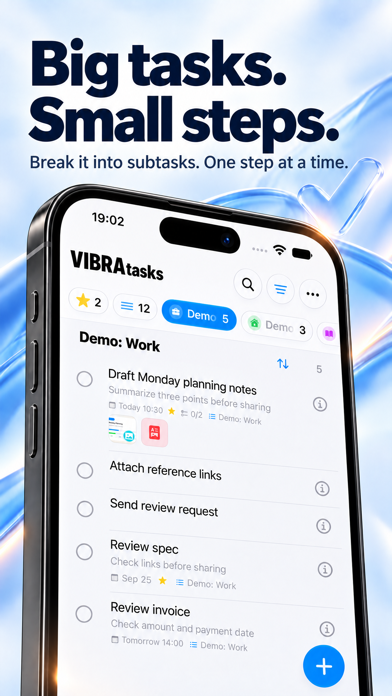
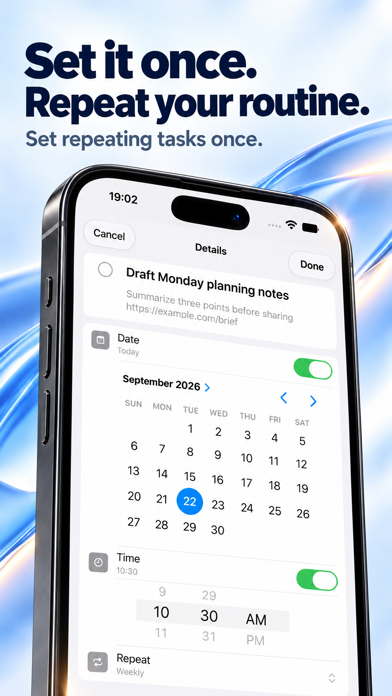
See tasks from multiple Google accounts in one view, without switching accounts. Set location reminders for arrivals and departures, attach photos and documents, and manage subtasks. View and edit saved tasks even when you’re offline. Find what you need with Today, Scheduled, Starred, All, and Completed views. Organize lists with colors and icons, and pin the ones you use most. Create and edit tasks and lists, mark tasks complete, or reopen them. Set a time as well as a date, schedule repeating tasks, and get reminders when you arrive at or leave a place. Attach photos, documents, and scans to keep the information you need with each task. Available on iPhone, iPad, and Apple Watch. Access tasks from Home Screen and Lock Screen widgets or the share sheet, and use Siri Shortcuts to open or complete tasks. Key features: - Location reminders for arrivals and departures - Photo, document, and scan attachments - View, create, edit, complete, and reorder subtasks - Offline access to view and edit saved tasks - All, Today, Scheduled, Starred, and Completed views - Create, rename, and delete Google Tasks lists - Create, edit, complete, reopen, and delete tasks - Notes, due times, stars, recurring tasks, and links in notes - Home Screen and Lock Screen widgets - Share sheet, Home Screen Quick Actions, Shortcuts, and deep links - List colors, icons, pinning, ordering, and organization Terms of Use (EULA): https://www.apple.com/legal/internet-services/itunes/dev/stdeula/
What's new · 1.0.38
Improved Google Tasks connection and sync recovery, with clearer guidance when permissions or device time need attention.
Details