

Offcue: Teleprompter Camera
Borys Kusmirek · Photo & Video
Independent analytics for this App Store listing. AppTracker is not affiliated with Borys Kusmirek.
Chart standing · US
What changed · US
Listing changes AppTracker has observed for this app in this storefront — new versions, price moves, rating shifts, and store copy.
• Fixed a crash when a video's thumbnail was missing • Fixed a crash when tapping a permission twice during setup • Stability improvements
Price & rating history · US
Reconstructed from the listing changes AppTracker has observed in this storefront. A field is charted once it has changed more than once, and each line starts at the value it moved from.
Average rating · ★ 4.33 now · 2 changes on record
Screenshots



About
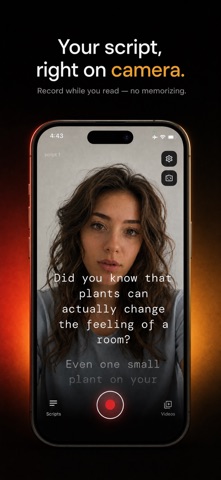
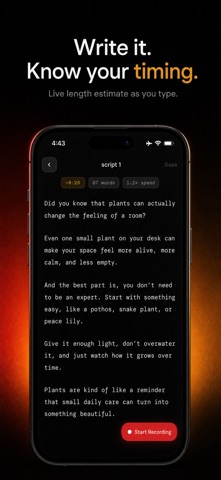
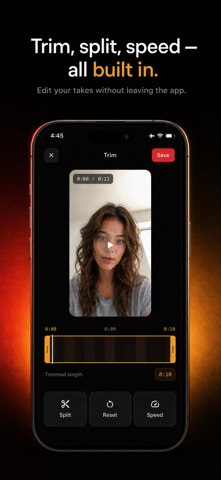
Offcue is a free teleprompter app that scrolls your script right over the live camera while you record. Write or paste your words, set your pace, hit record, and deliver every line looking straight into the lens — no memorizing, no glancing away, no awkward retakes. Made for talking-head videos, social clips, vlogs, course lessons, sales pitches, presentations, speeches, self-tape auditions and product demos. Sound natural and stay on message from the first take. HOW IT WORKS 1. Write a new script or paste one you already have. 2. See a live read-time and word-count estimate, so a 60-second video is 60 seconds before you press record. 3. Open the camera, tune the scroll speed and text size, and tap record. 4. Read along as the script scrolls over the camera while you look into the lens. 5. Trim the dead air, then save to Photos or share anywhere. A TELEPROMPTER BUILT FOR FILMING - Script auto-scrolls over the live front or back camera - Adjustable scroll speed to match your natural pace - Adjustable text size, readable at arm's length - Three reading styles: full overlay, a frosted center band, or a focus line - Background dimming for legibility in any light - Left, center or right alignment - Mirror text for beam-splitter prompter rigs - Pause and resume mid-take, like a real camera RECORD, TRIM, POST - Record in HD and Full HD at 30 or 60 fps (4K with Premium) - Video stabilization toggle for smoother handheld footage - Trim the start and end of every take with a live preview - Every take stays linked to its script, so re-shooting is one tap - Library with This Week and Favorites filters - Save to Photos, or share the file to any app PRIVATE BY DESIGN Your scripts and videos stay on your device. No account, no login, and your content is never uploaded. Offcue even works offline. FREE TO USE The teleprompter, recording, trimming, sharing and up to 5 saved scripts are free — with no watermark on your videos. OFFCUE PREMIUM (OPTIONAL) Premium adds unlimited scripts, 4K video capture, and split & speed editing. Choose yearly (includes a 3-day free trial), monthly or weekly. Subscription details: - Payment is charged to your Apple ID account at confirmation of purchase. - Your subscription automatically renews unless it is canceled at least 24 hours before the end of the current period. - Your account is charged for renewal within 24 hours prior to the end of the current period. - Manage or cancel your subscription anytime in your App Store account settings; cancellation takes effect at the end of the current billing period. - Any unused portion of a free trial is forfeited when you purchase a subscription. Privacy Policy: https://offcue.web.app/privacy Terms of Use (EULA): https://www.apple.com/legal/internet-services/itunes/dev/stdeula/ Additional Terms: https://offcue.web.app/terms
What's new · 1.1.1
• Fixed a crash when a video's thumbnail was missing • Fixed a crash when tapping a permission twice during setup • Stability improvements
Details