

Metadata Remover: SafeShare
Liamyte OU · Photo & Video
Independent analytics for this App Store listing. AppTracker is not affiliated with Liamyte OU.
Chart standing · US
What changed · US
Listing changes AppTracker has observed for this app in this storefront — new versions, price moves, rating shifts, and store copy.
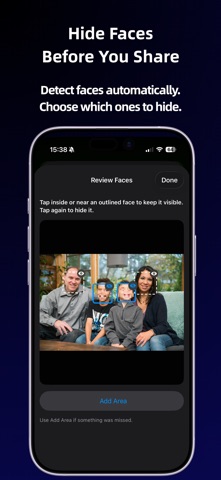
SafeShare can now help protect what’s visible in your photos too. • Automatic on-device face detection • Optionally hide detected faces before sharing • Tap individual faces to keep them visible • Add a manual area if something was missed • Review the final clean copy before sharing • Choose photos or videos directly from the app Face hiding is available for individual photos. Everything stays on-device with no uploads or tracking.
Ratings breakdown · US
The star breakdown behind this app's rating in this storefront.
In-app purchases · US
No in-app purchases.
Screenshots



About
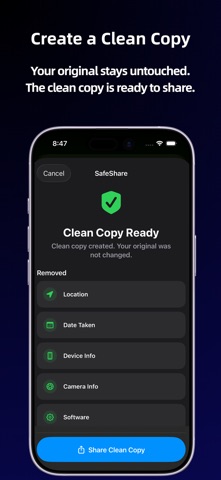
SafeShare helps you create privacy-clean copies of photos and supported videos before sharing. Photos and videos can contain hidden details you may not mean to send, including location, date, device, camera, and software information. SafeShare removes common metadata before your media leaves your iPhone. For individual photos, SafeShare can also detect faces on-device and let you choose which ones to hide before sharing. Use SafeShare from the iOS Share Sheet or choose media directly in the app: • Select up to 10 photos or one supported video • Review detected metadata • For a single photo, optionally hide detected faces • Add a manual hidden area if something was missed • Create a clean copy • Review visual changes before sharing • Share the clean copy onward Your original stays untouched. Everything happens on your device. SafeShare: • Does not upload your media • Does not require an account • Does not track you • Does not use external AI services Face detection also runs entirely on-device. SafeShare detects where faces are but does not identify people. SafeShare can help remove: • Location data • Date taken • Device information • Camera details • Software tags • Other common file metadata where possible For a single photo, SafeShare can: • Detect faces automatically • Hide detected faces with pixelation • Let you keep individual faces visible • Add a manual area if something was missed • Create a flattened clean copy Face hiding is currently available for individual photos. Photo batches and videos can still be cleaned of supported metadata. Supported sharing: • Up to 10 photos at once • One supported video at a time • Photos and videos should be cleaned separately Supported formats: • HEIC / HEIF • JPEG / JPG • PNG • MOV • MP4 SafeShare is free, offline, and designed to make privacy cleanup a quick step before sharing. Important: SafeShare removes common hidden metadata where possible, but some file details may remain depending on the format, source app, iOS behavior, or sharing destination. Face detection may not find every face, so review visual changes before sharing. SafeShare does not guarantee anonymity.
What's new · 1.1.0
SafeShare can now help protect what’s visible in your photos too. • Automatic on-device face detection • Optionally hide detected faces before sharing • Tap individual faces to keep them visible • Add a manual area if something was missed • Review the final clean copy before sharing • Choose photos or videos directly from the app Face hiding is available for individual photos. Everything stays on-device with no uploads or tracking.
Details