

Work Hours Tracker & Timesheet
Phuc Pham · Business
Independent analytics for this App Store listing. AppTracker is not affiliated with Phuc Pham.
Chart standing · US
What changed · US
Listing changes AppTracker has observed for this app in this storefront — new versions, price moves, rating shifts, and store copy.
Bug fixes and performance improvements.
In-app purchases · US
What this app sells inside itself, grouped by kind and priced for this storefront.
Screenshots



About
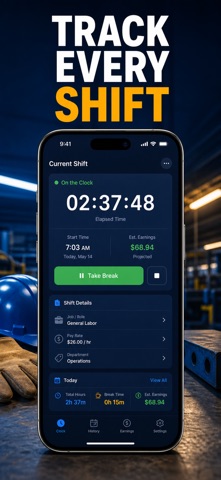
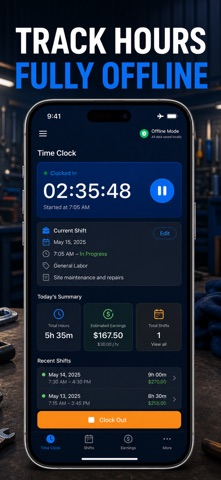
Know exactly how many hours you worked this week — and what those hours are worth. Tap once to clock in, tap once to clock out, and every shift, break, and overtime minute is logged and priced for you. Most hour trackers stop at a stopwatch. This one carries your hours all the way through to money: each job keeps its own hourly rate, breaks are deducted, anything past your regular day rolls into overtime at your own multiplier, and the Pay tab shows the weekly or biweekly total as a real dollar figure with a daily chart behind it. No spreadsheet formulas, no end-of-week math, no wondering whether your paycheck looks right. WHAT YOU GET - One-tap clock in and clock out with a live running timer, so you never guess your start time again - Every shift stored with exact in, out, break minutes, job and an optional note — editable any time - Multiple jobs side by side, each with its own hourly rate and color, plus a shift count per job - Overtime handled automatically: set your regular hours per day and your multiplier (1x-3x) once - A weekly or biweekly earnings total, split into regular pay and overtime pay, with a daily bar chart - A CSV export of your whole timesheet you can send to yourself, a client, or a payroll office PERFECT FOR - Hourly employees who want their own record of the hours they actually worked - People working two or three jobs at different rates who need them kept apart - Freelancers and contractors logging billable hours per client before invoicing - Anyone claiming overtime or extra shifts who wants the numbers ready before payday WHY NOT JUST USE NOTES OR A SPREADSHEET? Because a note tells you "9 to 5" and nothing else. It won't subtract your 30-minute break, it won't know your third job pays a different rate, it won't split regular from overtime, and it won't total your week. Here that happens the moment you clock out — and when you do want it in a spreadsheet, one tap exports clean CSV. PRIVACY Your hours, rates, and earnings stay on your iPhone. No account to create, no sign-in, no ads, no tracking. The app works fully offline — nothing is uploaded anywhere. A note on pay figures: totals are estimates for your own records, not payroll, tax advice, or an official employer document. FULL ACCESS Premium unlocks the full app: unlimited jobs and shifts, per-job hourly rates, overtime and break calculation, weekly and biweekly pay reports with charts, and CSV timesheet export. Choose a weekly plan, a yearly plan, or a one-time lifetime purchase. Subscriptions renew automatically until cancelled in your Apple account settings; lifetime is a single payment with no renewal. Add your job and hourly rate, then hit Clock In on your next shift — by Friday your week is already added up. Terms of Use (EULA): https://web-levi.web.app/terms Privacy Policy: https://web-levi.web.app/privacy-policy Questions? tphuc.work@gmail.com
What's new · 1.2.1
Bug fixes and performance improvements.
Details