

Origami PDF: Scan & Sign
Thu Trang Nguyen · Productivity
Independent analytics for this App Store listing. AppTracker is not affiliated with Thu Trang Nguyen.
Chart standing · US
In-app purchases · US
No in-app purchases.
Screenshots



About
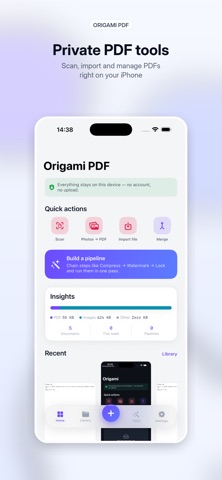
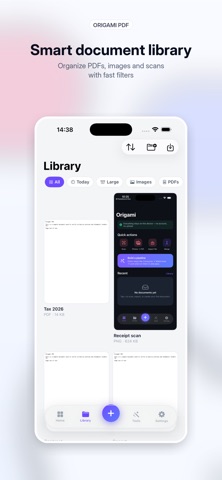
Origami PDF is built around one idea that no other PDF app on the App Store offers: a visual Pipeline that chains multiple PDF operations into a single, repeatable workflow. Stack steps — Compress → Watermark → Page numbers → Grayscale → OCR → Encrypt — and run them in one tap on one PDF or a batch of them. Save your favourite chains as Pipeline Templates and re-use them. Three built-in templates (Share-ready, Archive, Professional) get you started; the rest you build yourself. Everything is on-device. No account, no cloud upload, no third-party SDKs, no analytics, no ads, no subscription. WHAT MAKES ORIGAMI DIFFERENT ■ PIPELINE — the headline feature A visual builder that stacks PDF operations into a workflow. Run on one document or many. Save as a custom template. Re-run from Siri or Shortcuts with one phrase ("Run a Origami PDF pipeline"). This is what sets Origami apart from every other PDF utility on the store. ■ SEARCHABLE PDF — scans you can search Add an invisible on-device OCR text layer to a scanned PDF so words become selectable, copyable, searchable. Powered by Apple's Vision framework — no upload. ■ SHORTCUTS & SIRI READY Every key tool is exposed as an App Intent: "Scan a document with Origami PDF", "Merge PDFs with Origami PDF", "Compress a PDF with Origami PDF", "Photos to PDF in Origami PDF", "Open Pipeline in Origami PDF". Wire them into Siri, the Shortcuts app, Home Screen widgets, or Personal Automations. ■ A CALMER WAY TO WORK A floating action dock with a single "+" puts document creation one tap away from anywhere. Clean light theme, document cards with live previews, smooth haptics — no clutter. CAPTURE - Scan — camera document scanner with auto edge detection and multi-page output - Photos to PDF — combine images into a single PDF - Import — bring in PDFs, images and text files from the Files app - Text to PDF — type or paste text and export a clean PDF ORGANIZE - Merge several PDFs in your chosen order - Split into smaller PDFs - Rotate pages - Organize pages — drag to reorder, rotate, delete or extract - Folders, tags & smart filters keep your library tidy CONVERT - PDF to Images (export pages as PNG) - PDF to Text (extract plain text) - PDF to Word — export editable RTF that opens in Word and Pages - Compress — smart: keeps text pages crisp & selectable, shrinks scanned pages (Smallest / Balanced / Best quality) - Grayscale — convert to black & white SECURE - Protect a PDF with a password - Remove a known password EDIT - Sign — draw your signature with Apple Pencil or finger and stamp it on the page - Annotate — highlight and draw freehand - Watermark — stamp text across every page - Page numbers — number every page - Recognize text (OCR) — extract text from scans and PDFs with Apple's on-device Vision - Searchable PDF — bake an invisible OCR text layer into a scan - Fill forms — detect PDF form fields (text & checkboxes) and fill them in - Stamp — APPROVED, DRAFT, CONFIDENTIAL, a date, or your own custom seal PREVIEW EVERYTHING Open PDFs, images and text right inside the app. Saved files also appear in the iOS Files app — nothing is locked away. PRIVATE BY DESIGN — NO DATA COLLECTED Every scan, OCR pass and conversion happens on your device. Origami makes no network requests for its features: no cloud, no analytics, no tracking, no third-party SDKs. Your documents never leave your iPhone. 17 LANGUAGES English, Vietnamese, Spanish, French, German, Portuguese (Brazil & Portugal), Arabic, Hindi, Bengali, Indonesian, Japanese, Korean, Russian, Turkish, Chinese (Simplified & Traditional). Switch language instantly, no restart. Origami PDF is completely free — every tool unlocked, no ads, no subscriptions, no in-app purchases.
Details