

Open3D: STL & 3D Model Viewer
Rajesh Konatala · Graphics & Design
Independent analytics for this App Store listing. AppTracker is not affiliated with Rajesh Konatala.
Chart standing · US
What changed · US
Listing changes AppTracker has observed for this app in this storefront — new versions, price moves, rating shifts, and store copy.
Export & convert Turn OBJ, PLY, 3MF, FBX, DAE, 3DS and more into STL for 3D printing or GLB for sharing. Files save straight to your Downloads folder — no extra apps, no online converter, everything happens on-device.
Price & rating history · US
Reconstructed from the listing changes AppTracker has observed in this storefront. A field is charted once it has changed more than once, and each line starts at the value it moved from.
Average rating · ★ 4.75 now · 15 changes on record
Ratings breakdown · US
The star breakdown behind this app's rating in this storefront.
In-app purchases · US
No in-app purchases.
Screenshots



About
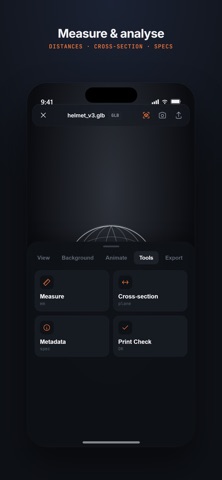
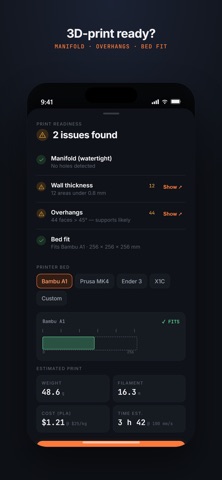
Open3D Viewer is the fastest free 3D model viewer for STL, GLB, OBJ, FBX, STEP, DXF, USDZ, PLY, 3MF, GLTF, IGES, DAE and 3DS files. Open any 3D file in seconds, view it in AR with Apple Quick Look, and check it for 3D printing — no account, no sign-up, no cloud upload. Your files never leave your iPhone or iPad. Whether you're a 3D-printing hobbyist checking an STL before slicing, a 3D artist previewing a GLB or FBX, or a CAD user opening a STEP or DXF, Open3D Viewer opens it instantly — without the paywalls and login screens other 3D viewers force on you. SUPPORTED 3D FILE FORMATS • Mesh: STL, GLB, GLTF, OBJ, PLY, 3MF, FBX, DAE, 3DS, USDZ • CAD: STEP / STP, IGES / IGS, DXF Export & convert Turn OBJ, PLY, 3MF, FBX, DAE, 3DS and more into STL for 3D printing or GLB for sharing. Files save straight to your Downloads folder — no extra apps, no online converter, everything happens on-device. A 3D VIEWER THAT DOES THE BASICS RIGHT • Open files from Files, email, downloads, or any "Open with" menu • Smooth orbit, pan and zoom touch controls • Render modes: solid, wireframe, X-ray, textured, matte • Wireframe overlay — see the geometry on top of the rendered surface • Preset camera views (front, side, top, perspective) • Light and dark themes • 5 background colours + 6 HDRI lighting environments (studio, sunset, dawn, dusk, dark, white) • Play built-in animations • View 3D models in AR via Apple Quick Look (USDZ) • Capture a screenshot or a rotating GIF and share it • Recent files with auto-generated thumbnails • Full model specs: triangle count, vertices, materials, textures, bounding box BUILT FOR 3D PRINTING • Print-readiness check: manifold / watertight detection, overhangs, wall thickness • Bed-fit check for popular printers (Bambu A1, Prusa MK4, Ender 3, Bambu X1C) • Rough weight, filament length and cost estimates • Measure distances on the model • Cross-section / clipping plane to inspect interiors • Scale and resize tool • Convert and export between GLB and STL LOCALIZED The interface automatically follows your device language. Currently available in English, German, Spanish, French, Portuguese, Hindi, Japanese, and Chinese. NO ACCOUNT. NO CLOUD. NO NONSENSE. • No sign-up, ever • 100% on-device. Works offline. • We never read, scan, or upload your files • We don't track which files you open The STL viewer and GLB viewer that makers, 3D artists and engineers actually want: clean, fast, and local. Measurements and print-readiness figures are estimates, not a replacement for a slicer or proper measuring tools. See the in-app Disclaimer. Open3D Viewer is an independent app and is not affiliated with the Open3D open-source library at open3d.org. All trademarks belong to their respective owners. Privacy policy: https://open3d.app/privacy.html
What's new · 1.3.9
Export & convert Turn OBJ, PLY, 3MF, FBX, DAE, 3DS and more into STL for 3D printing or GLB for sharing. Files save straight to your Downloads folder — no extra apps, no online converter, everything happens on-device.
Details