

Trace: Journal, Life & People
玉浩 李 · Lifestyle
Independent analytics for this App Store listing. AppTracker is not affiliated with 玉浩 李.
Chart standing · US
What changed · US
Listing changes AppTracker has observed for this app in this storefront — new versions, price moves, rating shifts, and store copy.
• With Pro, each entry can hold up to 30 photos, videos, recordings and drawings, up from 9. Today and Journal show the first 9. Open the entry to see them all. • Choose how big each photo is in a notebook. Turn to the page, tap Layout and pick Large, Medium or Small for each photo. If a paragraph and its photo end up on different pages, make the photo one size smaller and they'll stay together. • Notebooks can keep a birthday or a start day. Each entry then shows how old they were that day or which day it was, and marks 1 month, 100 days and birthdays. • Each notebook can have its own layout: page breaks, text size and line spacing. • To-dos can have photos. Open a to-do and tap Add photos. • In People, anyone with a birthday saved shows how many days are left until it. • Tap a tag like #travel to see every entry with that tag. • When you sort the Inbox, tap Done on anything you've already finished. We also fixed long screenshots in notebooks showing only the middle, and the page jumping after adding photos. On entry, to-do, goal and person pages, less-used buttons are now in the ··· menu at the top right.
In-app purchases · US
What this app sells inside itself, grouped by kind and priced for this storefront.
Screenshots




Keywords this app targets
Search terms AppTracker associates with this app — estimates, not search volume. ❝ = in the app's title; a highlighted number is its current position for that term.
Similar apps
Competitors and close alternatives, as estimated by AppTracker.




About
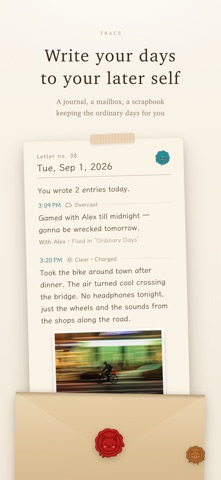
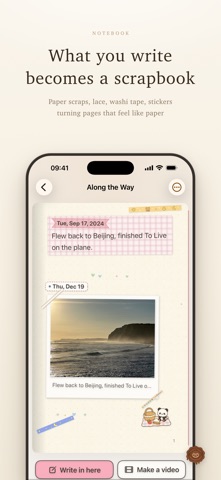
Not every day is a big day. Some are just worth keeping. A good dinner. A photo from your walk. Something you finally got done. Keep it in Trace, alongside tomorrow's plans and the people you care about. No account registration needed. MAKE ROOM FOR YOUR DAY Write, add photos, videos, Live Photos, voice recordings or sketches. Include a mood, place or weather, or catch up on a day you missed. Underline, circle or highlight the words that matter, and pin entries you want to come back to often. PUT IT IN A NOTEBOOK Give a trip, a reading list or a stretch of life its own notebook. Choose a photo cover, add stickers to the pages and pick a song that plays when you open it. Add a birthday to see their age on each entry, and set page breaks and photo sizes. Pages curl with your finger as you turn them. You can also seal a day's entries into a letter for your future self, and choose the line it ends on. REMEMBER WHAT YOU DID Organize tasks into lists, add subtasks, photos and reminders. Already finished something that wasn't on your list? Record it anyway. Track goals by count or quantity, use tags and milestones, take days off, and look back by month or year. Keep birthdays and anniversaries. If you like, sync tasks and goals to the Reminders app, where ticking works both ways, and send important dates to Calendar with their alarms. SAVE UP FOR A LITTLE TREAT Make a wish for a reward you want, and it becomes a lantern. Earn stars for it from journal entries, completed tasks and goals, using rules you choose, and watch the lantern grow brighter as you make progress. When you have enough, press and hold to release it, then enjoy the treat you planned. Stars are an in-app record, with no cash value or goods supplied by Trace. REVISIT YOUR PLACES The places in your journal gather on a small, turning globe. Tap a place to leaf through the days and photos you kept there. Explore the mood calendar, On This Day, photo wall and monthly or yearly reviews. Make share cards, export entries as a PDF, or save a notebook as a page-turning video. KEEP PEOPLE CLOSE Link entries to a person to see your shared history. Remember their preferences, gifts and conversations, or set a reminder to get in touch. MAKE IT FEEL LIKE YOURS Choose from 24 themes, built-in fonts, photo backgrounds and adjustable text sizes. Pick separate themes for light and dark mode. Add app icons and eight Home Screen widgets, or use Simple mode for quieter pages. On iPad, wide layouts use two columns and notebooks open into two-page spreads in landscape. YOUR RECORDS STAY YOURS Entries are stored on your device by default and work offline. No ads or third-party tracking. Optional features include private iCloud sync, ZIP backups and an app lock. Preview a backup before restoring it. Optional period tracking is off by default. Menstrual-flow dates stay in Apple Health, outside your journal database, iCloud journal sync and ZIP backups. FREE AND PRO Entries, tasks, goals and people are unlimited for free. The free plan includes five notebooks, five important dates and three media attachments per entry. Themes, built-in fonts, backgrounds, icons, widgets, iCloud sync and ZIP backups are free too. Pro adds Wishes, daily letters, PDF export, notebook videos, journal comments, Live Activities and font import, with 30 media attachments per entry and unlimited notebooks and important dates. New users can claim three days of full Pro during setup. Wishes and daily letters also offer seven-day feature trials; previously claimed letter trials keep their original duration. Gifted trials require no payment and do not become paid subscriptions. Existing letters, wishes and star history remain readable after access ends. Subscription and lifetime options are available at in-app prices. For iPhone and iPad. Requires iOS or iPadOS 17.2 or later. Privacy Policy: https://bittolab.com/en/privacy.html Terms of Use: https://www.apple.com/legal/internet-services/itunes/dev/stdeula/
What's new · 1.4.7
• With Pro, each entry can hold up to 30 photos, videos, recordings and drawings, up from 9. Today and Journal show the first 9. Open the entry to see them all. • Choose how big each photo is in a notebook. Turn to the page, tap Layout and pick Large, Medium or Small for each photo. If a paragraph and its photo end up on different pages, make the photo one size smaller and they'll stay together. • Notebooks can keep a birthday or a start day. Each entry then shows how old they were that day or which day it was, and marks 1 month, 100 days and birthdays. • Each notebook can have its own layout: page breaks, text size and line spacing. • To-dos can have photos. Open a to-do and tap Add photos. • In People, anyone with a birthday saved shows how many days are left until it. • Tap a tag like #travel to see every entry with that tag. • When you sort the Inbox, tap Done on anything you've already finished. We also fixed long screenshots in notebooks showing only the middle, and the page jumping after adding photos. On entry, to-do, goal and person pages, less-used buttons are now in the ··· menu at the top right.
Details