

Video Compress Offline
S M Moinur Rahman · Photo & Video
Independent analytics for this App Store listing. AppTracker is not affiliated with S M Moinur Rahman.
Chart standing · US
What changed · US
Listing changes AppTracker has observed for this app in this storefront — new versions, price moves, rating shifts, and store copy.
Meet Video Compress App — completely redesigned and packed with new features. NEW - Compress for Email, Discord, Messages, Instagram & TikTok in one tap - Set an exact file size — under 10, 25, 50 or 100 MB - HEVC option for files up to 50% smaller at the same quality - Compress All: free up gigabytes of iPhone storage in one tap - Replace originals and keep the same date and location - Video to GIF — turn any clip into a looping GIF - Extract audio from any video as M4A - Clean Up: find large, old and duplicate videos - Swipe to review videos, with Undo - Compress recent videos right from the Home screen - See your iPhone storage and total space saved - Save to Files, open videos from Files, and get notified when done - Now in 10 languages, with Light and Dark Mode IMPROVED - All-new, faster and simpler design - Your real file names are kept - Even more private — everything stays on your iPhone Enjoying the app? A quick rating helps a lot. Thank you!
Ratings breakdown · US
The star breakdown behind this app's rating in this storefront.
In-app purchases · US
No in-app purchases.
Screenshots





About
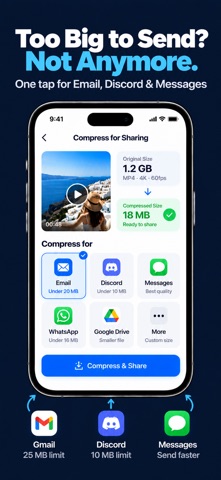
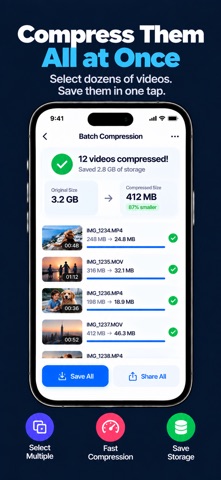
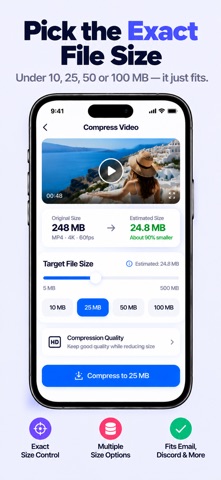
Video too big to send? iPhone storage full again? Video Compress App shrinks your videos in seconds — with no visible loss in quality. Pick a video, choose where it's going, and tap Compress. That's it. SEND ANY VIDEO, ANYWHERE One tap fits your video for where you're sending it: - Email — under 20 MB, fits Gmail and Outlook attachments - Discord — under 10 MB - Messages — perfect for iMessage and WhatsApp - Social — crisp 1080p for Instagram and TikTok - Storage Saver — the smallest file for your library - Max Quality — keep full detail, lose the extra weight PICK THE EXACT FILE SIZE Need it under 25 MB? Set an exact size and the app fits your video under it. Quick buttons for 10, 25, 50 and 100 MB, with a live before-and-after estimate. FREE UP IPHONE STORAGE - See how much space is left on your iPhone - Find large videos, videos older than a year, and exact duplicates - Compress All: shrink every large video in one tap and free up gigabytes - Swipe to review — keep or delete, one by one, with Undo - Compress big videos instead of deleting them and keep every memory REPLACE ORIGINALS Swap a big original for its compressed copy. The new video keeps the same date, location and favorite, so it stays in the right place in your library. Originals go to Recently Deleted, so you can recover them for 30 days. HEVC FOR EVEN SMALLER FILES Choose HEVC (H.265) to make files up to 50% smaller at the same quality, or H.264 for videos that play everywhere. VIDEO TO GIF Turn any clip into a looping GIF — up to 15 seconds, three sizes and three smoothness levels. Save it to Photos, share it, or save it to Files. EXTRACT AUDIO Save the sound from any video as an M4A file — great for lectures, voice notes and music clips. BATCH COMPRESS Select many videos at once and shrink them all. Save them all to Photos or share them in one tap. FULL CONTROL WHEN YOU WANT IT - Trim the start and end with a visual timeline - Resolution: Original, 1080p, 720p or 480p - Frame rate, quality and audio — or remove audio - Export as MP4 or MOV - Save your favorite settings as presets MADE FOR IPHONE - Compress your recent videos right from the Home screen - Preview the original and the compressed video - Save to Photos, Save to Files, or share anywhere - Open videos straight from the Files app - History of everything you've compressed, with total space saved - Get a notification when compression finishes - Supports HDR video - Light and Dark Mode - Available in English, Spanish, French, German, Italian, Portuguese, Japanese, Korean and Chinese PRIVATE BY DESIGN Every video is processed right on your iPhone. Nothing is uploaded, no account is needed, and there's no tracking. Location data is removed by default, so it isn't shared when you send a video. Questions or ideas? Email us at developer26.app@gmail.com — we read every message.
What's new · 2.0.2
Meet Video Compress App — completely redesigned and packed with new features. NEW - Compress for Email, Discord, Messages, Instagram & TikTok in one tap - Set an exact file size — under 10, 25, 50 or 100 MB - HEVC option for files up to 50% smaller at the same quality - Compress All: free up gigabytes of iPhone storage in one tap - Replace originals and keep the same date and location - Video to GIF — turn any clip into a looping GIF - Extract audio from any video as M4A - Clean Up: find large, old and duplicate videos - Swipe to review videos, with Undo - Compress recent videos right from the Home screen - See your iPhone storage and total space saved - Save to Files, open videos from Files, and get notified when done - Now in 10 languages, with Light and Dark Mode IMPROVED - All-new, faster and simpler design - Your real file names are kept - Even more private — everything stays on your iPhone Enjoying the app? A quick rating helps a lot. Thank you!
Details