

Captions Bro: Auto Subtitles
Taras Leskiv · Photo & Video
Independent analytics for this App Store listing. AppTracker is not affiliated with Taras Leskiv.
Chart standing · US
What changed · US
Listing changes AppTracker has observed for this app in this storefront — new versions, price moves, rating shifts, and store copy.
• New Templates tab: start from 16 ready-made layouts (split screen, photo dump, before & after, travel recap and more), drop in your clips, and they fill the slots. • Borders for photo and video overlays: pick the colour and thickness, and animate them with keyframes. • 12 new pattern backgrounds, including notebook, graph paper, gingham and starry night. • A fresh teleprompter: new controls, your take plays behind the review screen, and an Apple Watch remote with a live viewfinder and shutter. • More control: a Snap to guides switch, ±0.1 speed buttons, gentler rotation snapping, and photo clips up to an hour long. • Exports check free space before they start, plus many playback, audio and export fixes. • On Mac: right-click menus everywhere, external camera support, and AI agents like Claude can caption and export for you (PRO).
Screenshots




About
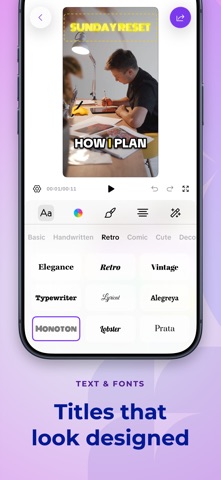
Captions Bro turns raw phone footage into finished vertical video — automatic subtitles, karaoke-style word highlighting, a real editing timeline, and a built-in teleprompter, all in one app. Record with the teleprompter, pull clips in from Photos, let the app transcribe the speech on device, then style the captions until they stop the scroll. What you see in the preview is exactly what gets exported. AUTOMATIC SUBTITLES AND CAPTIONS • Generate subtitles from speech automatically — transcription runs on device • Karaoke-style highlighting that lights up each word as it is spoken • Bold, social-ready caption templates with fonts, colors, outlines and shadows • Add punctuation, remove filler words, and regenerate any line • Split, merge, retime, restyle and correct captions by hand • Mixed-language speech supported with a secondary language A REAL EDITING TIMELINE • Multi-track timeline — trim, split, reorder, duplicate and delete clips • Speed, reverse, freeze frames and transitions between clips • Keyframe animation for position, scale, rotation and opacity • Text, image and video overlays, with masks and background removal • Color grades, filters and effects • Noise reduction, voiceovers and sound effects • 9:16, 4:5 and square reframing for every platform TELEPROMPTER Write or import a script, set the scroll speed, and record yourself reading it while the camera rolls. Built for talking-head videos, explainers, tutorials, UGC, course clips and sales videos — the formats where the words matter more than the b-roll. EXPORT AND SHARE • Export MP4 or MOV with the captions burned in • Choose resolution and frame rate to match where you are posting • Save to Photos, or share to Instagram, TikTok, YouTube, Facebook and Messages WHY CREATORS USE IT Most people watch with the sound off. Captions are what keep them watching — and typing them out by hand is the slowest part of publishing anything. Captions Bro handles the transcription, the timing and the styling, and leaves the editing to you. Everything runs on your iPhone, so a weak signal never stops you working. Terms of Use (EULA): https://www.apple.com/legal/internet-services/itunes/dev/stdeula/ Privacy Policy: https://captionsbro.app/privacy/
What's new · 1.7
• New Templates tab: start from 16 ready-made layouts (split screen, photo dump, before & after, travel recap and more), drop in your clips, and they fill the slots. • Borders for photo and video overlays: pick the colour and thickness, and animate them with keyframes. • 12 new pattern backgrounds, including notebook, graph paper, gingham and starry night. • A fresh teleprompter: new controls, your take plays behind the review screen, and an Apple Watch remote with a live viewfinder and shutter. • More control: a Snap to guides switch, ±0.1 speed buttons, gentler rotation snapping, and photo clips up to an hour long. • Exports check free space before they start, plus many playback, audio and export fixes. • On Mac: right-click menus everywhere, external camera support, and AI agents like Claude can caption and export for you (PRO).
Details