

Bulk Video Compressor: Resize
Happy Melon Games Corp. · Photo & Video
Independent analytics for this App Store listing. AppTracker is not affiliated with Happy Melon Games Corp.
Chart standing · US
What changed · US
Listing changes AppTracker has observed for this app in this storefront — new versions, price moves, rating shifts, and store copy.
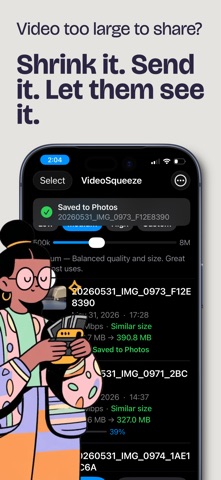
New in 1.8: • Moments: videos recorded together, like a practice filmed in clips, are grouped so you can compress the whole moment in one go. Browse the last 7 days or your biggest older moments. • Delete originals after compressing, with one confirmation. They go to Recently Deleted. • Every compressed video is saved to a VideoSqueeze album, ready to upload in one batch. • New dark mode. • A new results screen with a share card you can post in one tap. • Clearer free-trial reminder.
Ratings breakdown · US
The star breakdown behind this app's rating in this storefront.
In-app purchases · US
What this app sells inside itself, grouped by kind and priced for this storefront.
Screenshots


About
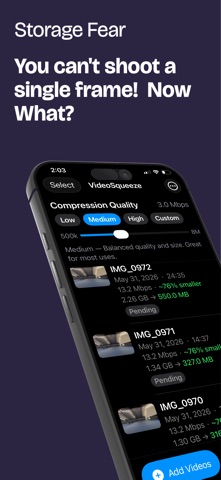
Bulk Video Compressor: Resize is the fastest way to shrink your entire video library — without any quality loss you can actually see. Stop running out of iPhone storage. Stop getting "not enough space" right when you need your camera most. Compress your videos up to 90% smaller and reclaim gigabytes in minutes. REAL COMPRESSION, REAL RESULTS Most video compressors shave off 1–2 MB and call it a day. This app compresses a 1.8 GB video down to 187 MB — and it still looks identical on screen. That's not a trick. That's real compression. UNLIMITED BULK PROCESSING No queue cap. No 3-video limit. Select your entire camera roll in a single tap and let the app process everything. Add 50 videos, walk away, come back to a "done" notification. WORKS WHILE YOUR PHONE IS LOCKED Put your phone in your pocket. Bulk Video Compressor keeps working in the background. You'll get a notification when every video is finished — no need to leave the app open or babysit the process. THREE TAPS FROM START TO DONE 1. Tap "Add Videos" — pick as many videos as you want 2. Choose your quality preset — Low, Medium, or High 3. Tap Compress No complicated export dialogs. No mystery settings. Just add, choose, compress. YOU CHOOSE THE QUALITY Three presets let you control the balance between file size and visual quality: • Low — ~90% smaller — ideal for archiving videos you rarely watch • Medium — ~75% smaller — recommended for most use cases • High — ~50% smaller — near lossless, best for important memories Set a default for your entire batch, or fine-tune individual clips. SAVES DIRECTLY TO YOUR PHOTOS Compressed videos go straight back to your Camera Roll — exactly where you'd look for them. No mystery exports, no third-party folders, no "where did it save?" confusion. Originals are kept alongside compressed copies. Date, time, and location metadata are preserved. FREE 3-DAY TRIAL Try every feature free for 3 days. We'll send you a reminder before your trial ends so there are no surprises. $34.99 per year — less than $3 per month $5.99 per week for flexible billing Cancel any time directly from your iPhone Settings. No watermarks. No hidden limits. Privacy Policy: https://moonnightapp.com/support Terms of Use (EULA): https://www.apple.com/legal/internet-services/itunes/dev/stdeula/
What's new · 1.8
New in 1.8: • Moments: videos recorded together, like a practice filmed in clips, are grouped so you can compress the whole moment in one go. Browse the last 7 days or your biggest older moments. • Delete originals after compressing, with one confirmation. They go to Recently Deleted. • Every compressed video is saved to a VideoSqueeze album, ready to upload in one batch. • New dark mode. • A new results screen with a share card you can post in one tap. • Clearer free-trial reminder.
Details