

Sungalizer
Geoffrey Graven · Music
Independent analytics for this App Store listing. AppTracker is not affiliated with Geoffrey Graven.
Chart standing · US
What changed · US
Listing changes AppTracker has observed for this app in this storefront — new versions, price moves, rating shifts, and store copy.
Price & rating history · US
Reconstructed from the listing changes AppTracker has observed in this storefront. A field is charted once it has changed more than once, and each line starts at the value it moved from.
Average rating · ★ 4.25 now · 2 changes on record
Ratings breakdown · US
The star breakdown behind this app's rating in this storefront.
Screenshots



Keywords this app targets
Search terms AppTracker associates with this app — estimates, not search volume. ❝ = in the app's title; a highlighted number is its current position for that term.
Similar apps
Competitors and close alternatives, as estimated by AppTracker.
 Scope AUv3 Visualizer
DiscoDSP LLC
2 shared topics
Scope AUv3 Visualizer
DiscoDSP LLC
2 shared topics
 SoundScope: Audio Analyzer
Waldemar Schneider
1 shared topic
SoundScope: Audio Analyzer
Waldemar Schneider
1 shared topic
 Ambiotica
Charles Vestal
1 shared topic
Ambiotica
Charles Vestal
1 shared topic
 LED Audio Spectrum Visualizer
ONYX 3
1 shared topic
LED Audio Spectrum Visualizer
ONYX 3
1 shared topic
 VisualSound - AV Modular Synth
Mike Gazzaruso
VisualSound - AV Modular Synth
Mike Gazzaruso
 SampleScape
Limelight Software
1 shared topic
SampleScape
Limelight Software
1 shared topic
 SoundSaw
Igor Vasiliev
SoundSaw
Igor Vasiliev
 Spectra - Music Visualizer
Spectre Software Inc.
Spectra - Music Visualizer
Spectre Software Inc.
About
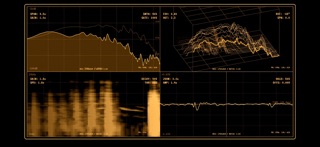
Sungalizer is a live audio visualizer inspired by classic scopes, studio displays, and retro signal screens. Use it standalone with your microphone or a compatible connected audio source, or load it as an AUv3 audio effect in a compatible iOS or iPadOS music host. Incoming sound drives five real-time visual modes: Spectrum for frequency motion, Depth for dimensional landscapes, Trace for scrolling spectral memory, Scope for waveform display, and Quad for a combined view. Three preset slots let you save and recall visual setups. Adjust the controls, select slot A, B, or C, then tap Save. To restore a setup, select its slot and tap Load. The control rack keeps input and display settings close at hand. Double-tap the visual display to hide the right-hand rack for a full-screen view, then double-tap again to show the controls. Built for artists, musicians, and performers, Sungalizer turns synths, mixers, audio interfaces, live sets, voices, and routed tracks into expressive motion.
What's new · 1.1.0
Sungalizer 1.1.0 introduces AUv3 support, enabling compatible iOS and iPadOS music hosts such as GarageBand to route audio through the app for real-time visualization. Three new preset slots let you save and recall visual setups: adjust the controls, choose A, B, or C, and tap Save; select it later and tap Load to restore it. The gain fader has been refined, while double-tapping the visual display now hides or restores the control rack for an unobstructed full-screen view.
Details